
Inspiring
June 13, 2024
Open for Voting

Effect Controls parameter hitboxes need to take a lower priority than keyframe adjustment buttons

  • June 13, 2024
  • 3 replies
  • 437 views

I don't have a perfect solution for this yet, but just to get the ball rolling, oftentimes when my effects control window is narrowed due to having the timeline part of it expanded, the various effect parameters and the keyframe adjustment buttons overlap and get bunched up.
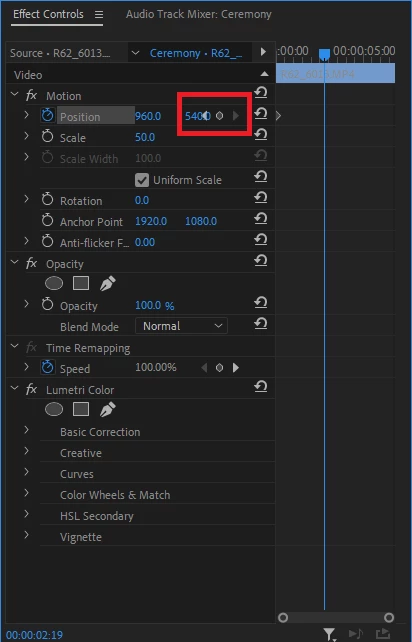


Way more often than not in this scenario I am wanting to click previous, new or next keyframe rather than adjusting the effect parameter. But the parameter will always override (as though it's sitting on top) and so I then have to re-expand out the left side of the EC window to be able to hit the buttons, then narrow it again so I can get back to fine tuning the position of keyframes on the right side. Here's a video demonstrating this:


I would love for the keyframes hitbox to always override the parameter hitbox. Or for Premiere to somehow dynamically alter this.

Does this make sense? Maybe there's a better solution but this has been a big annoyance with editing in Premiere for the last 15 years.


3 replies

Known Participant
June 13, 2024

Select Next Keyframe and Select Previous Keyframe can be mapped to a keyboard shortcut.

Inspiring
June 13, 2024

Glad to know it's not just me!

Ooh the moving down a line thing could be mad @Daniel Fewchuk - maybe could get tricky when there's heaps of keyframes on multiple effects. Or yea I like the idea of hovering over it pops out, so you're only making it change when you're altering that specific effect.

Participating Frequently
June 13, 2024

I can't believe this hasn't been changed @Tom Fewchuk ! I've also had this exact problem for about 10 years - you would have thought Adobe would figure things like that out over 10 years.. I'm not saying it should be perfect from the release date, but there's a whole bunch of problems that have been around forever.


Maybe I'll start posting some of my own to make a difference too!

Ideas for a solution - not sure if, when hovering your mouse over that area, the 'effect parameter' and 'keyframe navigation' buttons pop out so you're able to access both? 


Or, when the window is narrowed, the parameter or navigation tools move down a line, so it would add more effect lines vertically, but you'd always be able to access those icons.