


lbernier
Known Participant
March 6, 2024
Open for Voting

Enable Multi-Camera view for sequences opened as Source Sequence

  • March 6, 2024
  • 3 replies
  • 224 views

When editing via a sequence opened in the Source Monitor and/or as a Source Sequence, it would be a great addition to have the option to enable the Multi-Camera view.


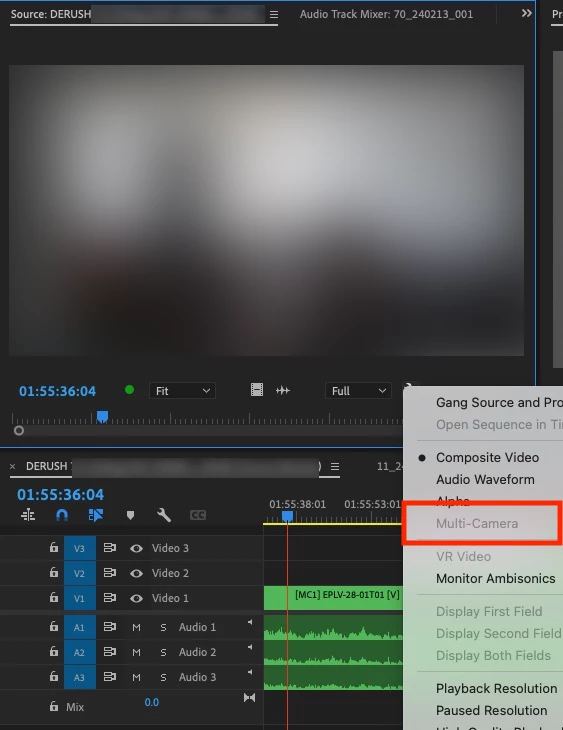
Right now, it is greyed out (see picture below) and the only way to view more than one angle from my derushed sequence is to open the sequence in the program monitor or match framing to the original multicam clip.


My workarounds a this moment :

  1. Editing with the copy/paste function from a derushed sequence opened in the program monitor, but this way, you can't have both the source and program monitor opened AND edit with the insert and overwrite function, the later being my preferred way to edit for track patching reasons.
  2. Setting a picture-in-picture effect to view multiple angles when which is not great for clarity of image and it gets time consuming on the long run to removed the effect - if edited.


Editing from a source sequence is a huge time saver when assembling and/or revisiting a curated selection but right now, there are limitations to this great workflow.


PS : if it gets requested, it will be my pleasure to video capture the workflow.
 

3 replies

Legend
September 29, 2026

Do i get your question right?

i do it all the time:

If you don’t see that option, a right click in the source monitor to enable multi cam might be the solution.


Participant
September 29, 2026

I’m not the OP, but I commented earlier expressing support for their post.


I didn’t know about that right-click menu to enable Multi-Camera in the Source monitor, thank you for pointing that out. However, it doesn’t seem to actually give me what I want.


The way I’m working is by using a pancake editing method wherein I load a stringout sequence, which contains multi-cam clips, into the Source monitor, and then I also hit the wrench in the Source monitor and select “Open Sequence in Timeline”. That gives me my stringout sequence in a timeline panel as well as in the Source monitor, and they stay in sync with each other. However, using this method I am unable to view the Source monitor in Multi-Camera view, meaning that I can only see one angle of the multi-cam clips in my stringout at a time.


If I attempt the fix you suggested, it does indeed load a Muti-Camera view in the Source monitor. However, it also introduces some new issues that make this technique harder to use. For one thing, it doesn’t seem to actually show all of the camera angles in the multicam clip. It also seems to break the synchronization between the Source monitor and the timeline containing the stringout sequence, so I lose the benefit of having those two things connected. On top of that, it seems to introduce some bugs and limitations, such as noticeably sluggish performance, no longer syncing with the transcription in the Text panel, etc.


So in it’s current state, with that particular workaround, it seems like the cure is worse than the disease, so to speak.

Participant
September 29, 2026

I completely agree, having this functionality would be a great benefit to me. I hope it can be enabled in the near future.