
Participant
February 1, 2023
Open for Voting

Essential Graphics shadow

  • February 1, 2023
  • 6 replies
  • 316 views

First time posting, as this got me pretty furious about Essential graphics being unusable for me and Adobe deleting the original "legacy title tool".. (some things got a bit better over the time, but there is still so much work for Adobe to do here..)


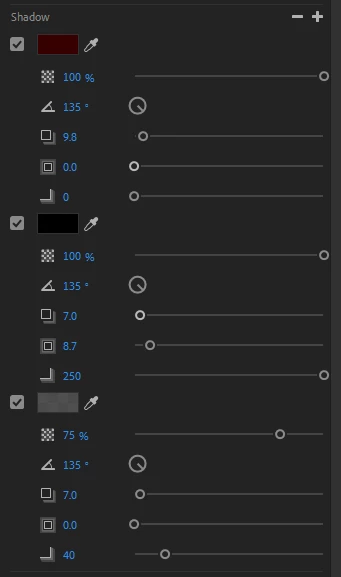
I'm really not sure how this got through, but since we have the ability to add more shadows/strokes in the panel, why the heck is there no option to change the order of them?


This is such a basic thing I cannot even consider this a letter asking for improvement, rather a technical issue in my eyes.


Pls fix..


6 replies

Ann Bens
Community Expert
Community Expert
February 3, 2023

So its not a bug but a feature request.


R Neil Haugen
Legend
February 3, 2023

Totally agree with the OP and with Stan about wishing to be able to drag those layers to change the order. That would be very useful ... and handy at times.


Neil

Everyone's mileage always varies ...
Stan Jones
Community Expert
Community Expert
February 3, 2023

Friendly,


Upvoted.


And yes, it is one of those feature requests that is a bug in the eye of many beholders.... It is working as designed (i.e. without the ability to drag or otherwise change layer order), so it may technically not be a bug. But logically, it cries out to be something that can be modified. The "designed" operation to change layer order is to delete a layer and recreate it.


There have been continuing improvements in graphics text, so here's hoping.


Stan


R Neil Haugen
Legend
February 3, 2023

Having more options in the EGP would always be good. Although like Ann says, the way it works now actually has in some ways more options and functions than the titler did. I do wish they had a small shape library though.


But as to  "fixing the gamma issue on exporting" ...


You must be on a Mac ... and that problem is due to the odd choice by Apple to display Rec.709/SDR video with a display gamma of 1.96 instead of the standards-required 2.4 gamma. Adobe's apps abide by the standard, the Mac ColorSync utility doesn't.


And when you apply a LUT to darken the file outside of Premiere on that Mac, you do realize you nearly destroy usage of that file on all non-Mac systems, right?


As played on my calibrated/profiled tightly controlled Rec.709 compliant system, it will be way too dark with crushed or near crushed blacks, and probably over-saturated to boot.


There isn't any way to display an image at two widely different screen gammas and get the same visual result. So ... how is "Adobe" supposed to fix Apple's odd choice?


No color management expert has a solution for this ... period. Because you can't.


Neil

Everyone's mileage always varies ...
Participant
February 3, 2023

How can you consider this "not a bug", when it's literally a tool missing it's functionality.. It is a real issue that should be really easy to fix.


Imagine you have 4 shadows you want to work with and then realize you forgot to add one that needs to be way above them all, now the only thing you can do is take a screenshot of your settings, delete all the shadows, add the one you needed and redo all of the others. Reminds me of stoneage.


Also if this is considered just an "idea for improvement", then I'm not surprised my beloved Premiere is starting to fall short in user-experience against other alternatives.. I guess fixing stuff such as the gamma issue when exporting is also "just an idea"..


I am disappointed but not surprised.

Ann Bens
Community Expert
Community Expert
February 1, 2023

In the legacy titler you were only able to add one shadow.

You could however add multiple Drop Shadows from the Effects Panel.

As for stroke you could add multiple inner and outer and move them up or down.


With the EGP you can add multiple strokes (inner, centre of outer) and play with those settings.


This is not a bug thread moved to Ideas.