
Essential Sound User Interface
I am new to Premiere Pro and am taking the Improve Audio for Polished Results tutorial.
This step in the tutorial asks me to locate an audio clip, titled "90bmp_exotica.m4a". It's the same as the A2 audio track, but that isn't evident at first. The name of the audio track does not appear on the timeline panel (whereas titles of video clips do appear there).
After some searching around, I see the title of this audio clip in the Essential Sound panel. Please note the screenshot: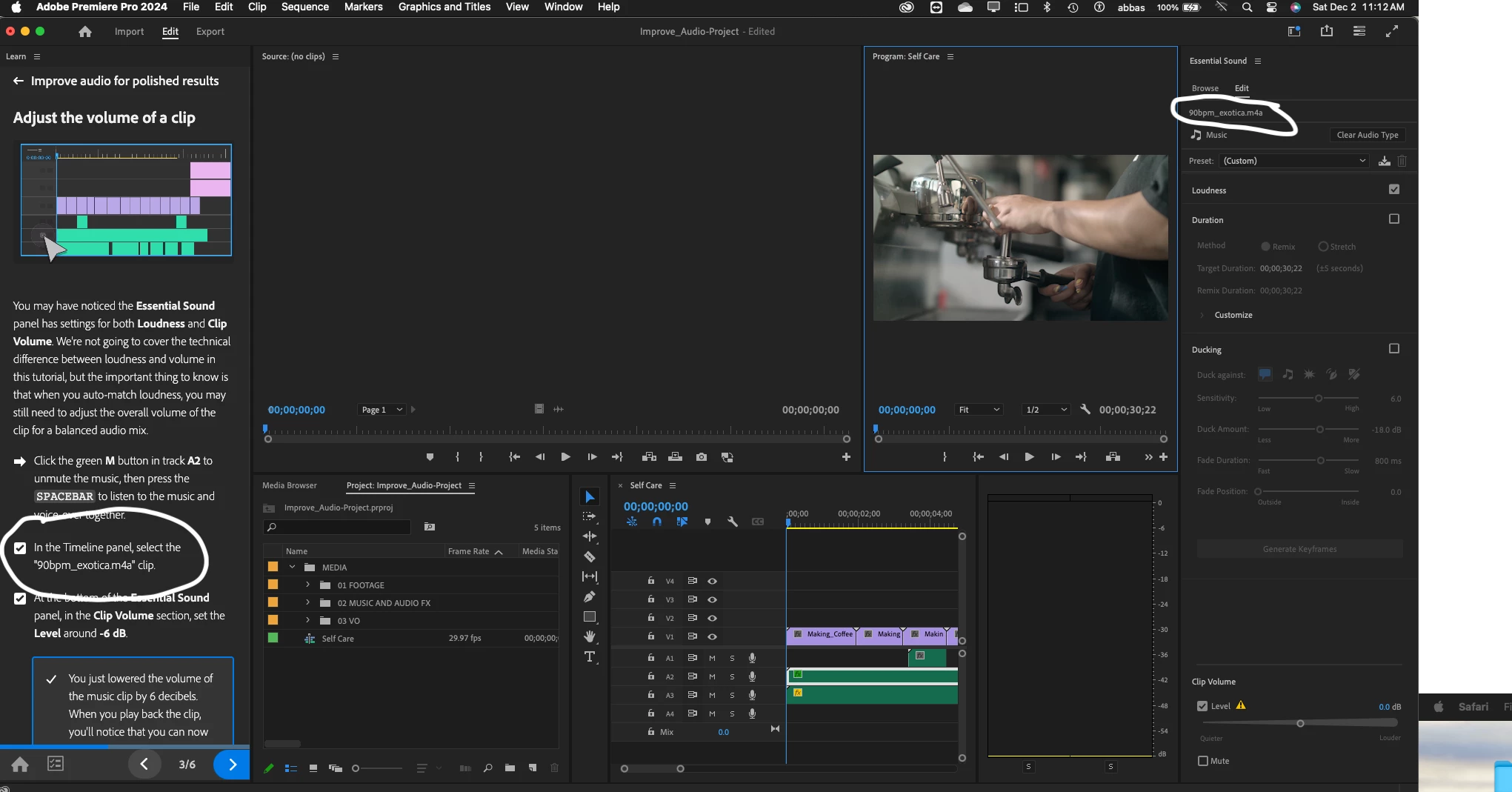
The title appears in a tiny font, grey colored text, on a black background. This is a major accessibility problem, and an obscure item to find. Given this is a basic tutorial, it doesn't leave a good impression.
Please consider including the title of the audio track in the Timeline graphic, increasing the color contrast between the background and text color, and increasing the font size (or providing extra UI customizing to do so under Settings -> Appearance).
Also, please consider changing the tutorial instructions to select the "A2" clip in addition to or instead of the title, and please be coginizant of other details like this in instructional content.
 AdChoices