Make the Export Frame window SUCK LESS! Here's 4 easy ways how!
There's no denying it... the Export Frame window SUCKS!
Here are 4 EASY ways to make it suck less (which would go a long way towards Adobe showing its users they care. BTW, spending resources on accelerating cheesy effects from the 80's that no one uses anymore (i.e. Split and Center Split transitions) as was done lately does NOT show they care about us... it only goes to show how out of tune they are. Here's an easy opportunity for them to get back on track [/end rant]:
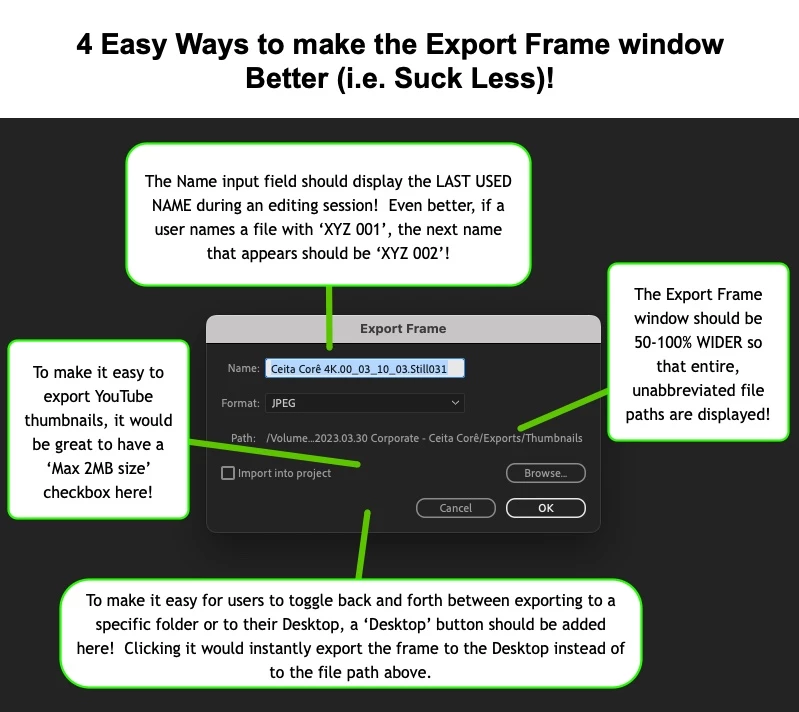
1. NAMING The Name input field should automatically display the LAST USED NAME during an editing session! If I want to export a bunch of still frames to give to a client, and name the first one ‘Ceita Corê Still Image 001’, it's 99.9% more likely that I'm going to want my next exported frame to be called ‘Ceita Corê Still Image 002’ rather than the generic 'Sequence Name.00_03_10_05.Still002'. So why does Pr completely disrespect our time as editors by defaulting to names most editors don't want? Being forced to retype the desired frame name every time from scratch is a huge PITA! To make naming even smarter, if a user names an exported frame ‘XYZ 001’, the next time the Export Frame window is called up, the name that appears should be ‘XYZ 002’! In case a user wants to use the default naming scheme, a 'Use default naming scheme' checkbox could appear next to the naming field. BTW, this intelligent naming scheme should apply everywhere it makes sense, not just in Pr but in EVERY Adobe program! Why is Adobe working on fancy AI tools when it can't even provide something as basic as help with file naming?! The time to fix this is way overdue!
2. WIDER WINDOW Why is the Export Frame window so narrow that it can't properly display the File Path? On a Mac, the Path that gets displayed in the example above is /Volume...Folder Name/Folder Name/Folder Name. I can't even see at a glance which one of my Volumes (i.e. connected hard drives) the path refers to! Of course, users can mouse over the path name to get a tool tip that shows the full, unabbreviate path, but why not just make the Export Frame window 50-100% wider so that the vast majority of file paths can be fully displayed by default?!
3. YOUTUBE THUMBNAIL FRIENDLY YouTube accepts thumbnails up to 2MB in size. Wouldn't it be handy to have a 'Max 2MB filesize' checkbox so that a frame exported from a 4K timeline, for example, is capped at 2MB?! This would save users the extra step of having to resize an exported thumbnail down to 2MB!
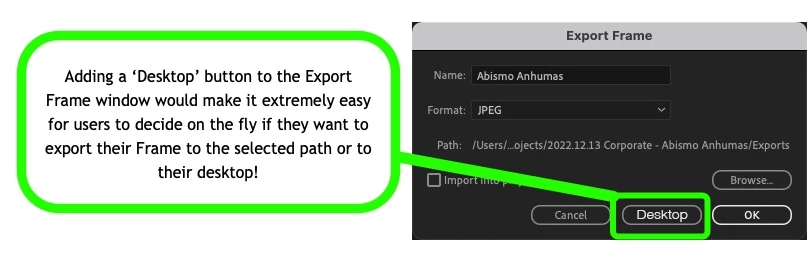
4. DESKTOP SHORTCUT Users often want to send exported frames to their desktop, a location that makes it easier to locate, review, share and delete temporary frames. While it's very easy to navigate to the desktop as an export location, navigating back to a project's 'Exports' folder, for example, can easily take 5 or more clicks, which is time consuming and annoying. Why not add a 'Desktop' button next to the 'Cancel' or 'OK' button to instantly export a frame there rather than to the entered export path? This would make it incredibly easy to choose where to export a frame, without losing the entered file path!
See guys, it doesn't take fancy AI tools to make us happy. Just simple, INTELLIGENT, time-saving features can do the trick! And please, for the love of God, give us USEFUL updates like these before adding GPU acceleration to any more cheesy 80's transitions that no half decent editor has ever used since then! Give us what we want and need... And maybe we won't jump ship to DaVinci Resolve just yet.
 AdChoices