
Participant
February 23, 2019
Answered

1920 Video shrinks to like 1024 when copy and paste

  • February 23, 2019
  • 1 reply
  • 917 views

Im not sure what's going on, but I have a Film scene in Premiere Pro that is 1920 x 1080. However, I created a new Sequence that is 1920 x 960 for which I am copying the footage from the 1920 x 1080 and moving it all over to the 1920 x 960 scene. However, some clips (that are 1920 x 1024) are being shrunk down, or look like they are 1024 wide instead of 1920... and I can't figure out why its happening. The rest of the scene looks fine (and has headroom above and below the other clips) however, there are some clips that  are 1920 x 1080 that when pasted into the 960 sequence, the top and bottom touch the edges of the frame, but the sides are smaller and don't fit properly.. not sure why its doing this but its driving me insane... Ill attach a screenshot (and yes all clips are 1920 wide)
    This topic has been closed for replies.
    Correct answer Richard M Knight

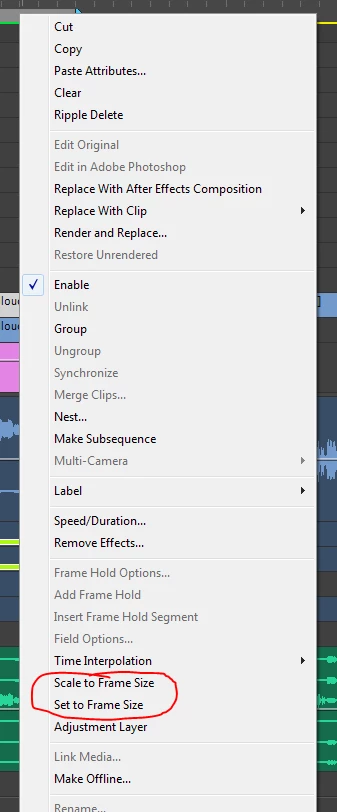
    Is this a 'set or scale to frame size 'problem?

    1 reply

    Participant
    February 23, 2019

    This video is a 1920 x 1080 video. When pasting in a 1920 x 1080 sequence it fits perfectly, but when I paste it in a 1920 x 960 sequence this happens.. (top of video and bottom) are touching the edges of the frame (no head room)

    --> This screenshot is copied from a 1920 x 1080 sequence a pasted in a 1920 x 960 Sequence..notice how the side edges are pushed in*  (the top and bottom are touching the edges of the frame)


    If I copy other 1920 x 1080 videos, and paste them into this 960 sequence the sides fill in fine, just certian clips do this crap.. its so frustrating.

    Richard M KnightCommunity ExpertCorrect answer
    Community Expert
    February 23, 2019

    Is this a 'set or scale to frame size 'problem?

    Participant
    February 27, 2019

    oh wow.. I've been using premiere pro for years and never knew about this! That was the cause.. tysm.. you saved me a LOT of work trying to fix the areas this happened in.