Participating Frequently
December 17, 2017
Answered

AAF Exporting Issue in Premiere Pro CC 2018

  • December 17, 2017
  • 9 replies
  • 22471 views

Hi there!

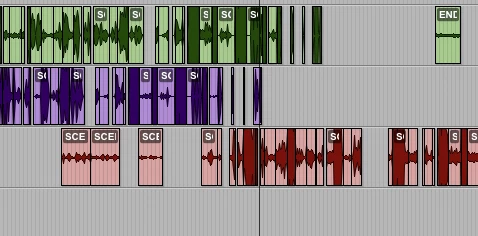
I'm having problems exporting an AAF from Premiere for use in Pro Tools. When I export the audio, all audio clips in the Premiere timeline are in line and in sync. However, after I export as an AAF, the clips are mostly a jumbled mess; out of sync, a minute ahead in some places etc.

I know this is not a Pro Tools problem, as I have tried importing the AAF into Logic Pro, and the same thing is happening. I have attached an image of the audio in the Premiere timeline, and the resulting audio in the Pro Tools timeline.

Any help would be greatly appreciated!

This topic has been closed for replies.
Correct answer Gjerry

Hey mate.

Had the same problem and so far I only found one fix.

You have to write out an XML and open/import it in the old version of Adobe Premiere (11.1.2 is what I use).
You can then write out an AAF from that version and it should work in ProTools.

With the newest version of Premiere my workplace have had major problems with it and AAF-exports. The only real fix we found was always to write out an XML and open it in the old version to export the AAF...

Not good! I really hope they look into it.

Good luck.

9 replies

Participant
November 10, 2018

I've got a similar issue with losing Metadata on audio tracks.

When I export an AAF (or OMF) from Premiere and import into Protools my metadata (sound tape name, channel name) is lost. On few sequences I even have the filenames changed in the AAF to clips that aren't even on the sequence.

When I import the original rushes into Protools ofc the whole metadata exists. I'm running Adobe 12.1.2 and I'm unable to revert to older version or update to new version as I'm in the middle of a post on a complex TV show (20 episodes). So basically need to get this fixed on the current version.

XML can work yeah but it's a lot of hustle for the projects I've got. It would be a shame if that's the only way to fix this.

Help? Any thoughts? I've cleaned all cache files - reinstalled my OSX and Premiere - tried all options on AAF and OMF and get my metadata still lost.

Sashko

Participating Frequently
September 23, 2020

Bug is back! Oldest version I can install is 13.1.5 and it exists there too!. I have wasted an entire day on what should be a like 10min task AT MOST!

Participating Frequently
June 12, 2021

Same problem here. I have been bussy with it for days. Frustrating.

Adobe Employee
April 5, 2018

This sounds like a bug that I fixed in 12.1. I can't guarantee it is the same issue you were seeing since I don't have your project, but I suggest you try exporting again in the latest version. I know of multiple customers who reported something similar, and the fix worked for them. Let me know if it still occurs and we can file as a new bug in our database.

WAICHULIS ENTERTAINMENT
Participating Frequently
June 8, 2018

Hello devinstone,

I am having the same issue with the AAF Export error in version 12.0.0 (Build 224).

I did open up my project onto a system that is running 12.1 and all of my text elements were all slightly scaled differently from where they were previously in version 12.0.0 (Build 224).

It would take me close to an entire day to re-adjust / re-conform all of my text elements in the 105 minute feature film.

Stephen

WAICHULIS ENTERTAINMENT
Participating Frequently
June 8, 2018

I updated to the latest version of Premiere Pro today and my AAFs exported successfully.

Problem Solved.

Jonah Lee Walker
Inspiring
April 4, 2018

Has anyone been able to test AAF export with the latest version April 2018 (Version 12.1) to see if it fixed. I don't see it listed in the Fixed Issues report. I have installed the new version but don't have anything to test the AAF in.

- Jonah Lee WalkerVideo Editor, Colorist, Motion Graphics Artist
Participant
February 21, 2018

Hey, I am having this exact problem @Gjerry.  Your workaround sounds good... but how does one import an XML into Premiere and then simply make an AAF from it?  Once you import the XML, there's still nothing in the timeline.

Can you give some more details on how this is done, please?

Inspiring
February 21, 2018

An XML can be created from anything in the project, you just have to make an XML of the timeline/sequence that you want to create an AAF of.

Participant
February 21, 2018

sure, Jason.  I got that far and made an XML.  Then I used an old version of Premiere and imported it there.  But it just shows a folder in the materials window.  Can't make and AAF with nothing in the timeline.  So, what's the next step?

Participant
February 15, 2018

ADOBE, we are two months in. YOU GOTTA FIX THIS. I'm on a deadline and you're killing me over here!

Participant
January 29, 2018

Export XML from Premier. Then create a new project and import XML

Participant
January 9, 2018

Yep, same problem here, though I'm getting two different errors when exporting from PP version 12.0.0; 'AAFRESULT_INSUFF_TRAN_MATERIAL' and 'AAFRESULT_ADJACENT_TRAN'.

The XML export workaround worked for me, but not 100%.  There are some gaps where transitions should be.  And it was very slow when exporting the AAF from PP version 11.1.2.  At least everything seems to be in sync now.

And on a side note, the option to export an OMF/AAF from Audition was greyed out in Audition version 11.0.0 so I was forced to try the XML export workaround.

Inspiring
January 9, 2018

I updated to Premiere 12 yesterday and had to export an AAF. I kept getting the AAFRESULT_INSUFF_TRAN_MATERIAL error as well and went through and deleted all transitions and was then able to export the AAF just fine. Fortunately the sound designer that needed it is going to rip it apart anyway. If that's feasible for you, it could be faster and hopefully more reliable than the xml and reinstalling an older version each time.

Also, I'm pretty sure Audition won't export an AAF, I have been looking and it doesn't seem to be an option.

Participating Frequently
January 9, 2018

Sorry, I meant to say I exported an OMF from Audition (not AAF)! Unfortunately you can't do AAFs from Audition. Hope Adobe fixes this as it seems like quite a primary issue! Hope this helps. Cheers everyone for your responses.

Transposition Films
Participating Frequently
January 5, 2018

I encountered the same issue finishing a series at the end of last year, and landed on the same fix (wash XML through Pr 2017).

I opened a support ticket with Adobe and spent a few sessions on the phone with them. In the end we finished the series and I didn't hear back from Adobe, though I'm sure they are now aware of the issue and hopefully working on a fix.

Gjerry
GjerryCorrect answer
Participant
December 18, 2017

Hey mate.

Had the same problem and so far I only found one fix.

You have to write out an XML and open/import it in the old version of Adobe Premiere (11.1.2 is what I use).
You can then write out an AAF from that version and it should work in ProTools.

With the newest version of Premiere my workplace have had major problems with it and AAF-exports. The only real fix we found was always to write out an XML and open it in the old version to export the AAF...

Not good! I really hope they look into it.

Good luck.

Participating Frequently
December 18, 2017

Glad to hear others are having this problem. Very annoying to find this out after the edit has finished!

Cheers

Inspiring
December 21, 2017

For me it's video and audio a total mess on aaf import, the video sequence settings are altered on aaf reimport too. Spent days on it so far - this thread could be the answer. Thanks for posting. Have you guys filed a bug report? I just did.