davidh54327476
Participant
Feb 18, 2018 2:33 PM UTC
Answered

Accessing "Keying/Ultra Key" on Free Trial

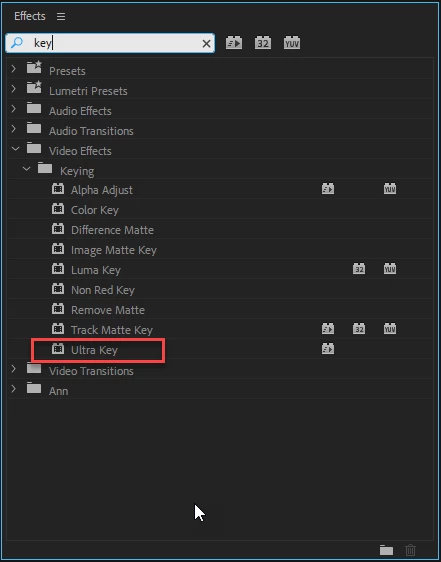
I have just downloaded the free 7 day trial of Premier Pro CC, and cannot find the "Keying" option under "Effects". There are only 3 options under Video Effects - Motion, Opacity and Time Mapping .... but no Keying.  I am trialling Premier Pro specifically for the chroma key function ....

Can anyone help??

Dave

    This topic is closed to new replies. Start a new post to keep the conversation going.
    Ann Bens
    Ann BensCorrect answer
    Community Expert
    Feb 18, 2018 2:50 PM UTC

    Effect are found in the Effects Panel which is not the same as the Effect Controls panel which contains the Motion etc.

    Adobe Premiere Pro Learn & Support

    6 replies

    Feb 10, 2020 7:35 PM UTC

    I updated the program to the latest version but I still don't see the "keying" option

    Translate
    Legend
    Feb 18, 2018 10:39 PM UTC
    Ann Bens
    Community Expert
    Ann BensCommunity ExpertCorrect answer
    Community Expert
    Feb 18, 2018 2:50 PM UTC

    Effect are found in the Effects Panel which is not the same as the Effect Controls panel which contains the Motion etc.

    Adobe Premiere Pro Learn & Support

    Translate
    davidh54327476
    Participant
    Feb 18, 2018 3:03 PM UTC

    Hmm.  How do I access the Effects panel?

    Translate
    davidh54327476
    Participant
    Feb 18, 2018 3:17 PM UTC

    All sorted - got it - many thanks!

    Dave

    Translate