
19Giovanni66
Inspiring
June 25, 2017
Answered

Action of bolt locked in audio track

  • June 25, 2017
  • 1 reply
  • 1503 views

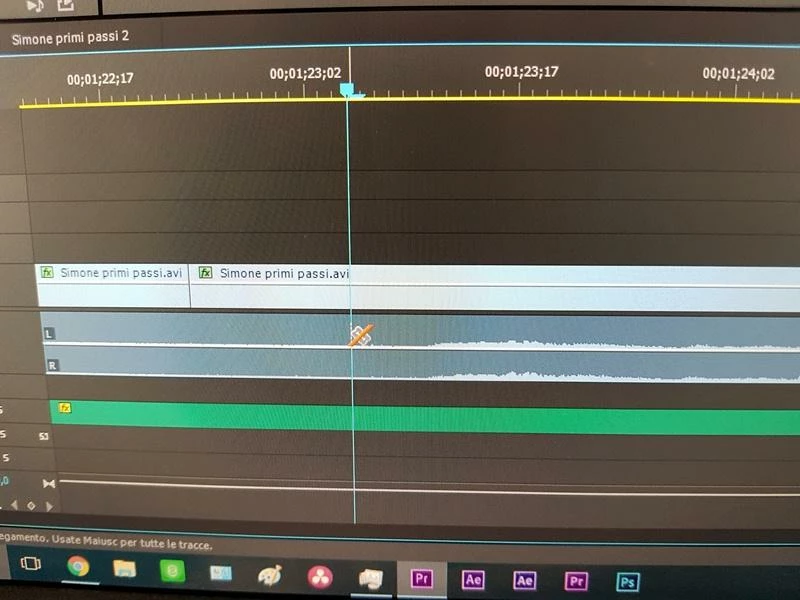
Dear guys are in the background with an astonishing situation, that is, I should split the audio track (obviously disconnected from the respective V1 video track) with the blade but I see that by selecting it as soon as within the track A1, the cursor becomes a blade with A red strip and consequently unable to do this ..... please tell me what to do to solve (unlock functionality) the problem?

Obviously the video track is unlocked (open padlock) the same thing for that audio (a1) .... that i hate but i can not understand the glimpse

Thank you so many John
    This topic has been closed for replies.
    Correct answer 19Giovanni66

    Nexahs1138

    I solved the problem by reading the Pr manual just by clicking the "uppercase" key at the same time for culture and wisdom

    Good evening Giovanni ;-)

    1 reply

    Nexahs1138
    Inspiring
    June 25, 2017

    Just click where you want to make a cut.

    19Giovanni66
    Inspiring
    June 25, 2017

    @ Nexahs1138

    Unfortunately, it's not that simple, even though clicking I DO NOT get NO

    The blade seems to be blocked and as if there was an impediment or a button not pressed continuously ..........

    In fact, the oddness and keeping the same point lying in V1 is enabled but as I descend in A1 ways barred by this red strip that impedes me any OPERATION

    19Giovanni66
    Inspiring
    August 20, 2017

    Expand A1 so you can seen the diamond (as shown in A2 and A3).

    Set it to clip keyframes.


    Very nice @Ann Bens

    After so much impassion I read the Pr manual and the audio related I found that by enabling the "clip clips" voice free the audio tracks

    Thank you so much for your intervention that was very useful because you addressed me

    Good day