
Participant
November 21, 2018
Answered

Add Clip to Multicam

  • November 21, 2018
  • 1 reply
  • 4076 views

I've created a multicam sequence and started to switch my shots on the timeline.  Now, I've been given a new clip to add.  How do I add this new clip to the exisiting multicam?

Using Adobe Premiere CC 2019 on iMac Pro.

Thanks in advance for your help on this.
    This topic has been closed for replies.
    Correct answer Harold Silva

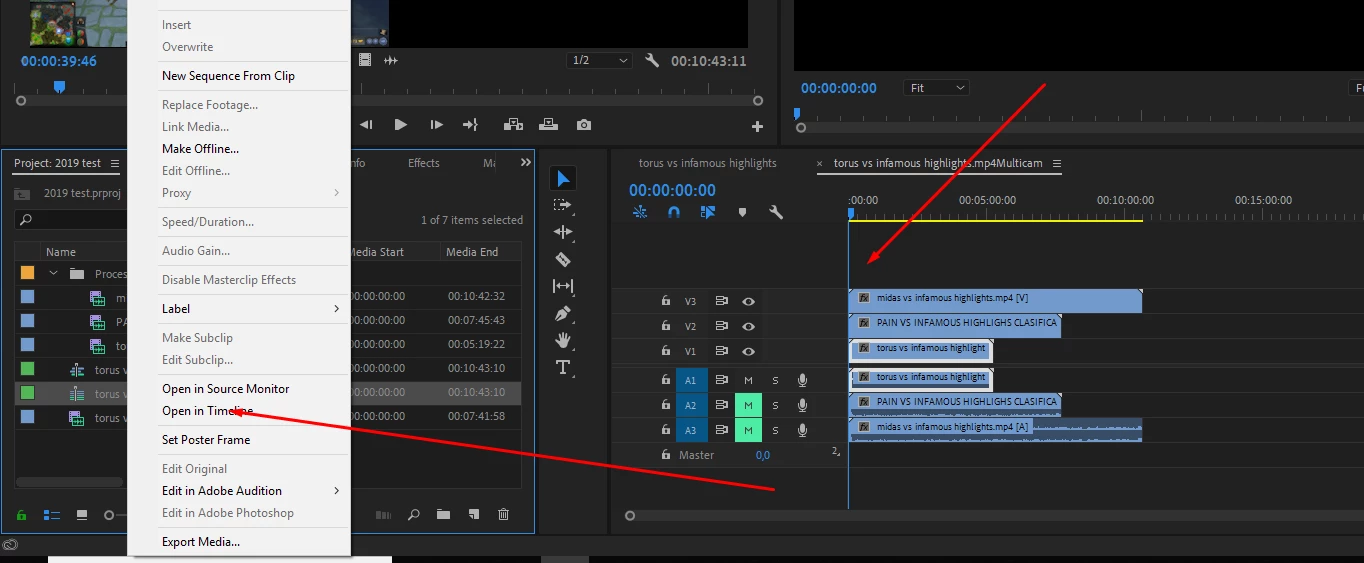
    Just Right Click on multicamera sequence as seen on photo (open in timeline)

    1 reply

    Harold Silva
    Community Expert
    Harold SilvaCommunity ExpertCorrect answer
    Community Expert
    November 21, 2018

    Just Right Click on multicamera sequence as seen on photo (open in timeline)

    Harold Silva B.
    Known Participant
    May 21, 2021

    When I do that (Premiere Pro CC 2021), it just shows me the single multicam sequence plus the 4 audio tracks in the timeline. It doesn't give me any access to the inside of the multicam sequence, where I could add new clips.