
Participant
November 18, 2017
Question

Adobe Premiere Pro 2018 Instagram Story export not working

  • November 18, 2017
  • 7 replies
  • 14162 views

Hello Folks! I am new to adobe premiere 2018 and very excited . Starting to use this for social account and trying to edit any video clib to 15 seconds and then export using 900 x 1600 aspect ratio. When i do that and then send the file to my samsung galaxy S8+ to upload as instagram story the file gives me an error.

However if i use the same file and modify it using an app ( reconvert it) like instashot then the file magically gets uploaded .

Below were my tests

  1. Cut the file to 14 seconds ( same issue)
  2. Tried syncing it using drop box , google drive , 4 other pieces of software + local drag and drop - same issue
  3. reduced the size to 1-2 megs > same issue

I then tried the installed instashot app , converted the file to 1080p ( it was now 22 mb) and it uploaded with out any issues.

I followed several dozen  youtube tuturials and was not able to crack the issue. Because I am doing the exact same thing as they are and yet it works for them and does not for me.

I noticed that quite a few people have this issue with Adobe premiere on youtube so your help on this would be really resolving the issue for a lot of folks.

Below i have my render settings >
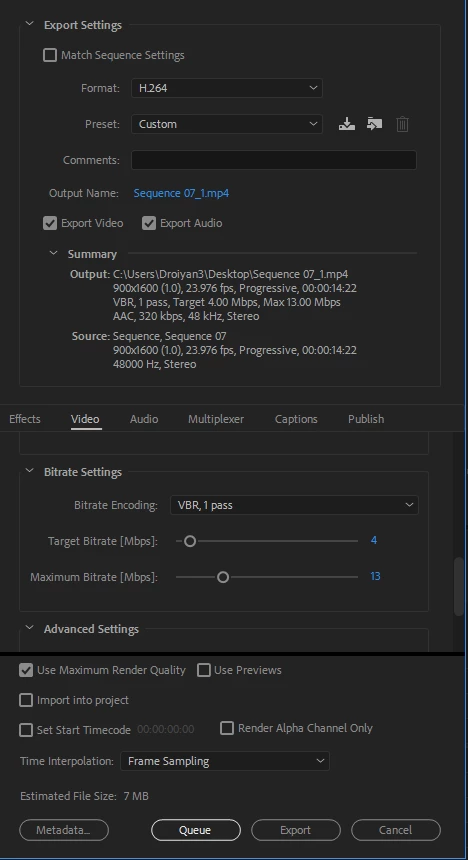
some part of me is thinking that this has to do with how instagram is detecting the video source > but i am not sure how to pin it exactly

thanks

Diego

    This topic has been closed for replies.

    7 replies

    Kevin-Monahan
    Community Manager
    Community Manager
    March 2, 2019

    Diego,

    Your sequence settings are incorrect. You need to export at 1080 x 1920. Try it.

    Thanks,
    Kevin

    Kevin Monahan - Sr. Community and Engagement Strategist – Adobe Pro Video and Audio
    andread96006218
    Participant
    July 17, 2018

    Still no working! Exporting and on my iphone i cant open it, sad

    Participant
    March 9, 2018

    I too was having a problem with exporting from Premier for IG stories. Uploaded videos would play and allow me to add stickers etc but IG would hang on "posting".  I tried different frame rates, resolutions and bit rates. Nothing worked. Setting profile to "baseline" was the only thing that worked. Interestingly I also have an S8.

    Inspiring
    March 13, 2018

    What works for me, as a galaxy user, is to download the file to my phone - then on the device click "edit" and then re-export the video ON THE DEVICE, before uploading to story. Seems like story doesn't like the files from premiere pro, but if you export it a second time on the device it'll upload.

    joulioc1985
    Participant
    March 8, 2018

    For now, i use a other and free Video Editor..
    I do my work on Premiere then put the video on that software and just save it in the right size " 1080*1920 ... then TADA !

    arewenotmen
    Known Participant
    March 9, 2018

    Yup - just taken a video file out of Adobe ME - opened and saved in the free VLC Media Player using settings as close to ME as possible. Visually I can't tell the difference from the original and it plays perfectly in Instagram Stories.

    Not a bad workaround, just wish I knew why it was necessary!

    arewenotmen
    Known Participant
    March 8, 2018

    My motion graphics business is now making quite a lot of promo videos for clients specifically for Instagram Stories and I'm getting exactly the same problem here. I'm also using Adobe Media Encoder and attempting to upload to Stories from a Samsung S8.

    Any video I output from ME and put in my phone will not upload to Insta Stories. However, open that video file in the phone and save it again without making any changes, and it'll upload fine.

    As TurboKaban said in the original post, even if the version which is saved on the phone is much larger than the original file output from ME, it still uploads no problem. I too have tried cutting down the dimensions, bitrate settings, duration etc. output from ME and it still won't work, unless it's been re-saved on the phone first.

    So annoying! Not saying it's an Adobe problem, but there's something about the files ME outputs that Instagram just doesn't like and I wish I could work out what it is!

    joulioc1985
    Participant
    January 24, 2018

    Same problem here.. I'm in that for like 2 or 3 week. Watching video and read forum.

    Nothing work, so bad

    I use the sequence exemple in that threads but nothing again.

    Kevin-Monahan
    Community Manager
    Community Manager
    November 30, 2017

    Hi Diego,

    Try these settings:

    Then Match Sequence Settings when exporting. Works great for me. Try it and report back.

    Thanks,
    Kevin

    Kevin Monahan - Sr. Community and Engagement Strategist – Adobe Pro Video and Audio
    Participant
    December 21, 2017

    Hello Adobe Staff.... those setting doesnt work.

    I need some special codec or something?