
Participating Frequently
June 18, 2013
Answered

Adobe Premiere Pro CC has stopped working

  • June 18, 2013
  • 17 replies
  • 146639 views

I get the following error when I try to run Adobe Premiere Pro CC:
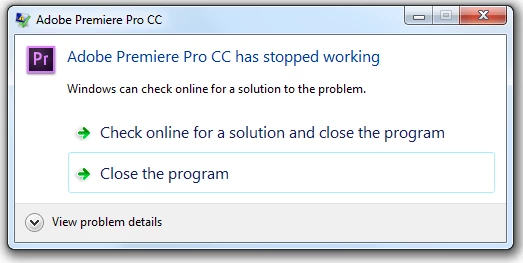
Adobe Premiere Pro CS6 still works well.  The other CC software I tried also work well (Photoshop, After Effects, Audition, etc)

I tried running it from the start menu or from the .exe

I tried running it normally or as an administrator

I tried updating my ATI video card driver, and quicktime just in case, didn't change anything.

I tried uninstalling it, rebooting, reinstalling it, rebooting, and it still doesn't work.

Here's the details:

Problem signature:

  Problem Event Name:    APPCRASH

  Application Name:    Adobe Premiere Pro.exe

  Application Version:    7.0.0.342

  Application Timestamp:    5176598d

  Fault Module Name:    StackHash_bd21

  Fault Module Version:    6.1.7601.17725

  Fault Module Timestamp:    4ec4aa8e

  Exception Code:    c0000374

  Exception Offset:    00000000000c40f2

  OS Version:    6.1.7601.2.1.0.256.1

  Locale ID:    1033

  Additional Information 1:    bd21

  Additional Information 2:    bd21f5c92378aee156f149a6ba7e9ffe

  Additional Information 3:    e8df

  Additional Information 4:    e8df4a89e00e0b1300dafab9669ace56

Read our privacy statement online:

  http://go.microsoft.com/fwlink/?linkid=104288&clcid=0x0409

If the online privacy statement is not available, please read our privacy statement offline:

  C:\Windows\system32\en-US\erofflps.txt

This topic has been closed for replies.
Correct answer Harm_Millaard

Hi Chad,  I don't know if that's good news or bad news, but I uninstalled the vid card driver and now it works.  Do you have a 2nd step to hopefully get both the driver + premiere to work at the same time?


Did you try the 13.06 driver?

17 replies

Kevin-Monahan
Community Manager
Community Manager
February 11, 2022

Hi Community,

This is a legacy post from 2013. If you are experiencing this issue with the current version, please create a new post. Let's lock this one.


Thanks,
Kevin

Kevin Monahan - Sr. Community & Engagement Strategist – Pro Video and Audio
New Participant
January 15, 2018

Hey guys, I found a solution.

If in the event viewer, faulting module name is nvcuvid.dll or some other DLL file, then find it via the path specified and just rename it to something else.

I had faulting module name : nvcuvid.dll and I rename it. Pp started correctly.

New Participant
September 22, 2016

I have the same problem too. I can't end exporting. Premiere pro cc stoped working on my mac pro. I dont know what to do?!!!

New Participant
September 2, 2016

I got this error message each time I closed AE CS6 and it was because my Video Card did not support Ray-Traced 3D yet my preferences were set to try to use my video card for Ray-tracing. As a matter of fact, each time I began AE, I got the following error message: "After Effects error: Ray-traced 3D: Initial shader compile failed (5070::0)." I fixed this error by going into Edit > Preferences > Previews > Fast Previews (box) > GPU Information (button) > then changed the "Ray-tracing" option from GPU to CPU. Then, I closed AE and re-started it and that fixed both problems.

ducn18831296
New Participant
June 1, 2016

I just find a solution.Just rename the "Adobe premiere pro.exe" to anything you like.I renamed it to "Adobe premiere pro CC.exe".  AMD Catalyst will recognize it as a new app, and you can change the power setting to Highperformance at all.

Adobe Premiere Pro CC crashes (locked in power ... | Community

stepheny23013143
New Participant
May 9, 2016

Fixed the problem here. Just bought Sony Vegas and just about to cancel my CC subscription. I have used Premier for about 15 years but for Gods sake I use this program for a living and don't want to spend all day searching the web to stop it crashing all of a sudden instead of working.

Life is too short.

New Participant
April 24, 2016

I am so pissed off a adobe, I now have time to work on a project, but instead I need to find out why the F*#& program in not working.

They never have any problem taking money from my account, but when I need to use the program F'NO

I have been using adobe products since the early 1990's

kovacsn74586379
New Participant
November 20, 2015

I am having the same problem. These are the details:

Problem signature:

  Problem Event Name: APPCRASH

  Application Name: Adobe Premiere Pro.exe

  Application Version: 9.0.2.6

  Application Timestamp: 55e6e340

  Fault Module Name: dvaui.dll

  Fault Module Version: 9.0.2.6

  Fault Module Timestamp: 55e6c394

  Exception Code: c0000005

  Exception Offset: 00000000001a0e38

  OS Version: 6.3.9600.2.0.0.256.48

  Locale ID: 1033

  Additional Information 1: fd41

  Additional Information 2: fd417de95f840765b74a1b78dbf776ae

  Additional Information 3: 92de

  Additional Information 4: 92de2300259a81e781f9fbe28f57578f

Can you help me fix it?

New Participant
September 14, 2015

I have this problem with a dell optiplex 9030 both using the latest driver found in windows update and the latest driver found on the ATI website.

Premiere only works with the original ati driver that I  find on the dell website; however I noticed that this driver makes premiere go in low performance mode, hence it uses the intel GPU instead of the ati.

New Participant
December 20, 2014

Hi there,

I had some issues recently : When I export a timeline, at a certain point Adobe Premiere CC 2014 crashes.

Afterwards I've tried to render the timeline before exporting the clip and turns out that it crash at the same point.

I don't know why some fades between clips and some blur would make Adobe Premiere CC crash.

I've checked if this is the program itself or the effect. Turns out it's the effect that make it crash all the time! Why?

D4RKD3V
New Participant
January 26, 2015

If you're using an AMD GPU just got to Windows\System32 and find the file called amdocl64.dll and just delete it or move it elsewhere and premieire should work no problem after this

brianw75837954
New Participant
August 2, 2015

This worked for me. Why? What is amdocl64.dll there for?