
Participant
February 18, 2018
해결됨

Adobe Premiere Pro CC "Directory access error. Please make sure your user directory isn't locked

  • February 18, 2018
  • 4 답변들
  • 9340 조회

Hi All,

Since upgrading, a client of mine is receiving the error below and cannot open Premiere Pro.
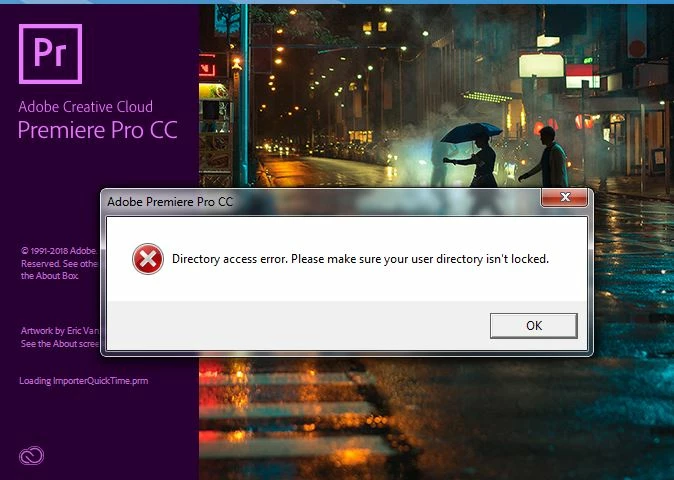
Running Windows 7 64-bit with latest SP and updates, user's scratch folder is a secondary internal hard disk for storage only. The user has local admin access.

An uninstall and re-install has failed to resolve the issue.

Any advice would be greatly appreciated.

[removed invalid link by Mod]

    이 주제는 답변이 닫혔습니다.
    최고의 답변: Nooooooo

    Thank you, thank you.

    I added the user to the scratch folder and all Adobe folders. It wasn't until I deleted multiple "Adobe" folders from the documents folder before the software successfully opened.

    4 답변

    nmohamad
    Participant
    September 27, 2018

    Hi Noooooooooooo,

    Could you please help me with scratch folder location of  Premiere Pro ?  There is only one folder of Adobe in documents and I am using Windows 10

    Nooooooo작성자답변
    Participant
    February 19, 2018

    Thank you, thank you.

    I added the user to the scratch folder and all Adobe folders. It wasn't until I deleted multiple "Adobe" folders from the documents folder before the software successfully opened.

    Vidya Sagar
    Adobe Employee
    Adobe Employee
    February 21, 2018

    Hi nooooooo,

    Glad the issue is resolved. Thanks for letting us know the status.

    Vidya

    Participant
    May 5, 2018

    Hi Vidya,

    I have the same issue, but I could not resolve it, can you help me? Thank you

    Vidya Sagar
    Adobe Employee
    Adobe Employee
    February 19, 2018

    Hi nooooooo,

    Sorry for the issue. As suggested by Jim Simon, it could be an issue with the access to the documents folder. What is the location of the documents folder?

    Thanks,

    Vidya

    Legend
    February 19, 2018

    Couple things to check for.  Steps 3D, G and H below.

    Unofficial Premiere Pro Troubleshooting Guide