
TrifilmEdit
Participating Frequently
December 12, 2018
Answered

Alexa embedded LUT driving me crazy

  • December 12, 2018
  • 3 replies
  • 4694 views

When importing footage, embedded LUT comes in automatically. First this is an issue because of project bloat. We know about the workaround, but then if we move to another workstation, when re-linking footage, it creates another instance of the embedded LUT in the master effect. I have projects where master effects on clips have 4 instances of the Amira LUT. This is in addition to the LUT not displaying consistently if we do decide to keep it on the master effect.

Then when it does display, we get 2 or 3 LUTs on the master tab displaying at the same time and there is no way to delete any of them.

Need an option to delete (really delete) the master Amira LUT either on import or after it is imported and don't import every time on re-link.

In the attached, the Amira is the original when first imported, the other 3 every time I re-linked on other systems...and I can not delete them.

I keep searching for a way to strip the metadata off the original file. If I import using Kyno and XML, the embedded LUT does not come with but if

I generate proxies with a 3rd party app like Editready, when I attach the proxy the LUT comes in and then it attaches to the original file as well. Maddening!

No one else is struggling with this issue?
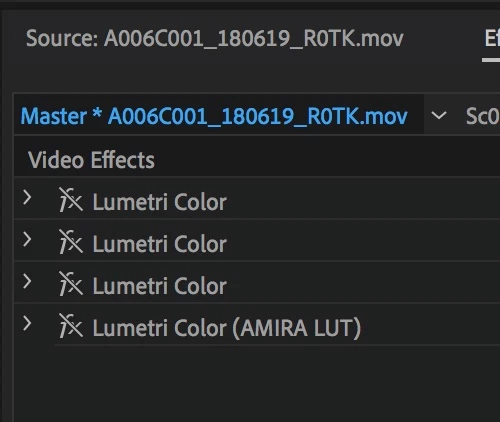
This topic has been closed for replies.
Correct answer mattchristensen

I was able to reproduce this issue on my end and will get it logged as a bug in our system.

Also, I have a workaround for you in the meantime:

- Open the Lumetri Color panel (Window > Lumetri Color)

- Double click an affected clip to load it into the Source Monitor

- At the top of the Lumetri Color panel, underneath the words "Master" and your clip name, you will see a drop down menu showing all of the Lumetri effects on the Masterclip level of the clip loaded into the Source Monitor

- In the drop down menu, choose "Clear"

- This should remove that instance of Lumetri from the Masterclip level

- Repeat as necessary

3 replies

mattchristensen
mattchristensenCorrect answer
Legend
December 14, 2018

I was able to reproduce this issue on my end and will get it logged as a bug in our system.

Also, I have a workaround for you in the meantime:

- Open the Lumetri Color panel (Window > Lumetri Color)

- Double click an affected clip to load it into the Source Monitor

- At the top of the Lumetri Color panel, underneath the words "Master" and your clip name, you will see a drop down menu showing all of the Lumetri effects on the Masterclip level of the clip loaded into the Source Monitor

- In the drop down menu, choose "Clear"

- This should remove that instance of Lumetri from the Masterclip level

- Repeat as necessary

mattchristensen
Legend
December 14, 2018

Attached is a screenshot from Premiere Pro v13.0.2

R Neil Haugen
Legend
December 14, 2018

Thanks Matt, for popping in ... and getting this into the system to get fixed.

Neil

Everyone's mileage always varies ...
Ann Bens
Community Expert
Community Expert
December 14, 2018

Different problem but the solution might do the trick.

Amira LUTs and project bloat — The Premiere Pro

R Neil Haugen
Legend
December 12, 2018

This would drive anyone nuts. Wonder if someone could pop in here with some ideas?

Neil

Everyone's mileage always varies ...