
thomasc61140050
Participant
April 3, 2018
Answered

Alpha Channel not supported (12.1)
  • April 3, 2018
  • 8 replies
  • 7154 views

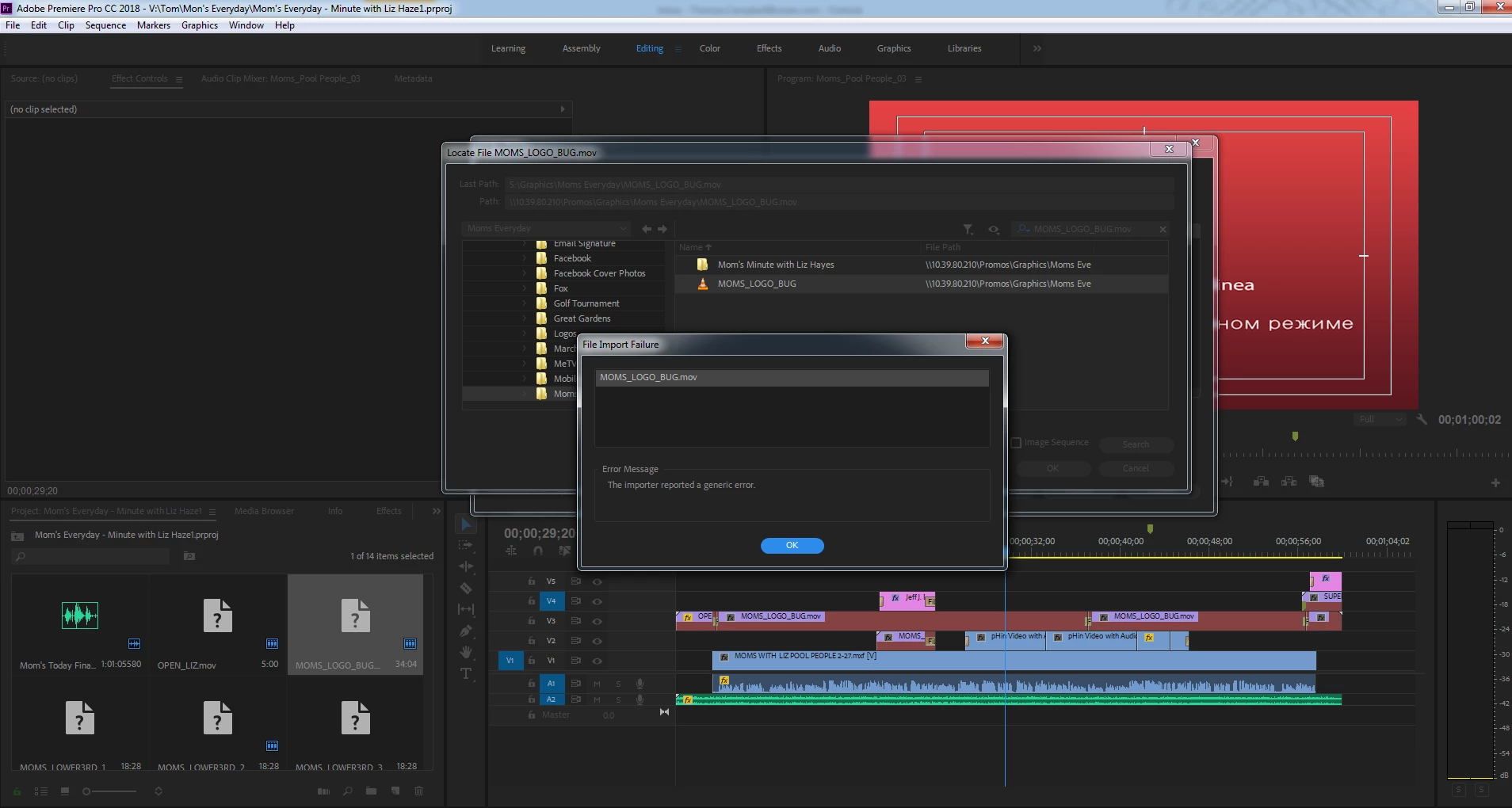
I am having similar with some Quicktime files. I opened a project I created months ago. All .mov clips that contain alpha channels are now offline and unable to import. I've tried re-importing with different directories, and clearing the cache. Still did not work. I've rolled back to 12.0.1 and it works as expected.

    This topic has been closed for replies.
    Correct answer Kevin-Monahan

    ThomasC,

    Could this be your issue? Dropping support for QuickTime 7 era formats and codecs

    Thanks,
    Kevin

    8 replies

    April 6, 2018

    Thanks Kevin, I have started converting a few avi and mov. files to mp4 with same quality or better results and smaller file sizes too. Surely the avi did not make as it is heavy poor quality and mostly 720 x 480. A Quicktime 64bit will be great but the guys at Apple spend all the time on iphone and do not give a cent on moving to a 64bit version so I will not put my hopes on that.

    But I am disappointed as the upgrades are not enough and I doubt if Adobe even reads the suggestions.

    The programs still do not fully utilize the rams and the expensive gpu only helps a little. Making movie still takes time despite the heavy rigs

    Kevin-Monahan
    Community Manager
    Community Manager
    April 5, 2018

    ThomasC,

    I'm not sure which format these files are in, but if they were created with the Animation codec and it has Delta Frames, then it won't be supported—as I understand it. If the file does not have Delta Frames, then the Animation codec should be supported.

    Thanks,
    Kevin

    Kevin Monahan - Sr. Community and Engagement Strategist – Adobe Pro Video and Audio
    April 5, 2018

    Kevin, But why should we lose those files. I have tons of AVI and Quicktime clips for various companies bought over the past years. Another thing AVI and Quicktime are rivals and are not from the same source. AVI used to be the file format for PC (Microsoft) and Quicktime for Mac (Apple) not supporting 32bit Quicktime should not affect my AVI files.

    Anyway we always have the option of using the previous versions as the differences are not all the relevant but I like the colour match comeback.

    Kevin-Monahan
    Community Manager
    Community Manager
    April 5, 2018

    Hello Bisa Goma,

    Kevin, But why should we lose those files.

    • 32-bit QuickTime files have been deprecated by Apple.
    • We have no control over what Apple has done.
    • We only had the engineering resources to rewrite 64-bit versions of these codecs for only the most popular broadcast formats.
      • My guess is that AVI didn't make the cut for some reason.
      • We have been warning customers about this for some time directly in the application.
      • Sorry if you missed any of those messages or did not realize the implications of said messages.

    I have tons of AVI and Quicktime clips for various companies bought over the past years.


    You will have to transcode these files if you wish to continue working with them. Sorry about that!

    Quicktime for Mac (Apple) not supporting 32bit Quicktime should not affect my AVI files.

    The Sr. Engineering Manager has asked for feedback from users like you, who feel that a 64-bit version of certain QuickTime formats (that are currently not on the list) should be engineered. Give him that feedback here.

    Thank You,
    Kevin

    Kevin Monahan - Sr. Community and Engagement Strategist – Adobe Pro Video and Audio
    Kevin-Monahan
    Community Manager
    Community Manager
    April 3, 2018

    Hi,

    I branched your post to a new thread as I feel it is a separate issue. Sorry some non-supplementary posts came in from the other thread.

    Thanks,
    Kevin

    Kevin Monahan - Sr. Community and Engagement Strategist – Adobe Pro Video and Audio
    zondervan
    Participating Frequently
    April 3, 2018

    Same here. No Quick Time Alpha support anymore in the new version with files that worked fine on the previous version. On Mac Pro with Sierra 12.6.

    Kevin-Monahan
    Community Manager
    Kevin-MonahanCommunity ManagerCorrect answer
    Community Manager
    April 3, 2018

    ThomasC,

    Could this be your issue? Dropping support for QuickTime 7 era formats and codecs

    Thanks,
    Kevin

    Kevin Monahan - Sr. Community and Engagement Strategist – Adobe Pro Video and Audio
    kathleend16954775
    Participating Frequently
    April 3, 2018

    Hi, How did you roll back to 12.0.1?

    thomasc61140050
    Participant
    April 3, 2018

    I have creative cloud installed on my computer. Click on the arrow next to the update/open button, click other versions, then pick the one you want to install.

    BTW, you'll have to uninstall the current version first.

    Participant
    April 3, 2018

    I'm having the same issue. QuickTime files with alpha channels will not import to Premiere, AE, or Media Encoder. Worked just fine before updating.

    Kevin-Monahan
    Community Manager
    Community Manager
    April 3, 2018

    EE - JB,

    Might this be related to your issue? Dropping support for QuickTime 7 era formats and codecs

    Thanks,
    Kevin

    Kevin Monahan - Sr. Community and Engagement Strategist – Adobe Pro Video and Audio
    zondervan
    Participating Frequently
    April 3, 2018

    After a rather painful update proces on the Mac to Premiere 12.1 (not starting, issue resolved, see other discussion), Premiere won't recognise any Avi files on the Mac. With version 12.01, everything was fine. Same thing for Media Encoder, After Effects and Prelude. Apple Finder, FCPX an Motion still play AVI-files fine... What is happening?