
Participant
November 24, 2019
Answered

Anchor Point Missing and missing button

  • November 24, 2019
  • 3 replies
  • 2002 views

I've been driving myself nuts because of my premiere has decided to stop showing me the anchor point and wireframe for keying.   The solution that everyone said fixed their problem said to click the wire box right next to "Motion"
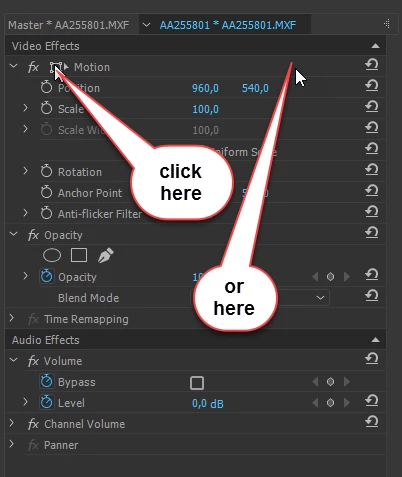
 

The trouble is that the box doesn't exist for me. At all! 
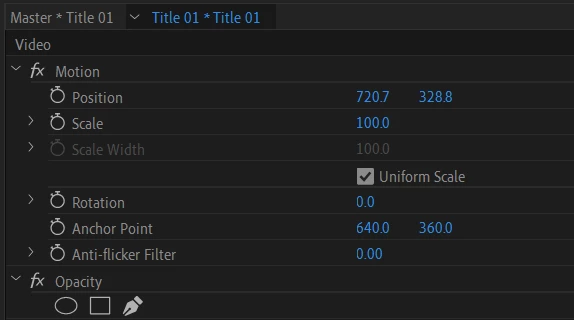
 

I've uninstalled and reinstalled and done all the normal stuff to try to fix this but as far as I can tell I'm just missing a key button that might solve my problem.  I'm sure there is an easy fix for this but I'm at my wits end.   

This topic has been closed for replies.
Correct answer Ann Bens

Make sure Windows OS scaling is set to 100% or the recommended scale. 125% is known to give issues.

Sometimes manually scaling the Program Window will bring the wireframe back.


The wireframe icon in the Effect Controls does not excist anymore in newer versions of Pr.


3 replies

Ann Bens
Community Expert
Ann BensCommunity ExpertCorrect answer
Community Expert
November 24, 2019

Make sure Windows OS scaling is set to 100% or the recommended scale. 125% is known to give issues.

Sometimes manually scaling the Program Window will bring the wireframe back.


The wireframe icon in the Effect Controls does not excist anymore in newer versions of Pr.


Participant
November 24, 2019

That seems to have done the trick! Thank you 

Community Expert
November 24, 2019

Please make sure that your playhead/timeline indicator is over the file that you are selecting and that you’re looking for the anchor point in the Program monitor.

Participant
November 24, 2019

It is in the correct place and I am looking in the program monitor 

Community Expert
November 24, 2019

Just click on the word motion. Don’t worry about not seeing the wire box.

Participant
November 24, 2019

One of the first things I tryed. Sadly didn’t work.