
Participating Frequently
June 22, 2017
Answered

Audio getting out of sync w/ iPhone video

  • June 22, 2017
  • 1 reply
  • 18462 views

Hi, I'm pretty new to Premiere Pro CC. I have video shot on my iPhone 5c I'm working on editing into a short film, and on each video file I have, the video and audio get increasingly out of sync towards the end of the file. This is occurring with every single video file shot on iPhone, despite the fact that obviously the video and audio were recorded together in the same file. I'm editing on MacBook Air running OS X El Capitan 10.11.6. My iPhone is running iOS 10.3.2. What can I do about this?

Thank you!
This topic has been closed for replies.
Correct answer Meg The Dog

At this time, Premiere Pro does not support editing with Variable Frame Rate material.

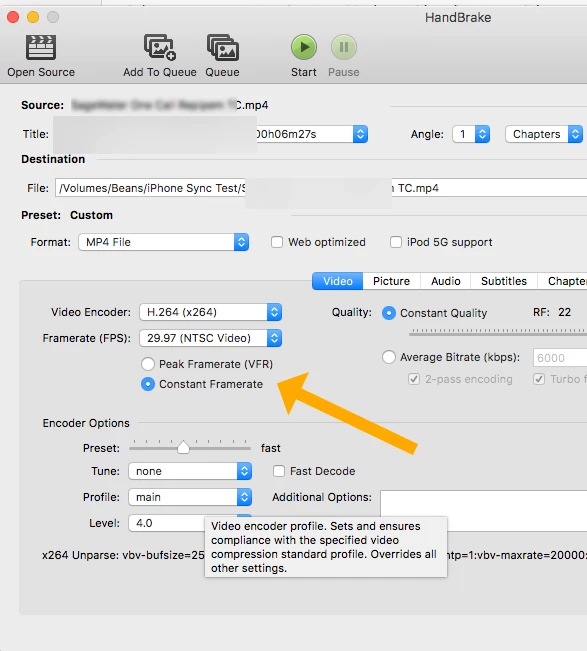
You need to convert your iPhone source files to Constant Frame Rate.

You can do this by downloading Handbrake (free)

https://handbrake.fr/

and converting the files to CFR files.

MTD

1 reply

Meg The DogCorrect answer
Inspiring
June 22, 2017

At this time, Premiere Pro does not support editing with Variable Frame Rate material.

You need to convert your iPhone source files to Constant Frame Rate.

You can do this by downloading Handbrake (free)

https://handbrake.fr/

and converting the files to CFR files.

MTD

rwalsh85Author
Participating Frequently
June 22, 2017

Thanks MTD. However, I've converted my first file and received this error message from Premiere Pro:

The other "3 warnings" are exactly the same. It won't allow me to open the files in the source monitor nor drag them into the timeline. Suggestions?

Inspiring
June 22, 2017

Sorry, I don't know what is causing this. Maybe someone will be able to post a solution.

MtD