
WoodAndShop
Participant
November 26, 2017
Question

Best export settings for MiniDV AVI files for computer and TV?

  • November 26, 2017
  • 1 reply
  • 2404 views

Hello, I recently captured a ton of old standard definition Mini DV tapes into AVI files via PP CS6. I'm trying to experiment with export settings, but am getting overwhelmed. I want to play digital files on both computer screens and TV screens (and maybe YouTube). I want the best quality possible (which isn't very high for SD) while minimizing file size. These are the settings I recently used, but the file size was large and still a bit pixelated:
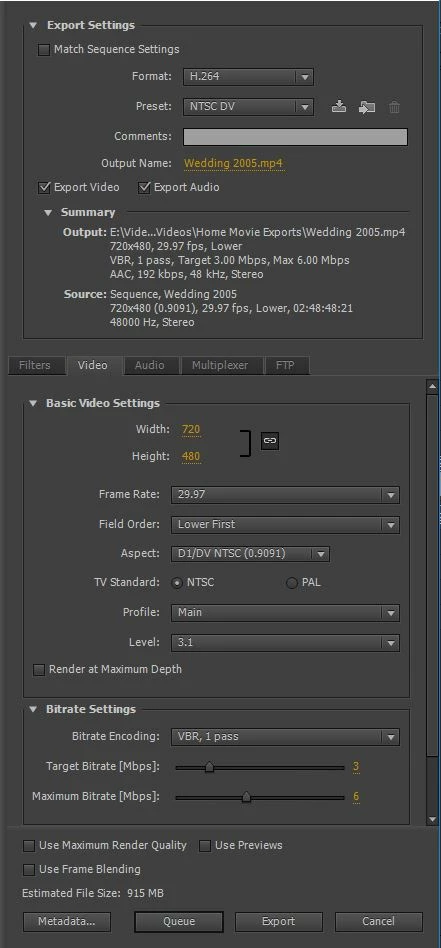
What export settings would you recommend? Thanks!

Josh

[Here is the list of all Adobe forums... https://forums.adobe.com/welcome]

[Moved from Premiere Pro NEW to Premiere Pro OLD... Mod]

This topic has been closed for replies.

1 reply

John T Smith
Community Expert
Community Expert
November 26, 2017

>best quality possible (which isn't very high for SD) while minimizing file size

I don't think you can have both "best quality" and "minimizing file size" at the same time

Your target bitrate is very low... have you tried VBR 2 pass to see if that helps?

WoodAndShop
Participant
November 26, 2017

Thanks for your reply John. I guess I should clarify. SD video can only get so good no matter how high the bitrate is or how big the file size is. For example, I could crank the bitrate way up, and choose settings that will give me an enormous file size. But with SD, it may not be any better than at a lower bitrate and more minimal settings. I guess I'd just like some settings that give me good enough quality for SD, without huge file sizes. Thanks! I tried the VBR 2 pass, but it multiplies the export time quite a bit and didn't seem to make much difference in quality.

John T Smith
Community Expert
Community Expert
November 26, 2017

Back when I was using the Grass Valley ADVC 110 external digital converter to get my 8mm analog tapes into my computer, and editing the "good bits" into an export to feed Encore to make a DVD, my playback was just as good as the original

Of course, I was not using a really low bitrate with two and a half hours of video, so what I was doing doesn't really compare