
StarMediaFilm
Participating Frequently
July 13, 2018
Answered

Bug report!! DPX
  • July 13, 2018
  • 2 replies
  • 1196 views

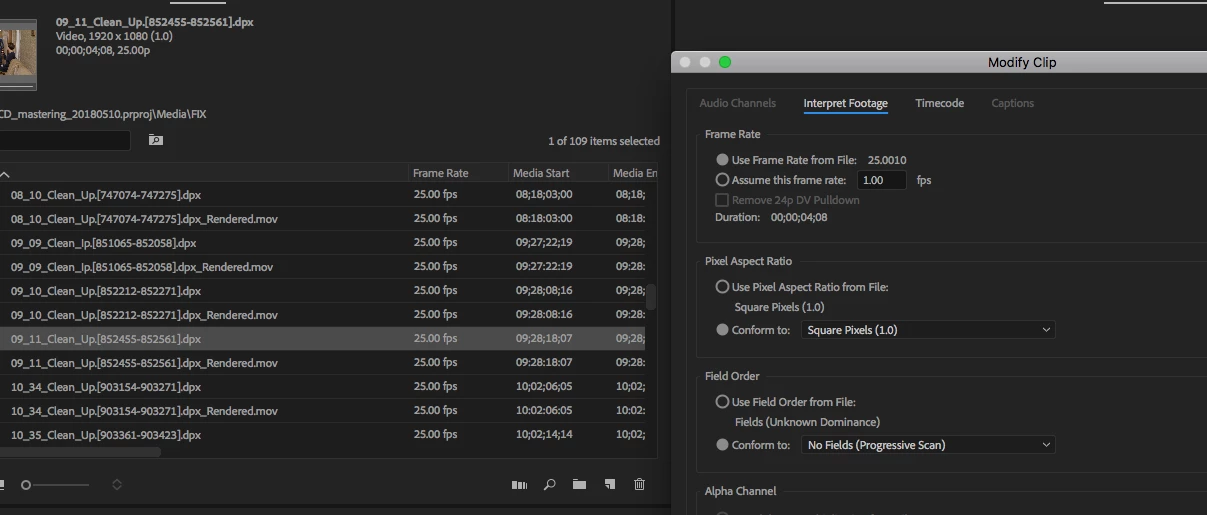
Premiere version 12.1.1 (build10) when importing the image sequence DPX is not correctly interpreted frame rate, instead of 25.0000 interprets 25.0010. Same thing with a frequency of 24.0000. this results in problems with duration and rendering

    This topic has been closed for replies.
    Correct answer Trent Happel

    The issue with Interpret Footage reporting an incorrect frame rate for the DPX Sequence has been reproduced and is currently under investigation.

    Thank you.

    2 replies

    Participating Frequently
    April 8, 2019

    FYI, this issue should now be fixed in the Premiere Pro 13.1 update that was recently posted. Make sure to delete your Media Cache folders before launching 13.1 and then import your DPX files. FAQ: How to clean (delete or trash) media cache files?

    More information on Premiere Pro 13.1:

    New and enhanced features | 2019 releases of Premiere Pro

    Fixed issues in Premiere Pro version 13.1

    Mike Dziennik
    Community Expert
    Community Expert
    July 13, 2018

    I think you have to do this here:

    Feature Request/Bug Report Form

    October 19, 2018

    Version 12.1.2 problems when working with DPX image sequence (version 13.0 is not resolved ((when importing, the frame rate instead of 25 is 25.010, you can’t solve the problem of importing image sequence! The After effect can drop  directly into the bin image sequence folder. After effect understands , and exactly what you need to appear in Bin !! Why can't the Primere do this? You managed to release a new version 13.0 , but there are more BUGS  when working with DPX image sequence!! Do something with this !!!

    Trent HappelCorrect answer
    Participating Frequently
    October 23, 2018

    The issue with Interpret Footage reporting an incorrect frame rate for the DPX Sequence has been reproduced and is currently under investigation.

    Thank you.