
setht94929637
Participating Frequently
February 10, 2019
Answered

Buttons are invisible in pop-up menu

  • February 10, 2019
  • 1 reply
  • 1227 views

This is my first foray into pop-up menu creation, so I apologize if the answer to my question is obvious.

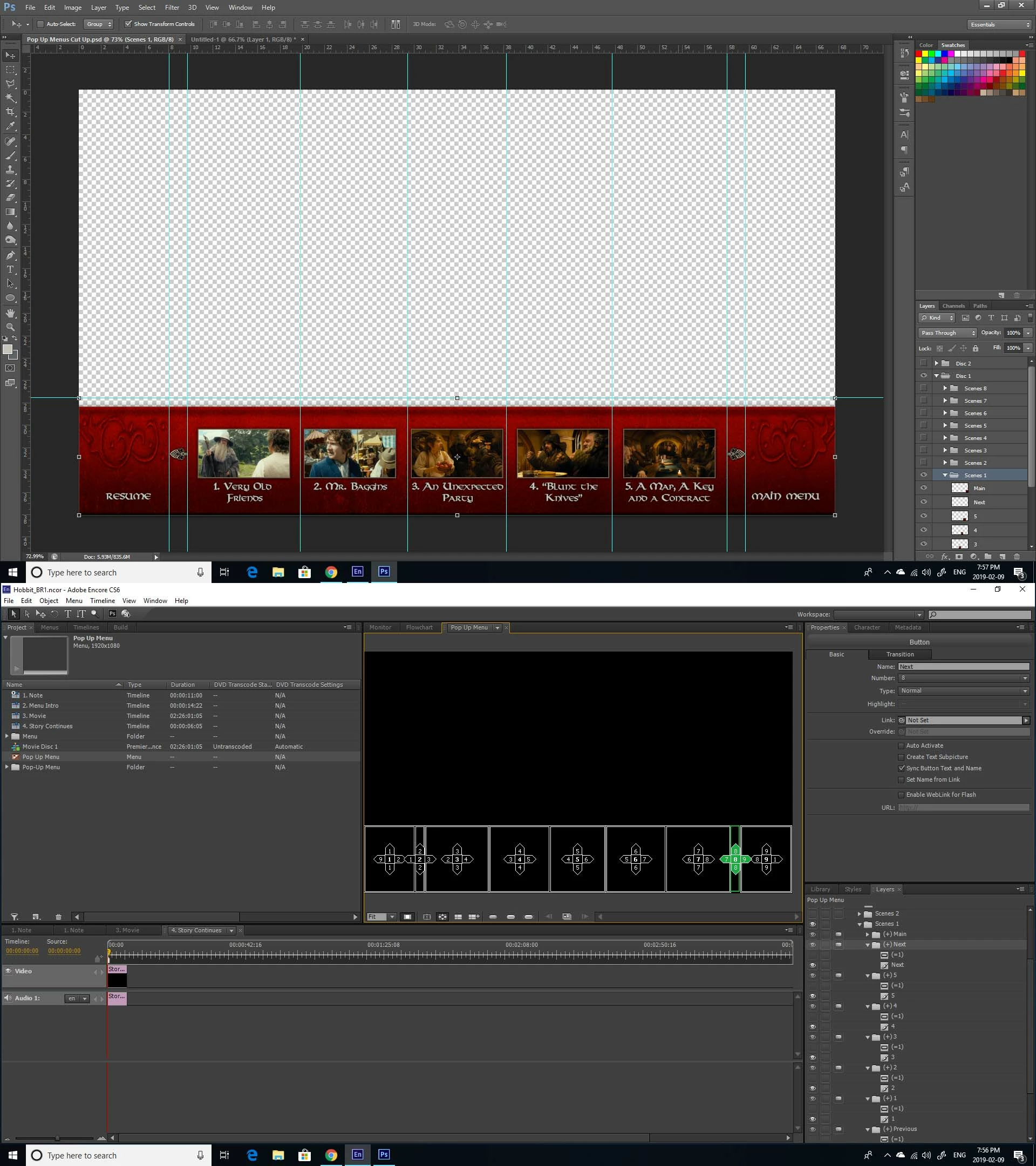
From reading this forum, I'm aware that only button layers will be visible on a pop-up menu. Anything that isn't a button will disappear. I had designed a menu with a solid background, so I merged my layers and sliced it up into pieces to create the illusion of a solid lower third menu. However, when I open my PSD in Encore and try to turn it into a pop-up menu, everything is invisible. I turned the relevant layers into buttons, but they're still invisible.


You can see in the graphic below what the menu should look like and how it appears in Encore. As you can see, it is divided into 9 buttons in Encore, but all of them are invisible.
Any ideas?

This topic has been closed for replies.
Correct answer Stan Jones

"Edit in Photoshop" and get a new screenshot that shows the layer prefixes etc. In your Photoshop screenshot there are no prefixes. In your Encore screenshot there are.

Encore on line help is messed up. Eventually, a link goes to the CS5 pdf. Here is a link to the CS6 pdf:

https://help.adobe.com/archive/en/encore/cs6/encore_reference.pdf

See page 74 or so (of the pdf document page numbers), "Using Photoshop to create menus," "Layer name prefixes for menus."

You cannot use full color images for button highlights, but I cannot tell what you have.

1 reply

Stan Jones
Community Expert
Community Expert
February 10, 2019

Post another screenshot from photoshop, with the layers inside Scenes 2 and 3 visible. None if your slices are coded to be buttons and will not be visible.

setht94929637
Participating Frequently
February 10, 2019

Nothing in the other scenes folders has been merged and sliced up. I've just been working in the Scenes 1 folder right now to test out my pop-up menu.

How do you code the slices to be buttons?

Stan Jones
Community Expert
Stan JonesCommunity ExpertCorrect answer
Community Expert
February 10, 2019

"Edit in Photoshop" and get a new screenshot that shows the layer prefixes etc. In your Photoshop screenshot there are no prefixes. In your Encore screenshot there are.

Encore on line help is messed up. Eventually, a link goes to the CS5 pdf. Here is a link to the CS6 pdf:

https://help.adobe.com/archive/en/encore/cs6/encore_reference.pdf

See page 74 or so (of the pdf document page numbers), "Using Photoshop to create menus," "Layer name prefixes for menus."

You cannot use full color images for button highlights, but I cannot tell what you have.