
Can't Export from Specific Sequence in Premiere Pro 2019
Hi,
I have a project with a range of different sequences. All different draft versions of the same project.
They are all identical sequences, but the one completed version which i want to output does not let me export in any format.
I have tried h.264, quicktime, mxf, even just a straight waveform audio, but nothing works. I have also tried exporting only small sections of the sequence to identify if it is an issue with a specific piece of footage/audio but that does not work either.
I have also tried to export through media encoder but it crashes during the "Queuing" period.
Other sequences export fine.
I have tried to import the project into a brand new project but whenever i tried, Premiere crashes and cant do it. I have copied the contents of the sequence into a new sequence, but this also does not work.
I have deleted the render files, cleared the cache (manualy), reset preferences, and "saved as" the project but still no luck.
I have many other projects that export and work fine, it's just this specifc sequence inside this specfic project that appears to be the issue.
Below are the specs of my comp:
Inte Core i9-9940x CPU
RAM 64gb
Quadro RTX 5000
Premiere Version: 13.1.3 (Build 44)
I do not want to update Premiere as i have multiple projects on the go and dont want to risk coming into issues with the new version. This is working fine for me with this one exception.
Sequence settings:
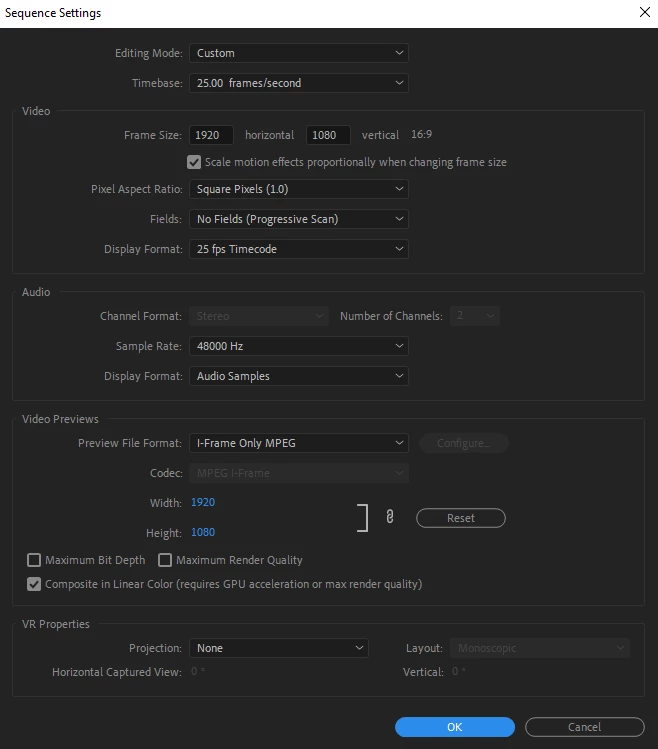
Export settings -> As i said it doesnt matter the export settings, even a straight waveform export does not work.
Finally the export does do the "rendering audio files" portion of the export process, but when it begins to Encode, it stays at 0% indefinitely.
Thanks for the help!
Title edited by mod
 AdChoices