
Revelta
Participant
February 21, 2019
Answered

Can't playback Apple Prores files in Windows 10

  • February 21, 2019
  • 1 reply
  • 40679 views

When I'm in Premiere pro, After Effects, or Media Encoder when I export a file to Apple Prores  it will not playback on a Windows 10 computer in VLC or Windows Media Player. The only player I could get it to play from was the old QuickTime player. Where can I can a codec that will allow me to playback the prores .mov files? Thanks for your help.
This topic has been closed for replies.
Correct answer Averdahl

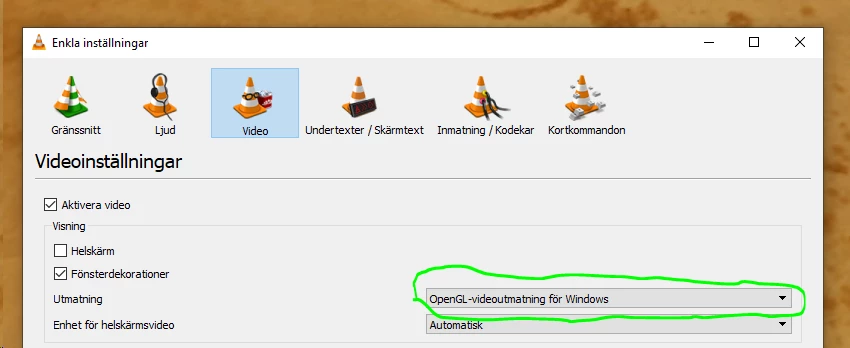
I can playback that file in VLC 3.0.4 but got problems when i updated to 3.0.6. I could however change the settings to OpenGL in VLC´s settings and then it worked.

1 reply

Legend
February 21, 2019

If you care to upload a short sample clip to a file sharing site, I can download and test it here.

Revelta
ReveltaAuthor
Participant
February 21, 2019

https://www.dropbox.com/s/jsmq6fiay29hw3o/exported%20in%20premiere%20pro%20prores%20422HQ.mov?dl=0

Averdahl
Community Expert
AverdahlCommunity ExpertCorrect answer
Community Expert
February 21, 2019

I can playback that file in VLC 3.0.4 but got problems when i updated to 3.0.6. I could however change the settings to OpenGL in VLC´s settings and then it worked.