
Inspiring
October 31, 2017
Answered

Can you change the default track for new text in Essential Graphics?

  • October 31, 2017
  • 1 reply
  • 1480 views

Hi All,

I have a fairly simple question. Is it possible to change the default track where new clips appear when you create new graphics with the type tool, pen tool, and other new essential graphics?

For example, when I select the "type" tool and type a sentence on the program monitor, a new clip is created, and this new clip always gets placed by Premiere one track above the highest track that's already being used. See the screenshot below:
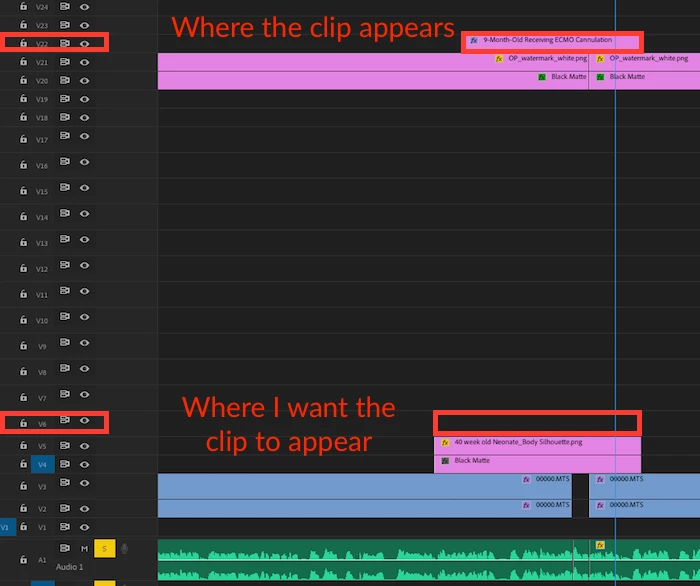
This current default makes it so that any new titles/graphics are placed above my watermark and subtitle matte (which I keep way up high and out of the way.)

Does anyone know if there is a way to change this default? I have looked through the keyboard shortcuts with no success. All i want to do is make the default go to a highlighted track (similar to how copy/paste works within the timeline)

Thanks!

Alex
This topic has been closed for replies.
Correct answer alexander_robertson

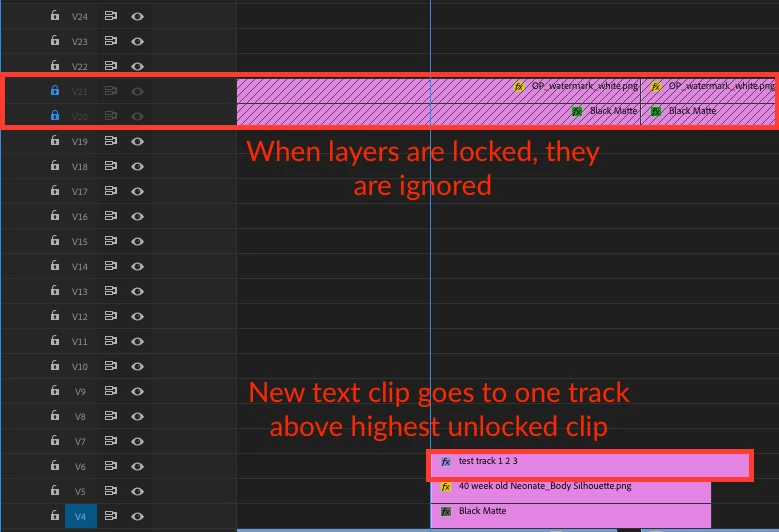
Update/work-around: Locking tracks makes premiere ignore them when placing new text clips:

But it still would be nice to know if there is a way to change the default instead of using this workaround...

Thanks,
Alex

1 reply

alexander_robertsonAuthorCorrect answer
Inspiring
October 31, 2017

Update/work-around: Locking tracks makes premiere ignore them when placing new text clips:

But it still would be nice to know if there is a way to change the default instead of using this workaround...

Thanks,
Alex

R Neil Haugen
Legend
October 31, 2017

You've got a good point ... it would be nice if we could use Track Targeting or some other UI control to 'guide' the EGP placements ... would be a great Feature Request ...

https://www.adobe.com/cfusion/mmform/index.cfm?name=wishform

Neil

Everyone's mileage always varies ...
Inspiring
October 31, 2017

Thanks, Neil. I submitted a ticket for feature request. For now I will use the workaround by locking upper tracks.