

sambatista
Participant
May 6, 2020
Question

Colors diverge between Premiere and final export

  • May 6, 2020
  • 1 reply
  • 265 views

Hello friends,


I've been dealing with this situation where it seems that the colors (particularly browns and reds, as they are the most proeminent in this case) as well as the exposure shift slightly after exporting. This can be seen when playing the exported video on any player, or upon uploading to YouTube. However, it doesn't show if I import that exported video to Premiere and compare it to the original graded footage.


I'm working on a 15 inch 2018 MacBook Pro within Catalina; the raw footage is from the first Blackmagic Pocket Cinema Camera (that caps at 1080p), graded in Premiere, and exported for web using H.264 with the following encoding settings,


Performance / Hardware Encoding

Profile / High

Level / 4.2

VBR, 1 pass @ 30 Mbps
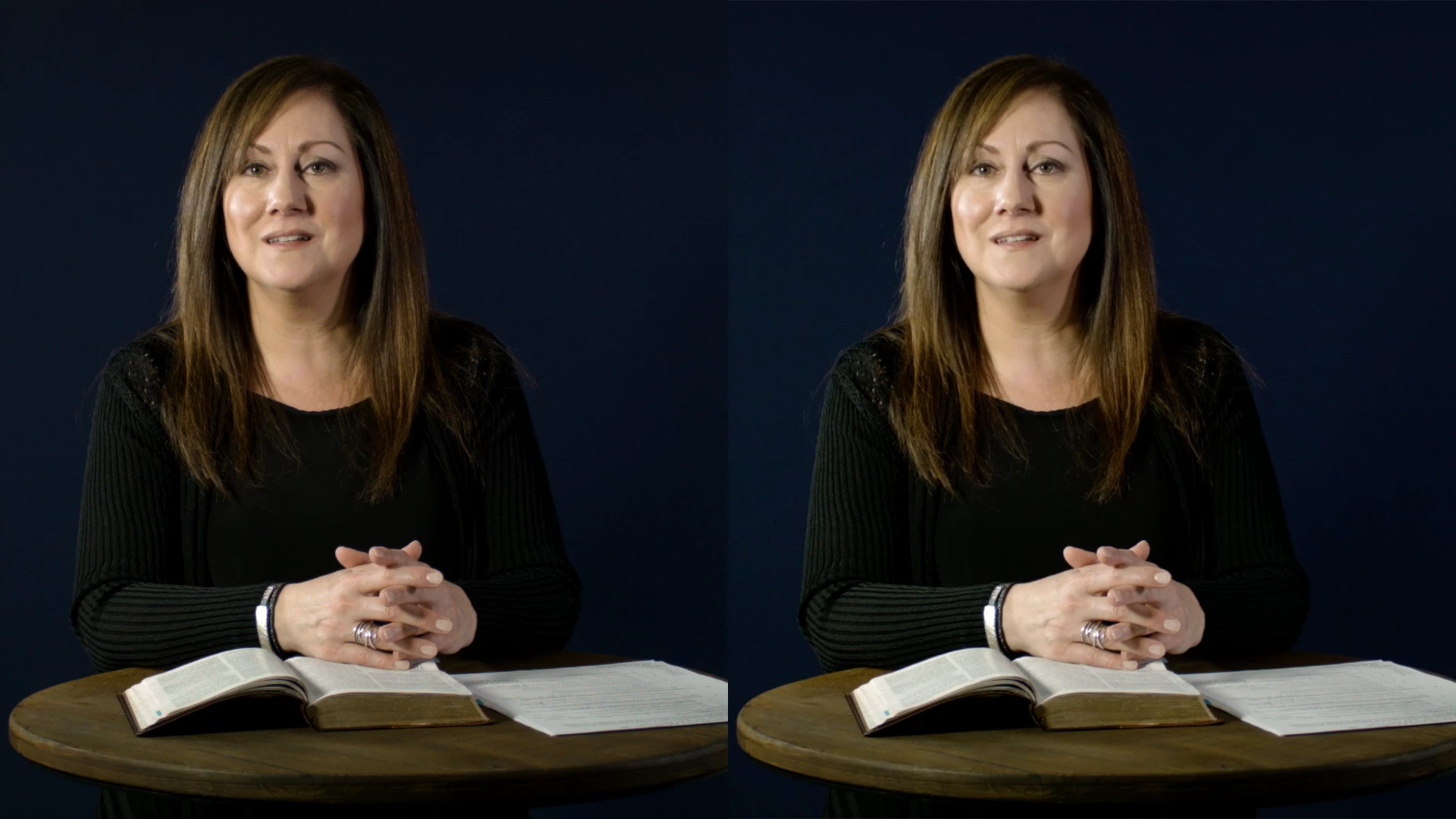
 

Any help on this matter is tremendously appreciated.


Best,

Sam


[Moderator note: please include images directly into your post either by drag/drop the image onto your reply or by using the picture icon of the reply box formatting bar to upload the image into the post. I've taken care of this for you.]

This topic has been closed for replies.

1 reply

R Neil Haugen
Legend
May 6, 2020

This is an issue between Macs and the world. Apple chose to create an entirely new color space and the Retina monitors to go with it, called Display-P3. It uses the P3 color primaries rather than the sRGB primaries of video media. Then the ColorSync utility on Macs applies an intriguing sort-of interpretation of Rec.709 to Rec.709 media. So viewing Rec.709 media actually accurately on a Mac takes some work on the part of the user.


Well ... viewing color correctly on anything actually requires some work on the part of the user. I work a lot with pro colorists, many of them total Mac people, and whether or not they run Macs, Pcs, or Linux, a constant problem is they grade on Grade 1 Reference monitors ... and that is a professional standard. With extremely tight calibration and profiling.


And their clients then look at the image on a Retina in a bright office, their phone or tablet, and bark and moan that 'it ain't right'.


With your situation ... when working in Premiere, make sure that "Display color management" is checked, therefore active, in your Preferences options. This will make Premiere look to the ICC profile of your computer and adjust the view within Premiere to your monitor, to try and get as close as possible to showing a correct Rec.709 image within Premiere as possible.


Outside of Premiere ... that's a crapshoot. Every player and viewer handles media and even tagged media differently, and the ColorSync utility also handles things ... intriguingly.


So ... you have to in the end work like any pro colorist. Setup your system to get the most accurate view you can. Then export ... and let it go. No other device out there will ever match exactly what you saw on your screen. Period.


But if you set up so that you are looking at a good Rec.709 view of your image with appropriate gamma and brightness, and the scopes show your data are within 0-100 and without out-of-gamut color excursions in the Vectorscope, you're good to go.


On all other devices, media produced to pro standards will look like other media produced to pro standards on that device. As noted above, it will not look on any other device like what you saw on your properly calibrated screen ... ever.


And on any one device, every browser and player will probably show at least a slightly different 'view' of the media.


Neil

Everyone's mileage always varies ...