Jeffrey_Goldberg
Participating Frequently
April 30, 2021
Answered

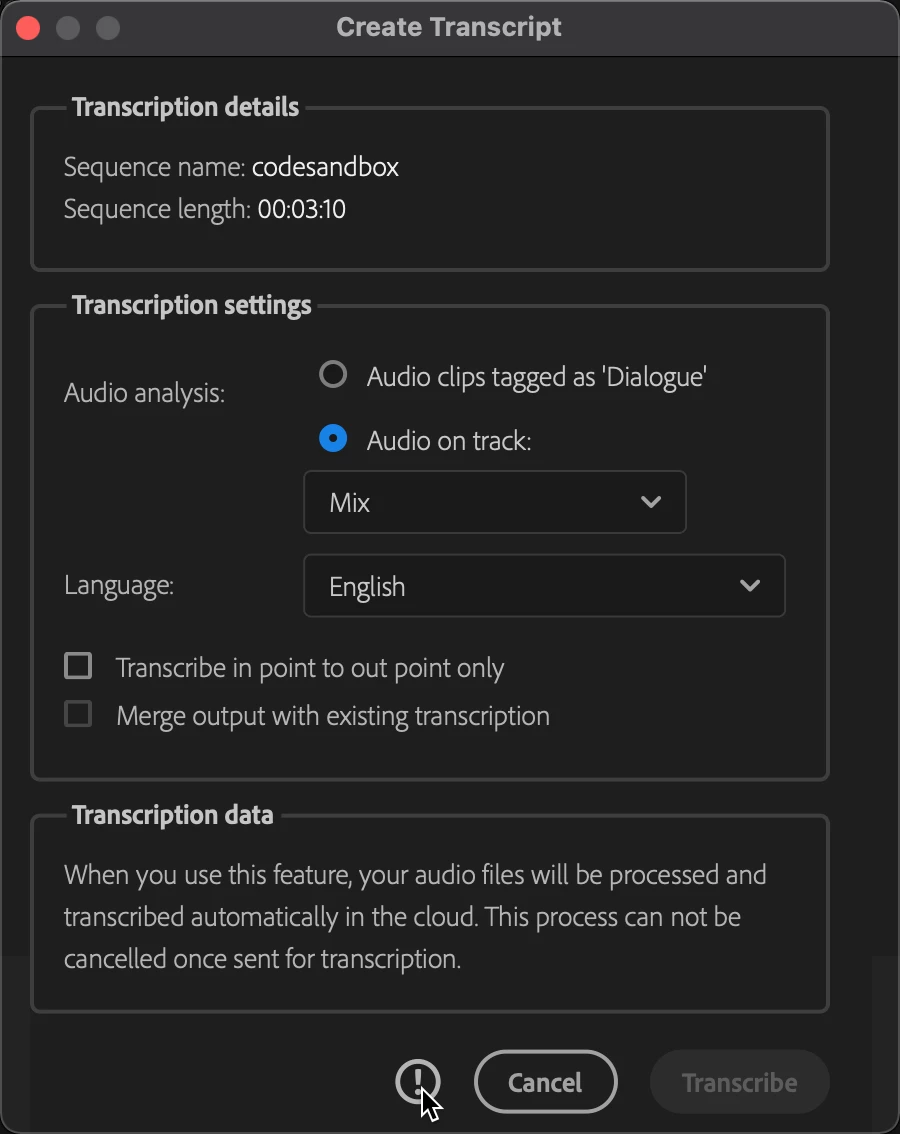
Create Transcript: Transribe button greyed out

  • April 30, 2021
  • 2 replies
  • 5166 views

Does anyone know if there is a log file on mac that can identify the reason Premiere Pro transcription is unable to connect to the service? I've uninstalled and reinstalled CC and Premiere Pro 15.1 and I'm unable to create a transcription. I'm experiencing the same problem with Premiere Pro Beta.


This topic has been closed for replies.
Correct answer Stan Jones

The transcription service is not generally available - it is still in essence a beta process. I think staff want problems with it posted in the beta forum. The beta is public, so I'm not suggesting a problem with posting here. Just pointing to the Beta forum as the better place to troubleshoot this.


In a different post, you state "I recently switched to a different account as well from my own that was part of beta to a corporate account. However, I believe the transcription capability is now generally available."


Since the capability is only available to those who have applied and been granted access, was the transcription access granted to the previous account, or to your current one? I don't think that should be the problem, since not having access should mean that you will not even see the Transcipt tab.


Stan

 

2 replies

Stan Jones
Community Expert
Stan JonesCommunity ExpertCorrect answer
Community Expert
May 2, 2021

The transcription service is not generally available - it is still in essence a beta process. I think staff want problems with it posted in the beta forum. The beta is public, so I'm not suggesting a problem with posting here. Just pointing to the Beta forum as the better place to troubleshoot this.


In a different post, you state "I recently switched to a different account as well from my own that was part of beta to a corporate account. However, I believe the transcription capability is now generally available."


Since the capability is only available to those who have applied and been granted access, was the transcription access granted to the previous account, or to your current one? I don't think that should be the problem, since not having access should mean that you will not even see the Transcipt tab.


Stan

 

Jeffrey_Goldberg
Participating Frequently
May 2, 2021

Well, it's going to cost me $53/month even though my company pays for it, but when I re-subbed and used my personal account that was accepted to the transcribe beta...BOOM!


Now I do remember receiving a message that this was available in 15.0 (GA) and this is indeed 15.1 GA and the capability is now live. 


So the desriable user experience I'd like to see is if you don't have access to the capability  1) it shouldn't appear in the interface and 2) the information icon should say something like: "click here for possible reasons why" and send you to a blog with the additional details.


Thanks @Stan Jones for the clarification.


Stan Jones
Community Expert
Community Expert
May 2, 2021

Glad you got it working.


I believe it should work in a similar way to what you describe: but if you don't have access, it simply isn't there (no Transcript tab). It was not announced as a new feature in 15.1. I believe it is still beta.


Totally a guess on my part, but I wonder if, since you got access on your installation when subscribed to an account that was given access, the installation shows the tab, but fails ("can't connect") when you actually try to use it.


Stan


Legend
May 1, 2021

 is the transcribe button at the bottom right unavailable?  

Just doing a test with a 2 minute sequence to see if there are any issues that I've forgotten.  took maybe 3 minutes or so...  

I'm not seeing the circle to the left of the cancel button where your cursor is placed.  

just to check, are any of your sources from a screen capture or recorded on a smartphone?   variable frame rate material can cause all sorts of unpredictable problems.  Maybe this is a new one.

Stan Jones
Community Expert
Community Expert
May 1, 2021

Just FYI, I did a test of a short VFR recording. No problem.


Also, I doubt that there is any test of the audio prior to this dialog popping up. It is only there that  you tell it what audio source to look at.


Stan


Jeffrey_Goldberg
Participating Frequently
May 2, 2021

it's never easy to troubleshoot from a distance.  Why not just save your project locally and see if that makes a difference.  Might take a minute or 2.  Everyonce in a while, a longshot solves the problem.  


Moved to local files. Same issue.

Still a problem. Still a problem if I close all adobe related processes from activity monitor, disconnect from vpn and on and on.


Is there a domain or ip range for adobe sensei services? I've searched and had no luck. I've tried to open a case with Adobe support and they told me to use community. This is impacting my workflow as this capability is probably the greatest time saver in my video backlog.


Appreciate all the help @Michael Grenadier . What's the best way to get Adobe to look at this?