
Answered
Defective imported video
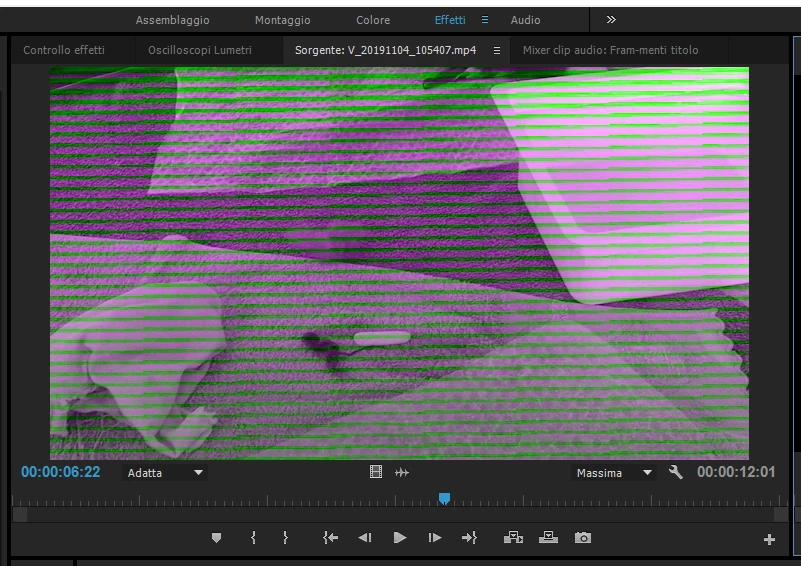
When i import a video onto Premiere Pro, the video is defective (photo).
On my computer the video is reproducing correctly.
Using App Mediainfo I recovered these informations about the video
- Video
ID : 1
Format : AVC
Format/Info : Advanced Video Codec
Format profile : Baseline@L4
Format settings : 1 Ref Frames
Format settings, CABAC : No
Format settings, Reference frames : 1 frame
Format settings, GOP : M=1, N=31
Codec ID : avc1
Codec ID/Info : Advanced Video Coding
Duration : 36 s 531 ms
Bit rate mode : Variable
Bit rate : 22.0 Mb/s
Width : 1 920 pixels
Height : 1 080 pixels
Display aspect ratio : 16:9
Frame rate mode : Variable
Frame rate : 29.970 (29970/1000) FPS
Minimum frame rate : 26.393 FPS
Maximum frame rate : 32.883 FPS
Original frame rate : 30.000 FPS
Color space : YUV
Chroma subsampling : 4:2:0
Bit depth : 8 bits
Scan type : Progressive
Bits/(Pixel*Frame) : 0.354
Stream size : 95.9 MiB (98%)
Title : VideoHandle
Language : English
Encoded date : UTC 2019-11-04 09:08:25
Tagged date : UTC 2019-11-04 09:08:25
mdhd_Duration : 36531
Codec configuration box : avcC
 AdChoices