
Dolby Codec/Codec Error
Having a problem in Premiere CC 2017. Trying to edit a video that keeps giving me an error about the files not matching up. The files are linked through other Adobe products, After Effects, which when I opened at one point it told me to download Dolby Codec. Problem is I keep getting this notification randomly which leads me to believe there's either a problem with the download or my computer just doesn't want to install it. I didn't have quicktime downloaded originally but I did install it after receiving this error and it didn't fix the problem.
List of attempted solutions:
1. Tried clearing the cache in Media Encoder CC (all cache files)
2. Tried installing codec's by themselves
3. Tried installing various versions of Quicktime
4. Tried looking up if there was any way to download Dolby codec by itself and I couldn't find anything.
5. I saw a possible solution was K-lite, I can't find that either, also I've recently installed a clean re installation of windows. One of the solutions was re-install the operating system, this would be the second time in the course of a few days I'd have to do this because of other errors involving memory.
6. Tried importing the files again to replace, they import with no sound and just a popping noise. Obviously it's some audio specific codec I'm missing but why Adobe Isn't installing it during a fresh installation I have no idea.
Other info:
I'm running windows 10, never had this issue before in the past with premiere or after effects but I can't seem to find any solution online that can fix this problem.
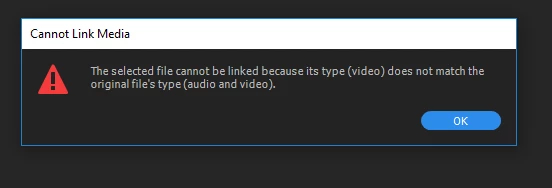
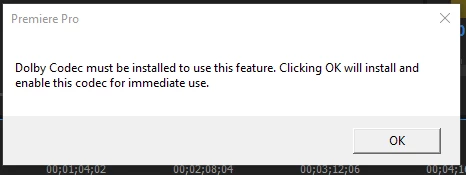
Basically I get this picture above every time I open Premiere or after effects if it has anything to do with audio.
Please help.
 AdChoices