

Duplicate Clips with XMP IDs
I have a project where I've imported footage with the "Write XMP ID on Import" option checked in my preferences, and I can see the XMP ID on the Media Management panel in the Metadata window, but when I run the Pluraleyes plug-in on those clips i end up getting duplicates when the operation finishes. I've been using it on other clips as they've been coming in, and sporadically come across this problem. Considering that pluraleyes is basically just importing an XML into premiere, and that the XMP ID is supposed to mitigate the duplicate problem, I'm just a little confused as to why it's happening.
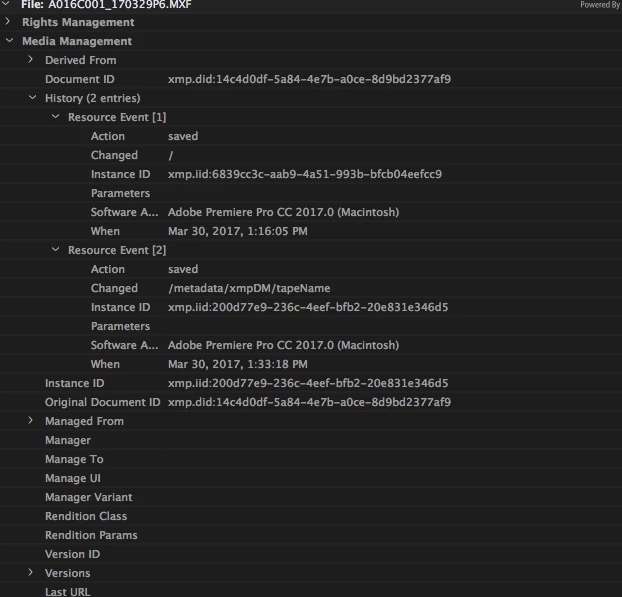
We're using footage from a GH4 and an FS7. We haven't transcoded any of the footage, and have linked to the raw footage (there is a backup that hasn't been touched by premiere). While the GH4 footage hasn't given me any problems, it's the FS7 MXF files that have been spotty in terms of "taking" the XMP ID. There would be entire shoots that perform the way they should, but then there's a sting of files that will create dupes upon completion of the Pluraleyes operation, so it's not a uniform problem. All of these files have XMP IDs written on them according to the Media Management panel (I have attached a screenshot of what i see on one of the offending clips).
I have experienced crashes of Premiere during proxy generation, so I don't know if that has anything to do with it. I've also been burning the logging information (Tape name, Descriptions, Scenes, etc.) into the metadata as well.
My larger concern in this problem is that this is for a feature documentary and the footage will be exchanging hands. I'm aware of the centralized nature of footage exchange with premiere due to the XMP IDs, so I'm trying to mitigate a future problem when sequences start to get handed around between AEs and Editors. As i see it right now, if doing a simple pluraleyes sync is tripping up the system, then exchanging stringouts and cuts will also yield the same result.
And for some additional context in terms of why I'm using Pluraleyes instead of the built-in syncing, Production isn't slating any interviews or shots, and are rolling sound for hours at a time. I am using the built-in syncing function of Premiere, but using pluraleyes as a check on the sync, since the built-in syncing sometimes overlaps certain takes that have nothing to do with each other. Just another pain in the ass to deal with. 😕😕
Specs of our set up are:
Machine:
Mac Pro (Late 2013)
3.7 GHz Quad-Core Intel Xeon E5
12 GB 1866 MHz DDR3
AMD FirePro D300 2048 MB
RAID:
15TB Micronet Raid Bank5 connected via USB 3.0
Running the latest Premiere
Screenshot of Media Management Panel:
 AdChoices