
denisp75936640
Participant
February 17, 2017
Answered

Enable Dual monitor workspace please !!!

  • February 17, 2017
  • 2 replies
  • 8007 views

It will be a very good feature to have a workspace for a Dual monitor in Premiere Pro.

You can see more features and manage by myself the size of individual windows.

For the moment if you activate the second monitor in playback settings, you just see the output of the timeline.

For comparison, Resolve has a workspace setting for single monitor and another for dual monitor.

Thanks !
    This topic has been closed for replies.
    Correct answer davescm

    Hi

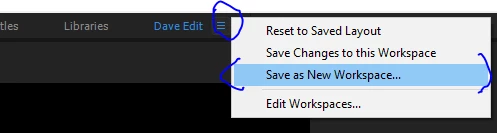
    Just start with an existing workspace. Drag the panels around the way you like them across your monitors ( I use three) then click on the symbol below and choose  "Save as New workspace" and give it a name.

    It will now appear in the bar at the top alongside the other workspaces.

    Dave

    2 replies

    kulpreet singh
    Inspiring
    February 17, 2017

    Hi Denisp,

    denisp75936640  wrote

    It will be a very good feature to have a workspace for a Dual monitor in Premiere Pro.

    You can do that in Premiere Pro, please check this document:

    Use and customize workspaces in Premiere Pro

    Un-dock any of the panels and drag it to the second monitor.

    Then you can add more panels to the second monitor according to your own preference.

    Thanks,

    Kulpreet Singh

    Participant
    February 22, 2017

    A dual monitor template would be helpful.  As a freelancer I walk into different working scenarios.  I may not always have my personal preferences with me.  Having a default dual monitor workspace saves a lot of billable(or not) time.  Time that I don't have to waste moving windows around.

    Legend
    February 22, 2017
    davescm
    Community Expert
    davescmCommunity ExpertCorrect answer
    Community Expert
    February 17, 2017

    Hi

    Just start with an existing workspace. Drag the panels around the way you like them across your monitors ( I use three) then click on the symbol below and choose  "Save as New workspace" and give it a name.

    It will now appear in the bar at the top alongside the other workspaces.

    Dave