
Participating Frequently
January 22, 2017
Question

Error Compiling Movie | Morph Cut

  • January 22, 2017
  • 9 replies
  • 7912 views

Hello All,

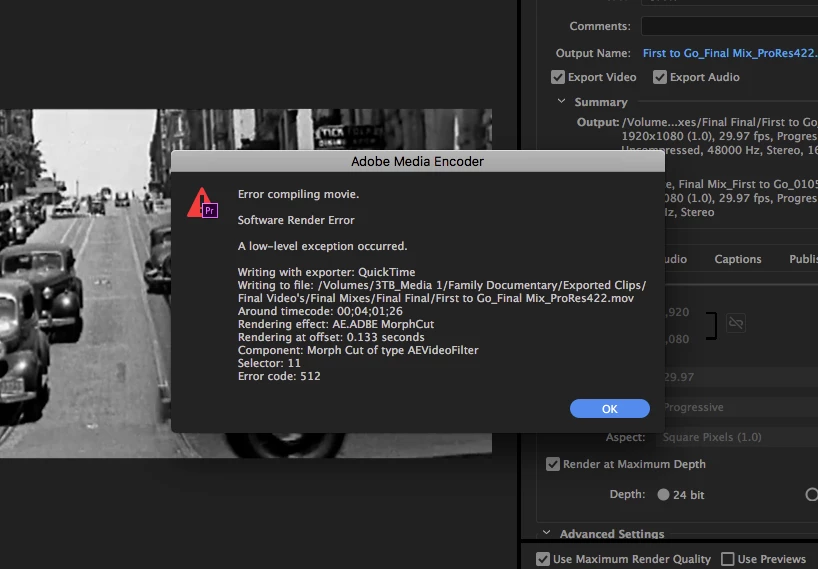
I was wondering if anybody has had this issue that I have been having for some months now. When I use the Morph Cut feature and export at "Maximum Render Quality" or "Render at Maximum Depth" my Premiere Pro system gives me a low-level error and then soon after crashes Premiere Pro.

Attached is a screenshot of this problem I keep having. I've tried clearing my cache's and cleaning things up. Even tried exporting through Media Encoder.

I'm currently running the latest version of Premiere Pro 2017.

Thank you!
This topic has been closed for replies.

9 replies

andrewftf
Participant
December 8, 2018

Hi -

I ran into this problem tonight and tried all of the solutions, none worked.

What I ended up doing was going through the clips with the morph cut transitions and deleting the transitions.  Then, I applied the morph cut again, let it analyze, then rendered.  It worked.  Hope that helps.

thirdeyepro
Participant
April 26, 2018

Morph Cuts have NEVER worked for me. Always have an issue exporting when I use them, no matter what I do. This has happened across multiple computers, multiple settings, etc... I have never been able to use a morph cut. Any time I try, I get an error exporting. Been like this since the feature was introduced. Still not working two years later. I have to second the comment: Get it together Adobe!

R Neil Haugen
Legend
April 26, 2018

I wish they could get all that stuff sorted. For some, like you, Morph just isn't working for whatever reason. Any time I go into Morph, it just works. Why? No clue.

Neil

Everyone's mileage always varies ...
Participating Frequently
March 23, 2018

Any NON-WORKAROUND answer to this from Adobe. It is still happening to me in 2018.

Get it together Adobe.

johng81978179
Participant
April 20, 2018

Agreed. Just got a brand new iMac and got that identical error message. Forced to unclick maximum render quality settings.

R Neil Haugen
Legend
April 20, 2018

For most projects, Max Bit Depth and Max Render Q are not useful ... and for some reason they can cause issues. So my default is off for both. If you've got a GPU installed, max bit depth is irrelevant. Supposedly turned 'off' internally. Max Render ​may​ occasionally help if you have much resizing and diagonal lines. Not much resizing with prominent diagonal line sections? You may not get anything visible. You might get junk added.

Neil

Everyone's mileage always varies ...
Participating Frequently
September 19, 2017

I don't have an answer for the problem either (just happened to me), but the workaround that did work for me was to put a copy of that portion of the clip (an adjustment layer might work too) on top of the morph cut, create an opacity mask in a part of the frame that wasn't moving, mark the clip in-to-out and Render In to Out. For some reason, it can render (or export) as a clip but it can't do it as an effect. Makes no sense to my non-engineer brain.

Kevin-Monahan
Community Manager
Community Manager
May 31, 2017

What ended up working for you matsunomm? Or are you still facing this issue? Please let us know.

Thanks,
Kevin

Kevin Monahan - Sr. Community and Engagement Strategist – Adobe Pro Video and Audio
matsunommAuthor
Participating Frequently
May 31, 2017

What worked for me was exporting that section that was causing an error without Maximum Render Quality and then re-importing that one clip on the layer above where that one section is causing the issue and it fixed it. It's a bit of a drag, but it isn't too bad of a workaround. Maybe an extra couple minutes (if that) since you're not exporting everything.

Kevin-Monahan
Community Manager
Community Manager
May 31, 2017

Man, that's painful matsunomm. Glad to hear you're out of the woods. Looks like you were trying to export a ProRes timeline. Was it HD? What kind of Mac do you have? What kind of GPU is in there?

Thanks,
Kevin

Kevin Monahan - Sr. Community and Engagement Strategist – Adobe Pro Video and Audio
clicoc54337742
Participant
April 13, 2017

Well, I unchecked MRQ and it didnt work ..unitl i DIDNT rename it...this was an odd occurrence.

Participant
February 16, 2017

Solved:

Here is wht I did

Before Exporting did a Sequence > Render Entire Work Area

Then Went to File> Export> Media

removed tick from use Maximum Render Quality

Then instead of Export gave Queue and rendered the entire video from Media Encoder

R Neil Haugen
Legend
February 16, 2017

As noted in my post above, "Max Render Quality" is ​only​ advised if you are exporting to a different frame-size than your sequence settings, and includes the comment that it drastically increases render time with no benefit if exporting to the same frame-size. Also ... it can cause glitches.

The way it's named, and the 'tool-tip' that shows above it when you hover, don't really give proper info to the user. That setting is ​rarely​ of any use, and normally is harmful to the workflow, at least for speed if not export fails.

Neil

Everyone's mileage always varies ...
Participant
February 2, 2017

I am having the very same issue using the same version of the program.  Creating a new project and new sequence did not help me. Anyone find a solution?

R Neil Haugen
Legend
February 3, 2017

If you don't use either "Render at maximum quality" or "Render at maximum depth" do the exports work?

The following information on using R-Maximum depth may be of interest:

You may benefit from this option in the following situations:

  • Your source media has a higher bit depth than the format you are outputting to
  • Your sequence contains heavy compositing or lots of layered effects (particularly 32-bit color effects)
  • Your sequence contains very high contrast or very low contrast images (for example subtle gradients)

Note, it says you may benefit from this, but elsewhere also notes that it typically causes longer renders without actually benefiting the export. What this does is take all rendering into 32-bit calculations. With higher-bit media, and with some lesser-bit media with certain effects, it might improve the results, a small amount.

As to "Maximum Render Quality" ...

"This is a high-quality resize operation that should be used when outputting to a different frame size from your sequence. It can reduce aliasing (jagged edges) when resizing images but is of no use when outputting to the same frame size. This operation significantly increases render times so only use it when resizing."

Again, not something that needs using on most sequence exports. Similar to selecting a two-pass render process, as Jim Simon notes for that choice, the only thing it normally does is give you more time for a coffee break. Or ... a long, long lunch.

Max depth & render quality are a couple options to test to see if they make a usable difference in your media. Quite likely, they may not. They will at the least increase export times.

So ... it might be worth leaving them un-checked and try an export, imported back into PrPro on completion. Then in the program monitor, put that up, at 100%, and in the Reference monitor, put up the original sequence. Note any changes you see ... or don't.

Neil

Everyone's mileage always varies ...
Participant
April 3, 2017

Thanks R Neil Haugen​,

Not only was this error a bit of a pain to find online. It was an issue finding a resolve.

Thank you original poster, and thanks Neil again.

I ran into this issue at less than 6% into my export when using the Morph feature. Please not I WAS using " Use Maximum Render Quality"

After reading this post I deselected this option and it is now exporting to H.264.

It worked without issue!


John T Smith
Community Expert
Community Expert
January 22, 2017

Error Compiling Movie... some past discussions and ideas

May be caused by . in name https://forums.adobe.com/thread/2166620

-1st, create a new project and import the project that has errors and see if that fixes the problem

-http://helpx.adobe.com/premiere-pro/kb/error-compiling-movie-rendering-or.html

-and a long discussion https://forums.adobe.com/thread/1240823

matsunommAuthor
Participating Frequently
January 22, 2017

Thank you for the tips John T. I know it's not caused by the name. I will try creating a new project just for that sequence and see if that works. Also, I'll try creating a new sequence or getting rid of the morphcut.