
Participant
April 27, 2017
Answered

Essentials Graphics missing in Tabs and Workspaces

  • April 27, 2017
  • 4 replies
  • 33409 views

Hello,
I've upgraded as well as restarted both the app and my laptop. I was looking forward to utilizing, but there seems to be a glitch with my download. I'm on a MacBookPro laptop running OS 10.11.6.

However, both Essential Graphics and Sound show up when I click "All Panels", but that's way too many tabs. What should I do here? See below

Instead of getting this (upgrade tabs)

I have this

And my Workspaces is missing Essentials graphics and sound
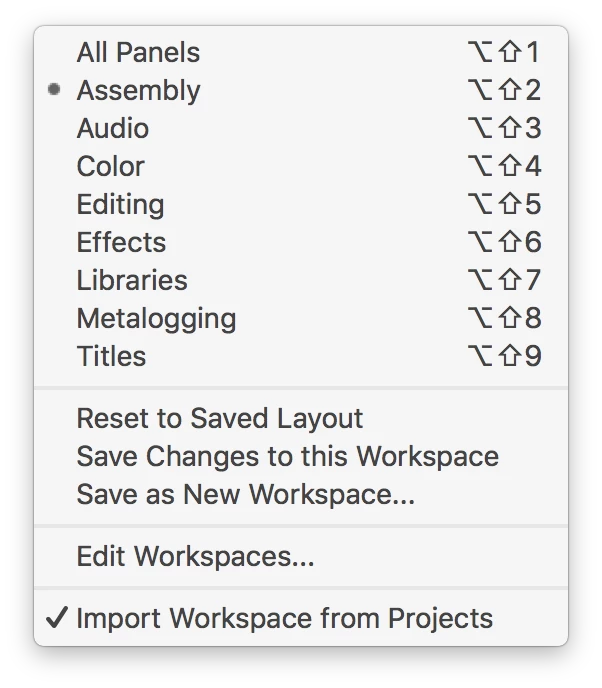
This topic has been closed for replies.
Correct answer stefan_gru

Additional info here: The “Graphics” tab is missing?

4 replies

Participant
February 3, 2020

Hi Sir

"Essential Graphics " option is missing in window bar, in my Adobe premier pro 2017.

How to fix that??


kwamena affuly89868885
Participant
June 26, 2018

I'm also have the same problem, after trying what you've said, The workspace is still same as before. Graphics or essential graphics is nowhere to be found

ThatgirlGrz
Participating Frequently
October 27, 2017

I'm having the same problem. I've never used Premiere before and i cannot find the graphics panel even after renaming the layouts folder and resetting the entire program by holding down shift+alt. What am i doing wrong?

stefan_gru
Inspiring
October 27, 2017

ThatgirlGrz: Please post a full screen shot of your entire program. Also, what version of Premiere Pro are you running?

ThatgirlGrz
Participating Frequently
October 30, 2017

Hey Stefan. I solved the mystery. I needed an update that fixed the issue.

stefan_gru
Inspiring
April 27, 2017

To restore the Workspace bar, close Premiere Pro. Then locate the profile folder available at Documents > Adobe > Premiere Pro >11.0 > [Profile name] > Layouts. Rename the Layouts folder to another name (like Layouts_BAK). Relaunch Premiere Pro.

cliffr24
Participant
October 25, 2017

well... I have the same issue and I’m running it on my windows 10. Already uninstal and re-install it but stil the essential graphics won’t appear in window menu.

stefan_gru
Inspiring
October 25, 2017

Cliff: What version of Premiere Pro are you running? And did you try the profile folder tip mentioned above?