
Known Participant
February 2, 2018
Answered

Exporting 4k clips montage : mpeg format versus MXF

  • February 2, 2018
  • 1 reply
  • 2797 views

So far, all my video clips montage, using 4K Sony FDR-X3000 camera, when choosing "Match Sequence Settings'"  where exporting the output montage in mpeg format.

But today, for no explained reason, I cant do it any more.  In choosing Match Sequence Settings, the format becomes P2 movie and the output file has MXF extension.

Why is that?

When I want to read the results, instead of having a single file like travelmovie.mpeg for example, now I have a sub-directory created and names CONTENTS in which several other sub-folders (CLIP, AUSIO, ICON, VIDEO etc.  And the video file 001W2.MXF file for example cay be played in my IMAC, but with no sound.

These new files are no longer workable for me.  How can I get back to the previous setting to have a single output file in *.mpeg format?
    This topic has been closed for replies.
    Correct answer Ann Bens

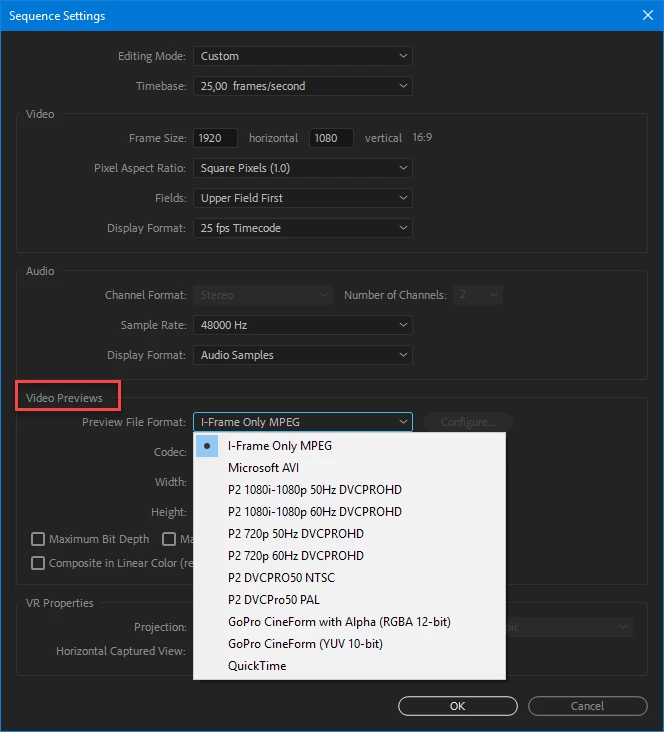
    this is the preview used:

    If its for Youtube use H.264 with a youtube preset (you can tweak the settings)

    For BD export to H.264 Bluray format.

    1 reply

    Ann Bens
    Community Expert
    Community Expert
    February 2, 2018

    Match sequence settings means you are using the preview codec for that sequence ; check your sequence settings for the preview codec.

    Pick an export format and select a preset is imo the best way to go.

    fdormoyAuthor
    Known Participant
    February 2, 2018

    I am not sure to understand what you mean.

    I am doing exaclty the same procedure as yesterday when constructing a project, using the same 4K clips.  But compared with yesterday when I had an mpeg format proposed when match sequence settings is on, today, in creating a new project, when I click "match sequence settings", I no longer have the proposed mpeg format for the output by MXF which I do not want.  Is it because Adobe updated PR Pro CC overnight with new features?

    Trying to do what you suggested, going into sequence settings, what parameter exactly should I check?

    It cant be in Editing Mode since the list does not show "preview codec", no where else I could see anything to change to follow your suggestion.

    However, when looking at some youtube tutorials, I was suggested to ignore Match Sequence Settings and choose H.264 in Format, and under Basic Video Settings, check "Match Source", which gives me a single file with mp4 format 3840x2160 (instead of mpeg like before).

    It works, but this puzzles me such change in the procedure I always followed in the past and that I can no longer follow.

    Now my question is: what difference in quality between mp4 and mpeg files?  Also can I put together mpeg files with mp4 files in burning a Blu-Ray disk with these movies I created?

    Ann Bens
    Community Expert
    Ann BensCommunity ExpertCorrect answer
    Community Expert
    February 2, 2018

    this is the preview used:

    If its for Youtube use H.264 with a youtube preset (you can tweak the settings)

    For BD export to H.264 Bluray format.