
Inspiring
July 3, 2018
Answered

Exporting video using PNG format

  • July 3, 2018
  • 4 replies
  • 15813 views

I need to export videos with transparency using the PNG format for use in other programs. I can't seem to do it.I'm sure I'm missing a simple export step but I cannot figure it out. Could someone please walk me through a typical export procedure with the proper steps to get to the png codec so we don't have to go back and forth with this discussion.

Thank you so much. I did this a year or so ago and for some reason I can't today. I will save a preset when I solve this.
This topic has been closed for replies.
Correct answer terrys30580497

So the PNG video codec is a newer codec but it has been around for a while, Apple dropped it from QuickTime.

I think it's part of there bid to shun Microsoft. Play Mega-Monopoly.

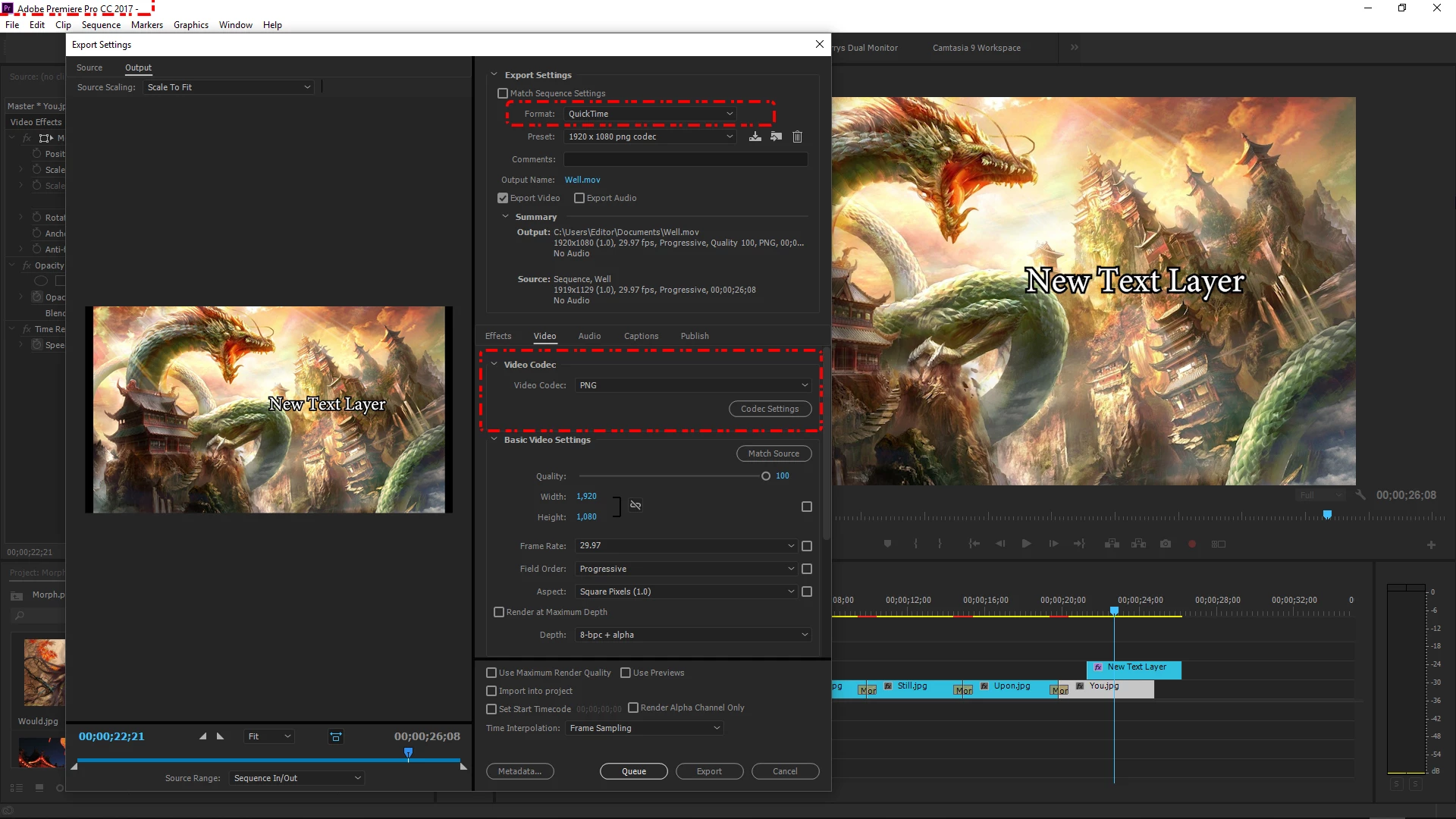
The solution is to use Premier Pro CC 2017 or an earlier version. I probably should have figured this our sooner. It's the version I was rendering PNG videos in the past. Take a peek, here it is in Export settings.

Thanks for trying {:> )

Camtasia 9 and Camtasia 2018 only support transparent videos using the PNG format. They say they will be adding more formats down the road.We'll see.


4 replies

Inspiring
July 8, 2018

It's stable and it works just fine.

The problem is the animation codec is being dropped on the Windows platform. This is Apples fault because they quit supporting QuickTime for Windows .

I've read Adobe is going to be dropping the animation codec for Windows soon. So this is a big deal.

We can still install the codecs. But this is having a ripple effect.

Mike Dziennik
Community Expert
Community Expert
July 6, 2018

Ah cool. I guess it's not a universally stable and agreed upon format, hence why Adobe have dropped it. I don't suppose you have tried the Animation codec (which also supports alpha) in Camtasia?

Mike Dziennik
Community Expert
Community Expert
July 4, 2018

I don't believe what you are trying to export is possible. PNG is a single image format.

From the PNG Wiki:

Although GIF allows for animation, it was decided that PNG should be a single-image format.[8] In 2001, the developers of PNG published the Multiple-image Network Graphics (MNG) format, with support for animation. MNG achieved moderate application support, but not enough among mainstream web browsers and no usage among web site designers or publishers.

terrys30580497AuthorCorrect answer
Inspiring
July 6, 2018

So the PNG video codec is a newer codec but it has been around for a while, Apple dropped it from QuickTime.

I think it's part of there bid to shun Microsoft. Play Mega-Monopoly.

The solution is to use Premier Pro CC 2017 or an earlier version. I probably should have figured this our sooner. It's the version I was rendering PNG videos in the past. Take a peek, here it is in Export settings.

Thanks for trying {:> )

Camtasia 9 and Camtasia 2018 only support transparent videos using the PNG format. They say they will be adding more formats down the road.We'll see.


Mike Dziennik
Community Expert
Community Expert
July 3, 2018

You need to export a PNG sequence - if you want a video file you need to use another format.

Choose "PNG Sequence with Alpha" from the format drop down in the Export window.

Inspiring
July 3, 2018

I appreciate your trying but I really need the PNG codec for video. I already know how to export png sequences. That doesn't help me here.