
Participant
July 22, 2020
Answered

External devices not showing on media browser when trying to import or ingest

  • July 22, 2020
  • 3 replies
  • 2147 views

Hi. 


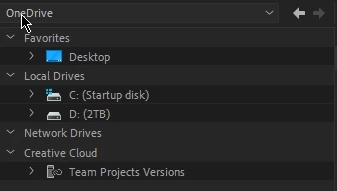
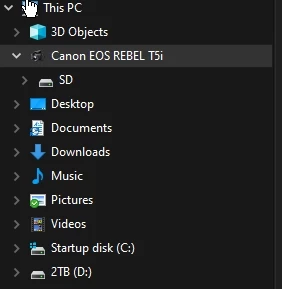
I'm trying to have good habits for importing my media. I see everywhere that you should stick to import your files only through the Media Browser window in order to avoid media corruption, and you should even avoid even CTRL + I for importing just to be safe. The problem is that when i connect my cameras in export mode, media browser from Premiere Pro and even Prelude does not show the camera folder.


Here you can see that the media browser does not detect the camera folder
 

But the file explorer perfectly shows the Canon EOS camera
 

This topic has been closed for replies.
Correct answer R Neil Haugen

Yes, as the teacher says ... ingest the camera media often in the original folder structure from the camera card to the folder structure that you use on your computer. In other words, copy the folders of media from the card to the computer.


Then use the Media Browser to ingest the media into Premiere.


Neil

3 replies

R Neil Haugen
Legend
July 22, 2020

Glad to hear you're using a decent course! And I highly recommend going through several of the LinkedInLearning (what used to be Lynda.com) courses as a good way to get grounded in Premiere ... and especially, do the tasks. Several times. Muscle memory of doing things gets you much farther along than anything else.


Neil

Everyone's mileage always varies ...
R Neil Haugen
R Neil HaugenCorrect answer
Legend
July 22, 2020

Yes, as the teacher says ... ingest the camera media often in the original folder structure from the camera card to the folder structure that you use on your computer. In other words, copy the folders of media from the card to the computer.


Then use the Media Browser to ingest the media into Premiere.


Neil

Everyone's mileage always varies ...
Participant
July 22, 2020

Thank you for your time! It's all clear now.

R Neil Haugen
Legend
July 22, 2020

Do NOT import from the camera connected to the computer. Premiere does not copy the media at import, it simply registers the location. So as soon as you disconnect a camera from the computer, there would be no media seen by Premiere.


Upload the camera media card to a local drive connected to your computer. Import the media from that computer drive into Premiere.


Neil

Everyone's mileage always varies ...
Participant
July 22, 2020

Hi Neil, thanks a lot. 


Understood, thank you. If I have a card reader, is it the same scenario? first I need to import the content to a local drive? 

I'm asking because in the Linkedin course I'm currently studing, the teacher recomends to ingest directly from the cards into the local drives.