
Participant
July 1, 2017
Answered

Frame By Frame Editing

  • July 1, 2017
  • 1 reply
  • 17320 views

Hey,

New to premier, and i can't find out how to do frame by frame editing. how does one change the timeline to be frame by frame?

i would like to know this so i can animate texts, like a stop motion, in a 30 frame per second video. it will take effort, but itll be worth it. but i cant find anywhere, how to change from seconds, or just have the frame by frame function.

is it a thing in premiere or should i look elsewhere?

-thanks
    This topic has been closed for replies.
    Correct answer stefan_gru

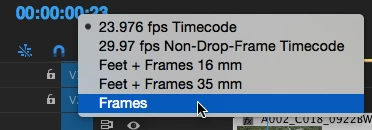
    Got it. Right-click the timecode display and choose Frames:

    Hope that works for you.

    1 reply

    stefan_gru
    Inspiring
    July 1, 2017

    RiuV: Any sequence in your timeline panel will be frame by frame: x frames per second, as a matter of fact. Press the left and right arrow keys to move the playhead ahead or back one frame at a time. The timecode indicator shows frames: hh:mm:ss:ff.

    Participant
    July 1, 2017

    thats what i believed, but it actually does it by seconds, if i use arrow keys or simply select it. not by the 30 frames per second

    stefan_gru
    stefan_gruCorrect answer
    Inspiring
    July 1, 2017

    Got it. Right-click the timecode display and choose Frames:

    Hope that works for you.