
Frame Rates and Audio only exports
Hello everyone!
I recently got Premiere Pro 2017 for my Youtube channel. Yesterday, I finished my first video, and decided to export it. Here is what I picked for the export settings:
-MPEG-4 with 3GPP 352 x 288 H.263
-Checked the "Export Video" and "Export Audio" boxes.
-The summary was as follows:
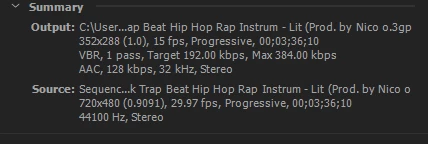
Aaaaand here's when I ran into my first problem. I decided to change the frame rate of my video to 60fps to conform with the frame rates of my other Youtube videos. (The preset was set to 15fps). However, for some reason I could only set the frame rate up to 30! When I tried to go any higher, I got this message:
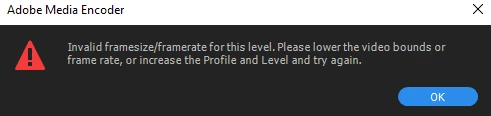
Coming from CyberDirector 14 (My old editing program), I had no idea what this meant. So I decided to just stick with 30 fps and be on my way. After all, my footage was captured in 60 fps in the first place, so it might not matter in the end.
When I finished exporting, I opened the file, and all I heard was the music! Not sure why, so I tried exporting one more time just to make sure nothing was wrong, and the same thing happened. What do I do?
(p.s. I'm not sure if this will help, but the Output name ended with .3gp)
 AdChoices