
Inspiring
January 8, 2018
Question

Gamma Shift on iMac but not Macbook

  • January 8, 2018
  • 7 replies
  • 5317 views

Hey everyone, spent a few hours tonight searching on this topic.

Can anyone provide some quick solutions/ideas on why the gamma shift occurs on exported videos on my iMac but not macbook? Both are 2015 models running newest version of CC.

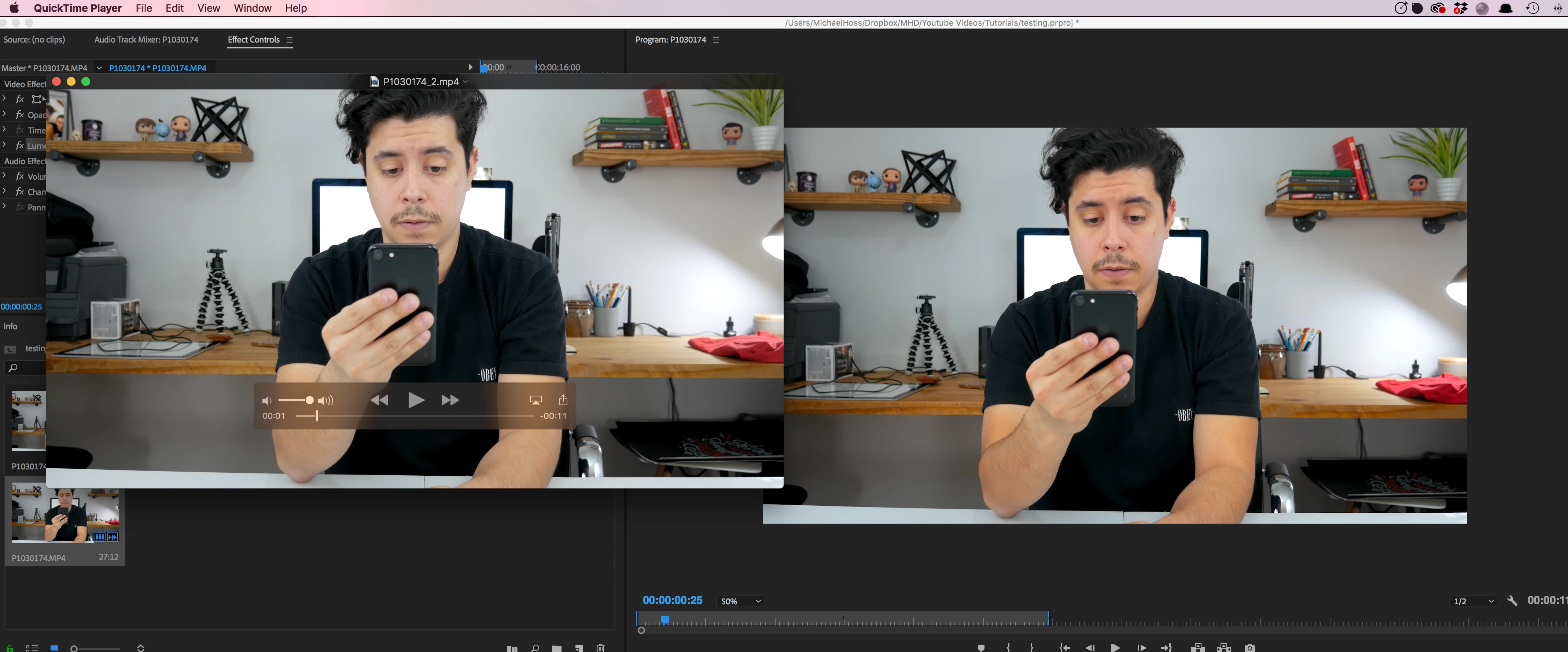
At first I thought it was the QT player that was the problem, but then I noticed the footage changes color when I import into premiere, it's more saturated and vivid. On my macbook it stays the same though (I shouldalso note that importing the footage into iMovie on iMac it stays the same). This makes me think it's an option that needs to be changed in premiere, especially since premiere on my laptop handles it just fine. It's so frustrating that exporting works perfect on one machine but not the other!

Again I know there's a number of threads out there but most seem to fizzle out - I'm continuously searching the internet. Would love some help here as editing video on a laptop isn't ideal.

Export Settings: 3840x2160 CBR 100mbps 30fps
This topic has been closed for replies.

7 replies

Participating Frequently
September 4, 2018

Wasn't sure if anyone else having this issue wanted to see if we have specs in common

Processor: 8 Core

Memory: 32GB

Graphics: Radeon Pro Vega 64

Storage: 1TB SSD

Also, my keyboard will randomly flip out either pasting over and over or deleting over and over. Probably not related but wanted to get all the info out there.

Waiting to hear back from Apple. 

chrisw44157881
Inspiring
September 4, 2018

I don't own a mac, but steve shaw from lightillusion just said try replacing the OS's icc with a rec. 709 color profile or null. even though it won't affect premiere, it might affect quicktime as supposedly its color profile aware. i think vlc runs separate of your OS's profile so you have to set it to openGL output.

The theory is, premiere is right and quicktime is wrong, not the other way around. If you import the footage directly into premiere in both systems, it should look the same unless the monitor is gamma 2.4 vs 2.2 in your monitor's actual power dim settings or something.

The problem with taking screenshots and comparing against premiere is that a quicktime or mac viewer software is color aware and premiere is not. The correct test would be export as png and import into the other system's premiere and verify against a RGB pixel sampler or scopes.

Inspiring
September 5, 2018

neither the iphone nor google chrome is the original color. so yes this affects even though the original color

Participating Frequently
September 4, 2018

Quick update. I just received my replacement iMacPro and it has the same issue as the first one. On hold with Apple now. Just like others are reporting, I take the project over to a MacBook Pro and it's perfect. I'll let you know more as soon as things change.  

Participant
August 30, 2018

Same exact problem. It's not color space or anything with workflow because the exact same set up on my macbook pro yields predictable results. Yes, things shift between viewers but this is a different beast.

R Neil Haugen
Legend
August 30, 2018

If you've read through this thread, it's been clear that there are several different color space/profiles on different Macs. Every different 'major' delineation seems to have a slightly different profile. The MacBook Pros are not using the same color profile as the full Mac desktops ... and in fact, separated by when they were made, there seem to be two or three different precise profiles between M-book Pro's alone. The desktop P3 monitors each have a slightly different profile depending on size of monitor. What a ... joy.

So there's no way to say "the same setup on this Mac product does, x, so this one should also."

None of the Mac products seem to be set for Rec709 broadcast standards ... except for a couple users found that magically the FCPx seemed to do so, when exported into a properly managed Rec709/sRGB system. Well, that's Apple being Apple, of course, always built to give the House apps an advantage within the OS that's not shared with "outside" vendors.

This would be easier to work with if the Adobe apps came with user-settable color management, rather than just being built to run on a system fully setup to run on sRGB/Rec709 "natively".

Neil

Everyone's mileage always varies ...
Participant
August 23, 2018

I am currently switching to FCPX for the small stuff & Resolve (better color/audio) for the big ones because of this very reason.

I lost days trying to figure out why the short film I just spent hours grading looked weird everywhere but on Firefox & VLC and figured out that ALL my work from last year looks dull pretty much on every browser/player because of this unacceptable issue for a so-called "professional" NLE...

I was already making do with the terrible render times, bugs & freezes of all sorts, monthly payments & poor playback perfs on OSX but this is too much.

I feel like I lost my time learning this software.

Not cool Adobe, not cool.

Participating Frequently
August 11, 2018

I am having the same issue with a brand new iMac Pro. Quicktime displays video correctly, Premiere and VLC have a contrast and saturation boost (aka gamma shift?) clipping my highlights and making everything unusable. Sometimes during playback Premiere will flicker back and forth between the correct exposure (as seen in quicktime) and the blown version. The problem is inconsistent across different clips in the same project, and changes every time I save and reopen.  I have been going round and round with Apple for weeks now with no solution. Adobe stopped responding. It's tough reading some people are on their third iMac with the problem persisting. The same premier project works perfectly on a 2012 MacBook Pro. I have to say I'm an Apple fan boy but this is really making be think about jumping ship.

Look at highlights in photos (quicktime on the left)

laitmai
Participant
February 27, 2018

Hi there,

I have exactly the same issue.

Got the new Imac Pro and work with third party software like Adobe and Black magic.

So far I've talked with Adobe and Black magic and with Apple for week's. I've even got them to send me another Imac, but still same issue.

I just can't believe there seems to be no solution to it. Incase you already figured something out or know something, pls let me know!

Best

R Neil Haugen
Legend
February 27, 2018

What's the profile (or color space) the OS and monitor are set to use on the Imac Pro? And of course, what gamma is it using? Those are the first things one needs to know. Sadly, Mac doesn't give a lot of user-settings on some of these sorts of things anymore, but ... we need to know how yours is set to start with.

Next, you do have to understand that QuickTime is never a valid choice for checking color/gamma. VLC/Potplayer are the two main generally available players that actually handle color of the files they display correctly within their own app.

And last ... Chrome & Safari don't properly handle or respect color management settings, so they can be all over the place. Firefox does.

I would prefer that PrPro gave some user settings for color managing as Resolve does. But until then, the main thing to know is PrPro works very tightly controlled in sRGB which is the basis of Rec709 professional video standards. And is built around a gamma of 2.4 or 2.2. Unless the codec standard for a particular flavor of a codec states otherwise, PrPro will both "see" and export files that are "full range" ... or "data levels", with the signal extending from 0-255 in 8-bit terms. Some apps expect to 'see' or play 16-235. And may play back files in the limited space, at which point, PrPro exports will look low-contrast, mushy, and low-saturation.

So when you have a file that in the PrPro program monitor looks good, and is full-range with saturation ... and looks low-contrast or low saturation outside of PrPro, there's an issue with the profile or gamma (or both) of the monitor or of the player. Or both.

We had a thread about this a couple years back, with someone insisting that as YouTube and QuickTime showed his exports flat & low saturation, it was a PrPro problem. He was rather shocked when he finally took a short export to a TV station, and got someone to put it up on their expensive, highly calibrated system ... and it looked just like it did in PrPro.

A PrPro export corrected on a system with appropriate color settings, viewed on a system with appropriate settings, will be within vary close bounds.

Now ... here's a question answer with the head of color for PrPro (slightly modified/condensed for clarity). Maybe some of it will be of use to you.

Neil

-----------------

Question: What space/profile should the "confidence" or program monitor be set to?

Best is to use a display setting and viewing environment that matches your main audience group’s viewing habits.

The Premiere content coming out the display port IS full-range (0-255) Rec.709. So ...

  • For TV viewers in a dim environment, Rec.709 is the best fit for viewing Rec. 709.
  • For computer viewers in an office environment, sRGB is the best fit for viewing Rec. 709.

sRGB was designed for good viewing of (unconverted) 709 content in an office environment.

The sRGB concept expects that the consumer end video player is not color converting from Rec. 709 to sRGB.

Such a conversion is likely to clip shadow details found in Rec. 709 video.

Question: Should the monitor controls or GPU controls be set to data levels (0-255) or video levels (16-235)?

Note that this question is actually unrelated to the first one.

Set the monitor for full range (0-255) as the content is full range.

Your Digital Color Meter and your Premiere eye dropper should read the same number values on Color Bars. Such as 102 for the grays.

Question: When working with a b-cast/tv monitor say via Decklink ... what are the proper protocols?

There are several ways to connect a second monitor, depending on type:

    1) Connected to the main display card or port.

    Part of the desktop.

    Can have desktop icons, OS menu bar and Dock.

    Can be mirrored in the OS Display control panel.

    Accessible to all apps.

    The rules for the first display applies to this display.

   2) Connected using Adobe’s Transmit and a 3rd party card and driver.

    Is not part of the desktop, cannot be mirrored in the OS, not accessible to most apps.

    Accessible to Ae and Pr only.

    The 3rd party driver receives the content in memory as full range, overranged, Rec. 709, and converts to the display format.

    The display can be a reference monitor, a TV set, HDR-capable etc.

    The display setup must be one supported by the 3rd party driver.

    This display interface is entirely controlled by the 3rd party card and driver.

    Some drivers seem to read the EDID data of the display.

    Some drivers seem to have a config panel.

    Providers include AJA and BMD.

    See 3rd party for instructions.

Question: How do we check what we're seeing in PrPro?

Here is a simple visual test to verify that you're not completely off. It works for all connected SDR displays regardless of how they're connected.

The most critical point in SDR display setup is the black clip level.

Use PLUGE (picture line-up generation equipment) on the color bars in Premiere for sanity checking. (Or similar test patterns.)

  • If you can't see the 2% or 4% steps, then you're clipping shadow details. If you grade with this setup, the final video will have milky blacks (@4%) on the perfect TV.

Another critical part of display setup is display gamma.

Target a gamma of 2.4 for a dim surround (living room, screening room), and 2.2 for an average surround (office, coffee shop, sRGB)

If grading with too high a gamma, the final video will look washed out on the perfect TV or in the office.

Gamma can be verified visually using a gamma checker test pattern.

White clip level is not as critical. You can be off by several percent without noting the flat whites.

When I say the perfect TV, I mean a reference SDR viewing device in a reference viewing environment displaying video according to the standards.

It's more complicated for cinema and HDR display setups.

The above test patterns must be viewed as ungraded footage in Premiere, as you want to verify the display output from Premiere, not from other apps. Color managed apps can fail this test.

Worth mentioning that your main content should not go outside the 0.0 - 1.0 range in the Premiere scope. Use the video limiter for cleaning up the occasional outlier.

Everyone's mileage always varies ...
Legend
January 8, 2018

I think Jamie LeJeune has it right in the following thread from the Blackmagic forums.  He's talking about Resolve, but the concept applies to all NLEs.

The upshot is how you view the material matters.  You can't use your computer screen.

Blackmagic Forum • View topic - Rec 709 & sRGB

mhosseyAuthor
Inspiring
January 9, 2018

I read through the thread, thanks for taking the time and posting.

I decided to color grade a video on my macbook, upload to youtube and check how it looks on my macbook, iphone and iMac and the results looked the same - just how it looks when I create in premiere. They even look the same in Chrome and Safari (slight differences but not enough to complain), and even quicktime.

I understand that I can't control how it looks when people view the video on different browsers/computers/video players, and I understand that editing for "true" color should not be done on an standard computer screen. Not disputing those aren't true.

I think that test I did proves that the thread above doesn't address the issue I have. Everything looks how you'd expect when working on one machine but try it on my iMac and the issue starts. Remember that the footage fresh from the camera looks the same when viewing it in finder on my macbook and iMac. It's only when I bring it into premiere on my iMac that the color gets automatically adjusted and saturated.

The search continues

R Neil Haugen
Legend
January 9, 2018

What are the system settings for color spaces and profile between the monitors? PrPro is dead stock Rec709, which calls for sRGB and gamma if 2.2 or 2.4 depending on use for web or theatre.

Some Mac monitors default to aRGB or P3 or something.

Neil

Everyone's mileage always varies ...