Participant
June 2, 2018
Answered

GTX 1080 ti, GPU acceleration on. SLOW render

  • June 2, 2018
  • 3 replies
  • 5088 views

Hi, I have used Adobe premiere for about 13 years and I have never needed to contact Adobe before but I really can't find a solution this time.

I find rendering and exporting HD increasingly slow with premiere pro cc. I thought it was down to filming AVCHD 50p, using 25fps sequences  and exporting at H264 25p. I understand a little colour enhancements here and there and a bit of denoiser, will take longer but really should it take 10 hours to export 90 minute HD video?

My PC is not that bad, I know it's old but its a HP z800, Windows 7 64bit, 96Gb ram 2x Xeon X5690 3.47GHz CPU's (6core) and Nvidia quadro 6000. I thought the only way to improve is to buy a better graphics card.

So I have just installed a GTX 1080 ti which has 3400 more cuda cores than my old GPU. I have installed the latest drivers and have checked the renderer is set to Mercury playback engine GPU Acceleration (cuda). It is still taking between 8-9 hours to export the 90 min video. something must be very wrong but i can't find the answer. looking at the CPU, Memory and GPU usage, there isn't much going on. The footage is on an internal raided pair of drives and output to an internal SSD

I really thought this graphics card would be the answer to my problems but it hasn't. I have searched and looked at all the settings. If i can't find the answer soon, I will have to return the graphics card before it's too late, i can't afford to waste £800 .
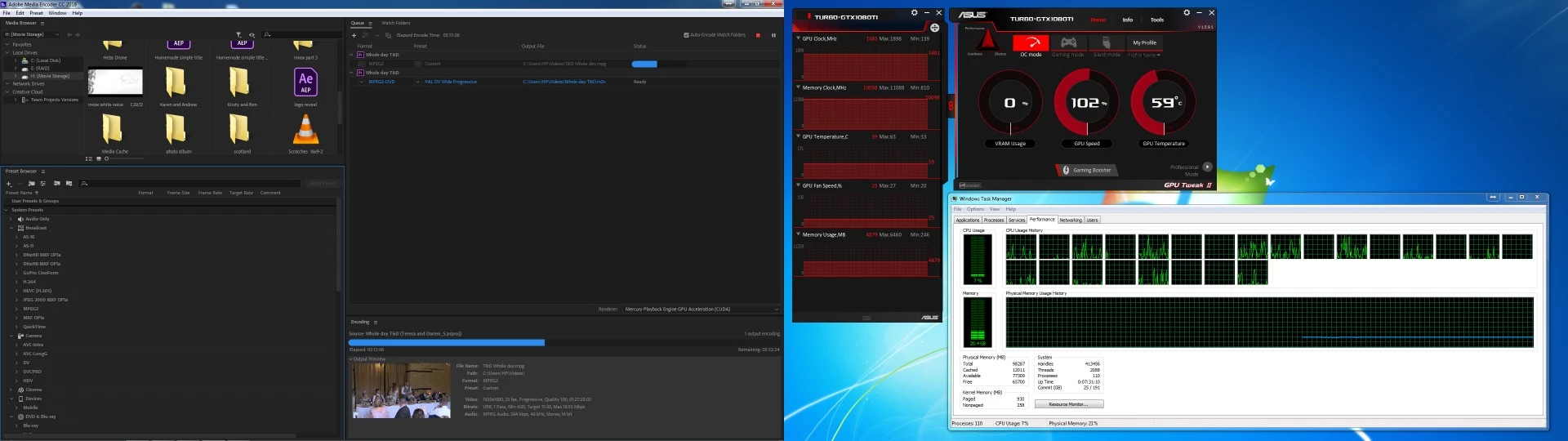
Can anyone help please?

    This topic has been closed for replies.
    Correct answer RjL190365

    Dave,

    In addition to what John and Neil stated, be aware that driver support for your old Fermi Quadro 6000 has now ended. Version 375.xx of the Quadro driver was the last version to support Fermi Quadros, and there will be no more new driver releases ever for that series of GPUs. Newer Quadro drivers now require a Kepler or later Quadro (the K-, M- or P- series) GPUs just to even work at all. And forthcoming new releases of Adobe Premiere Pro will eventually no longer support your old Quadro 6000 at all for GPU acceleration, thereby permanently locking the Premiere renderer to the software-only mode since the new versions of Premiere will then require driver version 396.xx or higher just to even be supported for GPU acceleration.

    Also, it is very likely that you simply bought too much GPU for your ancient relic of a CPU. A 3.47 GHz first-generation Westmere 6-core CPU just isn't any more powerful (performance-wise) than even a Haswell-generation (or fourth-generation) quad-core i7 CPU, let alone the new 6-core Coffee Lake (eighth-generation) versions of the mainstream Intel CPUs. And those fourth-generation quad-core Intel CPUs do quite nicely with only a GTX 1060 or 1070. So if a GTX 1080 Ti is overkill for those quad-core 2013-vintage i7s, it is way overkill for your 2010-vintage X5690. And you have two X5690 CPUs, which put together is actually weaker in overall performance than even a single-CPU i7-8700 Coffee Lake PC, let alone current HEDT PCs.

    Randall

    3 replies

    RjL190365Correct answer
    Legend
    June 3, 2018

    Dave,

    In addition to what John and Neil stated, be aware that driver support for your old Fermi Quadro 6000 has now ended. Version 375.xx of the Quadro driver was the last version to support Fermi Quadros, and there will be no more new driver releases ever for that series of GPUs. Newer Quadro drivers now require a Kepler or later Quadro (the K-, M- or P- series) GPUs just to even work at all. And forthcoming new releases of Adobe Premiere Pro will eventually no longer support your old Quadro 6000 at all for GPU acceleration, thereby permanently locking the Premiere renderer to the software-only mode since the new versions of Premiere will then require driver version 396.xx or higher just to even be supported for GPU acceleration.

    Also, it is very likely that you simply bought too much GPU for your ancient relic of a CPU. A 3.47 GHz first-generation Westmere 6-core CPU just isn't any more powerful (performance-wise) than even a Haswell-generation (or fourth-generation) quad-core i7 CPU, let alone the new 6-core Coffee Lake (eighth-generation) versions of the mainstream Intel CPUs. And those fourth-generation quad-core Intel CPUs do quite nicely with only a GTX 1060 or 1070. So if a GTX 1080 Ti is overkill for those quad-core 2013-vintage i7s, it is way overkill for your 2010-vintage X5690. And you have two X5690 CPUs, which put together is actually weaker in overall performance than even a single-CPU i7-8700 Coffee Lake PC, let alone current HEDT PCs.

    Randall

    daveappsAuthor
    Participant
    June 3, 2018

    Thank you for your reply, It makes a lot of sense.

    R Neil Haugen
    Legend
    June 3, 2018

    Go to Bill Gehrke's site, download the PPBM8 test stuff, install the loggers, and open the project and export it as instructed. Send the data back. You'll get an accurate detailed report of how every part of your rig is working with PrPro now. No speculation.

    Neil

    Tweaker's Page ... http://ppbm8.com/index.html

    Everyone's mileage always varies ...
    John T Smith
    Community Expert
    Community Expert
    June 2, 2018