
Participating Frequently
August 25, 2021
Answered

Help with an error I've never seen before: "No Duration To Export"

  • August 25, 2021
  • 5 replies
  • 14668 views

I have a ~1 minute sequence with a few captions, sound clips, music and a single adjustment layer with some very light Lumetri effects. When I try to export it, I get an "Error Compiling Movie" error, and the details say "No Duration to Export".  WHen I look at my timeline, there truly is no duration showing, although the last thing I did before trying to export it was trimming some of the clips to get the project time down under 1 minute for IG. All the assets for the project are in the project file I created on my network drive, as is the project itself.  I tried changing the location of the project, but I get the same error.


I pre- rendered the entire project before trying to export. I also tried exporting as Prores 422, and also changed the renderer to "software only", which usually does the trick of I have any export errors, but not this time.


I'm doing this on a Dell XPS 15 laptop, accessing a hard drive on my network. I've done lots of vids this way, so I can't figure out what's causing the error.


Any suggestions would be appreciated!
Correct answer Lance28154261wv5x

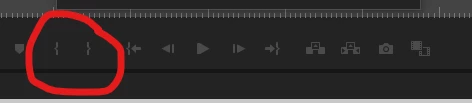
I had the same error today.... I think I accidently changed the Mark IN and Mark OUT times. 


Try experimenting with the two buttons on the control line that look like this.  You want to make sure that there is a highlighted grey area on the time line that matches what you want to export.  There are a lot of YouTube instructions too.

I just spotted that I'm 16 months late with my advise..... I'm a bit slow... sorry 🙂


5 replies

Lance28154261wv5xCorrect answer
Participant
January 29, 2023

I had the same error today.... I think I accidently changed the Mark IN and Mark OUT times. 


Try experimenting with the two buttons on the control line that look like this.  You want to make sure that there is a highlighted grey area on the time line that matches what you want to export.  There are a lot of YouTube instructions too.

I just spotted that I'm 16 months late with my advise..... I'm a bit slow... sorry 🙂


Participant
May 2, 2024

Thank you so much, this was my issue!!!

Participant
December 8, 2022

For me, the fix was: 

On the export screen, under the preview, there is a dropdown that says "Range".  Mine was set to "Custom".  I switched it to "Entire Source" and it now exports fine.  Hope that helps!


Participant
January 31, 2024

Had the same error today and this solved it for me, thanks!

Participant
November 7, 2022

In Premiere 2023, exporting audio has gone from 30-45 seconds in the previous version to over 7 minutes. I frustratedly canceled the export and started getting this "No Duration To Export" error when I attempted my export again.


Nothing worked to fix it. I tried Media Encoder 2023, and the export failed. I tried exporting the sequence in different formats. All failed in both Premiere Pro and Media Encoder 2023.


I tried completely different projects, and the issue didn't occur, so I created a new sequence from a video clip and copied the contents of the problem sequence to the newly created sequence.


The audio was exported in 30-45 seconds, as usual.

Participant
April 12, 2023

I found out same error as Jefferson mentioned right now.

Based on your suggestions, I crerated new sequence and copied all the timeline sources on it.


Mission complited! Thank you soso much for your suggestion!!


Participant
April 24, 2024

This helped me as well. coping everything to a new sequence.

Peru Bob
Community Expert
Community Expert
August 25, 2021

Have you tried:

  Another thing you can try is to copy all the project files into the local system and then try exporting them. You can easily collect all the files from the network drive into the local drive using the Project manager in the premiere pro.

as suggested by Vishu_Aggarwal

Vishu_Aggarwal
Participating Frequently
August 25, 2021

 I would suggest exporting the video in small chunks by marking in & out in the timeline and export only the in & out range. Another thing you can try is to copy all the project files into the local system and then try exporting them. You can easily collect all the files from the network drive into the local drive using the Project manager in the premiere pro.


Vishu AggarwalAdobe Certified Instructor, Professional and Expert
Participating Frequently
August 25, 2021

I don't mean to be dense, but what does exporting in chunks accomplish if it's successful? Then I'd have several video files when what I want is a single 1-minute video.

Participant
August 17, 2022

"marking in & out in the timeline"  Somehow you accidentely removed the (most likely) in-mark from your timeline. I did and received the same error. Go to the beginning of your timeline and press I for the In-point, and done.