
melissaa96808144
Participating Frequently
May 7, 2017
Answered

High End PC Laggy When Effects Are Added

  • May 7, 2017
  • 2 replies
  • 4758 views

When I add basic effects like "reverse speed" or use rate stretch to speed up a clip, I get a pretty bad laggy, stuttering video when viewed in the program window.  I've also gotten this lag on occasion from adding simple fade transitions.  I'm on Premiere Pro CC 2017 11.1.0 (222)build

My PC:

Intel i7 6800k 6 core 3.40GHZ

(4)Patriot 8GB DDR4-3000 (32GB)

NVIDIA EVGA Superclocked ACX 3.0 GTX 1080 8GB (updated as of the time of this post to most current driver)

ASUS x99-A II motherboard

512GB Samsung 960 Pro PCIE NVME M.2 SSD (OS and Applications only)

500GB Samsung 850 EVO SSD (media and cache)

(2)3TB HDD 7200RPM RAID 0 (project auto save)

My Source:

DJI Mavic Pro- MP4 3840x2160 29.97FPS

What can I try to fix this issue?  I would think that I shouldn't have this very laggy experience without having to resort to rendering to simply apply these basic effects.  I am new to premiere and video editing.  Any help would be appreciated.
    This topic has been closed for replies.
    Correct answer Meg The Dog

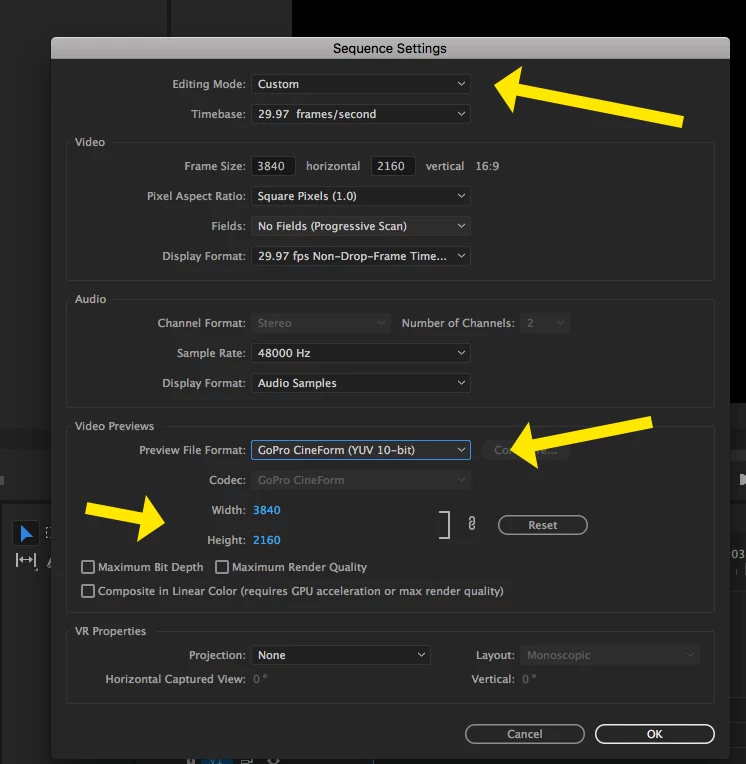
    thank you for your assistance.  The frame size only goes up to 1920x1080.  The video is 3840x2160 but the video preview won't go up that high.  That was my thought too as to why it looks blurry.  The thing is, prior to rendering the preview the video preview is clear with the 1080 setting (which may be the max for previews?).  It's only after I select "render in to out" that the video gets blurry.


    Make these changes:

    Does that help?

    MtD

    2 replies

    Inspiring
    May 7, 2017

    Transcode the highly compressed DJI footage to something more edit friendly like Cineform or ProRes, and edit with that material.

    You can do a short test and see if the improvement in editing fluidity is worth the increased file sizes and time spent transcoding to you.

    You could also look a working with a Proxy workflow:

    Basic Premiere Pro editing workflow

    Adobe Premiere Pro Help | Ingest and Proxy Workflow in Premiere Pro CC 2015.3

    MtD

    melissaa96808144
    Participating Frequently
    May 7, 2017

    Thank you for your response. If I understand correctly, it is not something at fault with my setup or system but rather even with my higher end system it is a function of how compressed the DJI 4K material is?  I guess my options then would be to deal with it being choppy when effects are applied, transcode as you suggested, or render the necessary sequences as I go along. 

    If I could ask one other question,  When I "render In to Out" affer applying the effects to the laggy sequence, the video preview is smooth but blurry.  Under sequence settings, my video preview options are greyed out and I'm locked at 1080p.  Although, that's what my video preview settings are normally set at.  Is there anything I can do to keep the video preview as sharp as it was prior to rendering the sequence?

    Inspiring
    May 7, 2017

    Can you post a screen shot of your sequence settings?

    Do you have the program monitor set to display Full resolution?

    MtD

    melissaa96808144
    Participating Frequently
    May 7, 2017

    I should add that normally, I can breeze through my 4k footage.  Scrubbing is smooth, lag free with no dropped frames at all.  Also, changing to 1/2, 1/4 or 1/8 does not alleviate the problem.