
lindae73085034
Participating Frequently
June 19, 2018
Question

Horizontal lines across whole screen while using Premiere

  • June 19, 2018
  • 1 reply
  • 4215 views

Hi!

I'm having an issue with my brand new MacBook Pro. I sometimes get these horizontal lines all over the computer, it looks like it's been smashed on the ground. See attached. I've spoken to Apple a million times and even brought it in and they find no faults. The thing is, it's only happened when I use Premiere Pro.

Could it really be a software issue???

I have the latest operating software 10.13.5 and have tried uninstalling and reinstalling Premiere.

Please help!
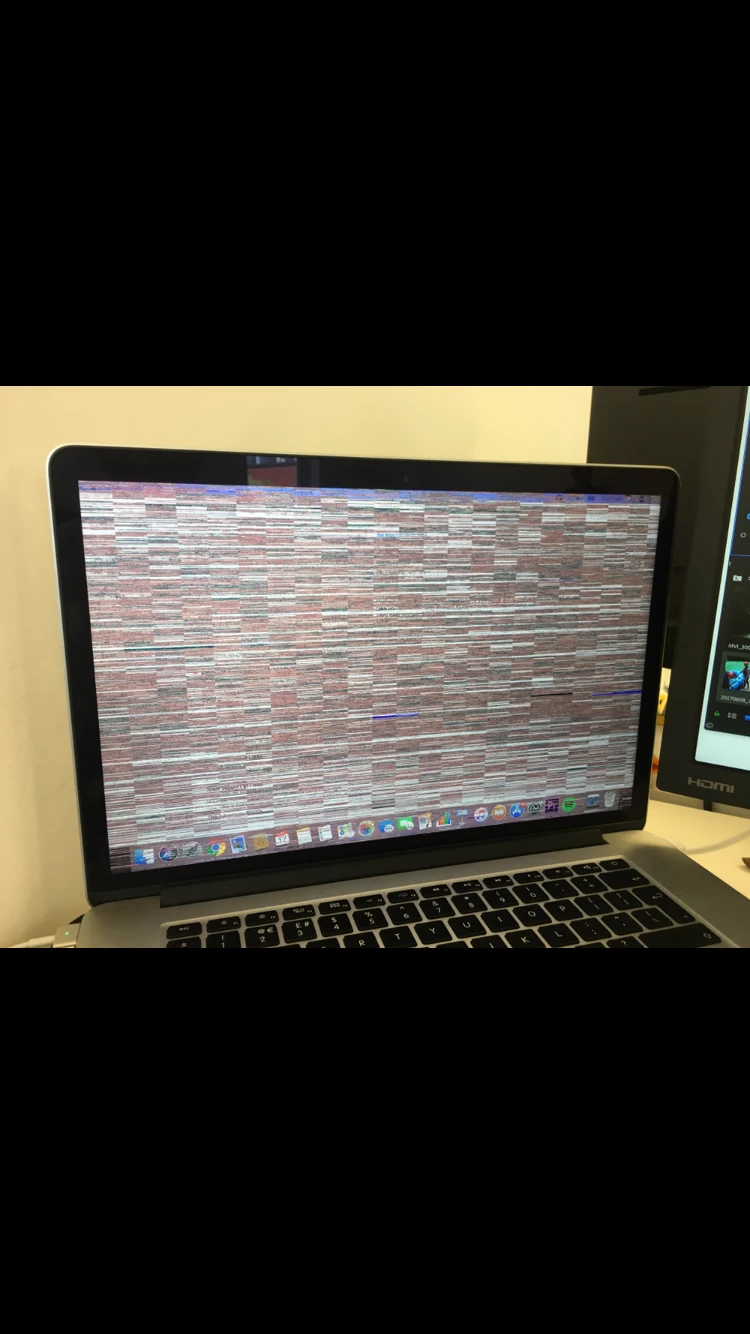
This topic has been closed for replies.

1 reply

Vinay Dwivedi
Adobe Employee
Adobe Employee
June 19, 2018

Hi Linda,

Try to Enable root user and check if the problem occurs in that too.

How to enable the root user on your Mac or change your root password - Apple Support

Also, check the below thread from apple and try to apply the solution.

Horizontal grey lines across entire displ… - Apple Community

//Vinay

lindae73085034
Participating Frequently
June 19, 2018

Hi,

Thanks for your response!

Not sure about doing the Root user, as it can happen as rarely as once a week.

And the second thread unfortunately does not help. Apple has said they've tried everything (over chat and in person, they took the whole computer apart)

and they are now insisting it's an Adobe software issue.

Can it be??

lindae73085034
Participating Frequently
June 21, 2018

Neither, it's often when I switch workspaces actually (in Premiere)


Actually sort of related to this, my Premiere Pro shuts down "because of a serious error" at least once a day. Could it be related?

It's never happened on my older Macbook Pro. So strange!!