Participating Frequently
June 13, 2015
Answered

how can I loop timeline playback?

  • June 13, 2015
  • 4 replies
  • 97761 views

I am editing an audio file. Need to play around with equalizer settings and I want to set an IN & OUT point (which I have already done on the timeline), but now how do I get the timeline to loop between my IN/OUT points so that I can play with my EQ settings?
Correct answer Richard M Knight

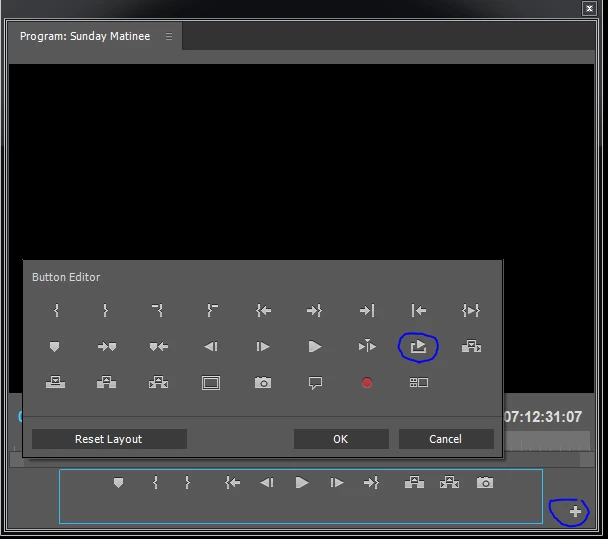
If you open up the 'add button' editor for the program monitor you will find a 'loop' button

4 replies

Participating Frequently
June 13, 2015

Thank you for your help, guys. I don't have a 'plus' symbol on my version of the Program Monitor, but was able to see the wrench icon. Under the menu of the wrench icon, I can see I had to select 'Loop'. Once I did that, I was able to loop between my IN/OUT points using CTL+L (loop shortcut). Exactly what I needed :-)

Ann Bens
Community Expert
Community Expert
June 13, 2015

If you check Show Transport Controls you will see your buttons (and the + sign) again.

Participating Frequently
June 13, 2015

Hit the + sign on the right and the box will open, now drag the buttons into the transport control area.

When buttons are added hit OK.

Next hit the Loop button to make it active (blue).


Cool beans! I see my problem was I was CLICKING, when adding buttons to my panel is done by DRAGGING. Thanks a ton, Ann! I'm playing with my audio file now and loving the ability to loop between IN/OUT points. You're the best.

R Neil Haugen
Legend
June 13, 2015

You control that in the Program Monitor ... you can say add the "Loop" icon to the icon controls in your Program Monitor Panel by 1) clicking the + in the lower right corner then 2) dragging the Loop icon to a spot on your Program Monitor controls section and click on it during playback, then going to the timeline or audio controls and working away.

Or ... while the Program monitor is highlighted with an in/out selected, it's Ctrl/Cmd-L to have it play a loop of the in/out selection. A simple keyboard short.

Neil

Everyone's mileage always varies ...
Legend
June 13, 2015

Click the + sign in the lower right of the Program Monitor.  You'll call up some extra icons you can add to your panel under the monitor.  One of them is the Loop switch.

Richard M KnightCommunity ExpertCorrect answer
Community Expert
June 13, 2015

If you open up the 'add button' editor for the program monitor you will find a 'loop' button