
chrissydetroit
Known Participant
February 22, 2018
Answered

How do I combine video clips into one?

  • February 22, 2018
  • 1 reply
  • 7883 views

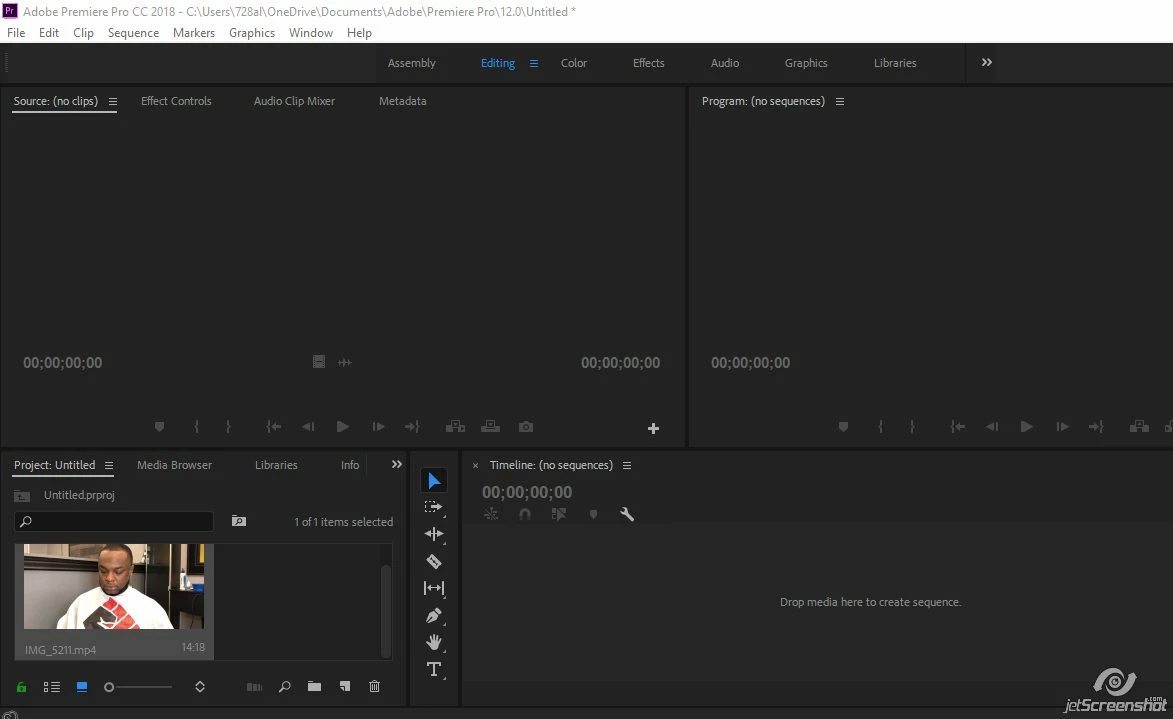
I'm new to Adobe Premiere Pro and I have 2 video clips. One is 3 minutes and another is 2 minutes. I made the mistake of stopping a video on my iPhone instead of just recording for the whole 5 minutes nonstop. Also, what's the best way to import the videos? When I import the video goes to the bottom left. I'm unable to edit the video down there.
    This topic has been closed for replies.
    Correct answer anissa_thompson

    I'm answering this in reverse order, but:

    The project bin in the lower left portion of your screen houses all imported content. It's not where you're actually doing the editing...

    Once you've imported the clips into Premiere Pro, you can simply drag and drop them on to the timeline (panel in the lower right portion of your screen) in the order you like.

    Take a little bit of time to get familiar with the interface - there's so much cool stuff to play with, but it'll be a little daunting until you see how everything is organized:

    Adobe Premiere Pro Help | Premiere Pro Get Started

    1 reply

    anissa_thompson
    Community Expert
    anissa_thompsonCommunity ExpertCorrect answer
    Community Expert
    February 22, 2018

    I'm answering this in reverse order, but:

    The project bin in the lower left portion of your screen houses all imported content. It's not where you're actually doing the editing...

    Once you've imported the clips into Premiere Pro, you can simply drag and drop them on to the timeline (panel in the lower right portion of your screen) in the order you like.

    Take a little bit of time to get familiar with the interface - there's so much cool stuff to play with, but it'll be a little daunting until you see how everything is organized:

    Adobe Premiere Pro Help | Premiere Pro Get Started

    Hope this helps! Make sure to press "✔ Correct Answer" on this post if this answers your question. Happy Creating!Anissa • @anissat
    chrissydetroit
    Known Participant
    February 22, 2018

    Thanks so much.