Kizzume
Inspiring
March 18, 2017
Answered

How do I post a thread in the Premiere Pro forum/community?

  • March 18, 2017
  • 2 replies
  • 1532 views

I can't find an option to ask a question, and there certainly isn't an option like "post a new message" like a regular forum would have, all I can do is search other people's questions, it seems.  I could post in one of the subforums to the Premiere Pro forum/community that the question doesn't relate to, and I suppose I could wait for a moderator to move it, but that seems silly.

Am I missing something?  Is this a bug?  Thanks.

[Moved from the Lounge to the Forum comments forum - moderator]
    This topic has been closed for replies.
    Correct answer Michael J. Hoffman

    Hi Kizzume,

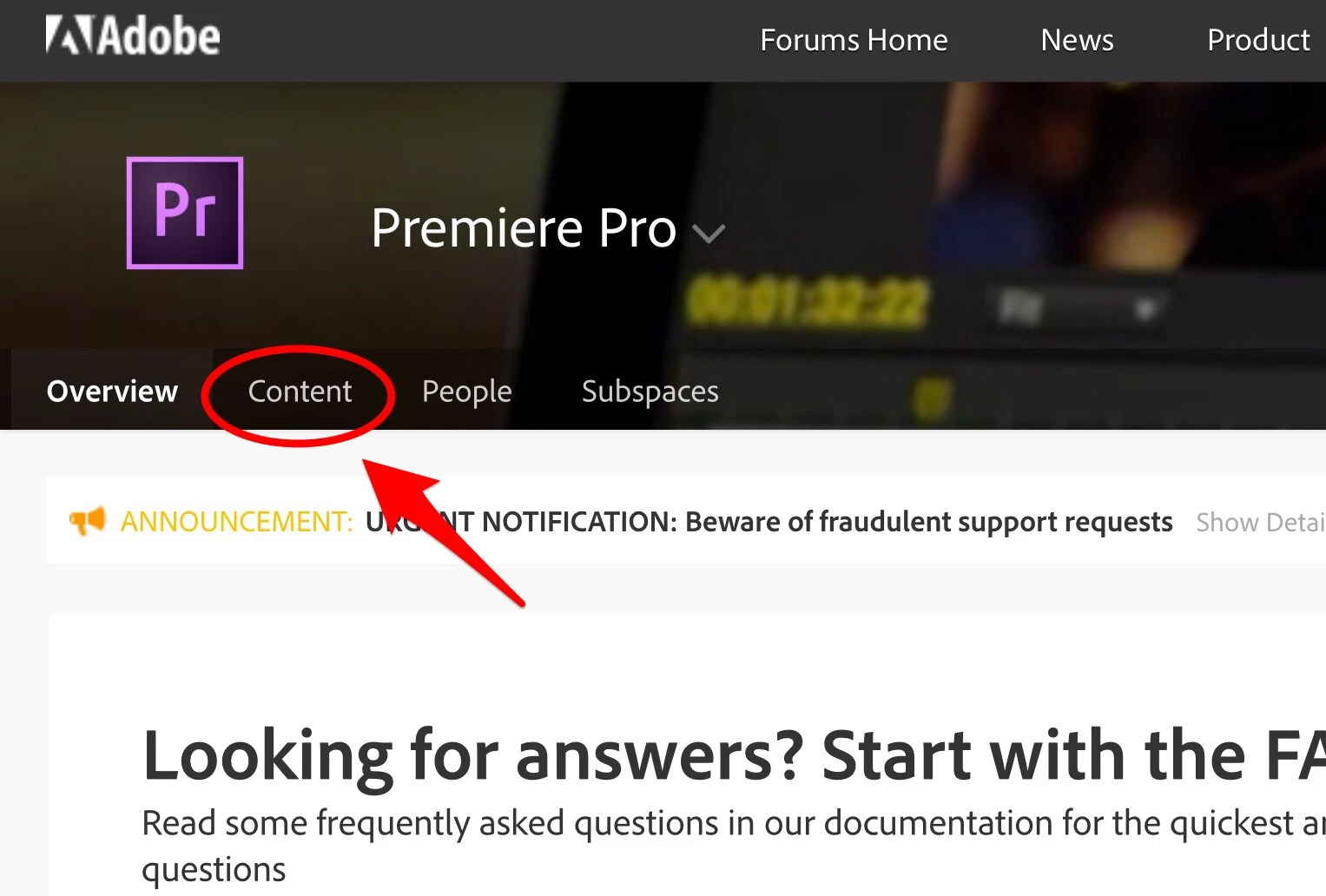
    The structure of the forums isn't always obvious. First, you'll need to select "Content," from the menu at the top of the Premiere Pro page, like so:

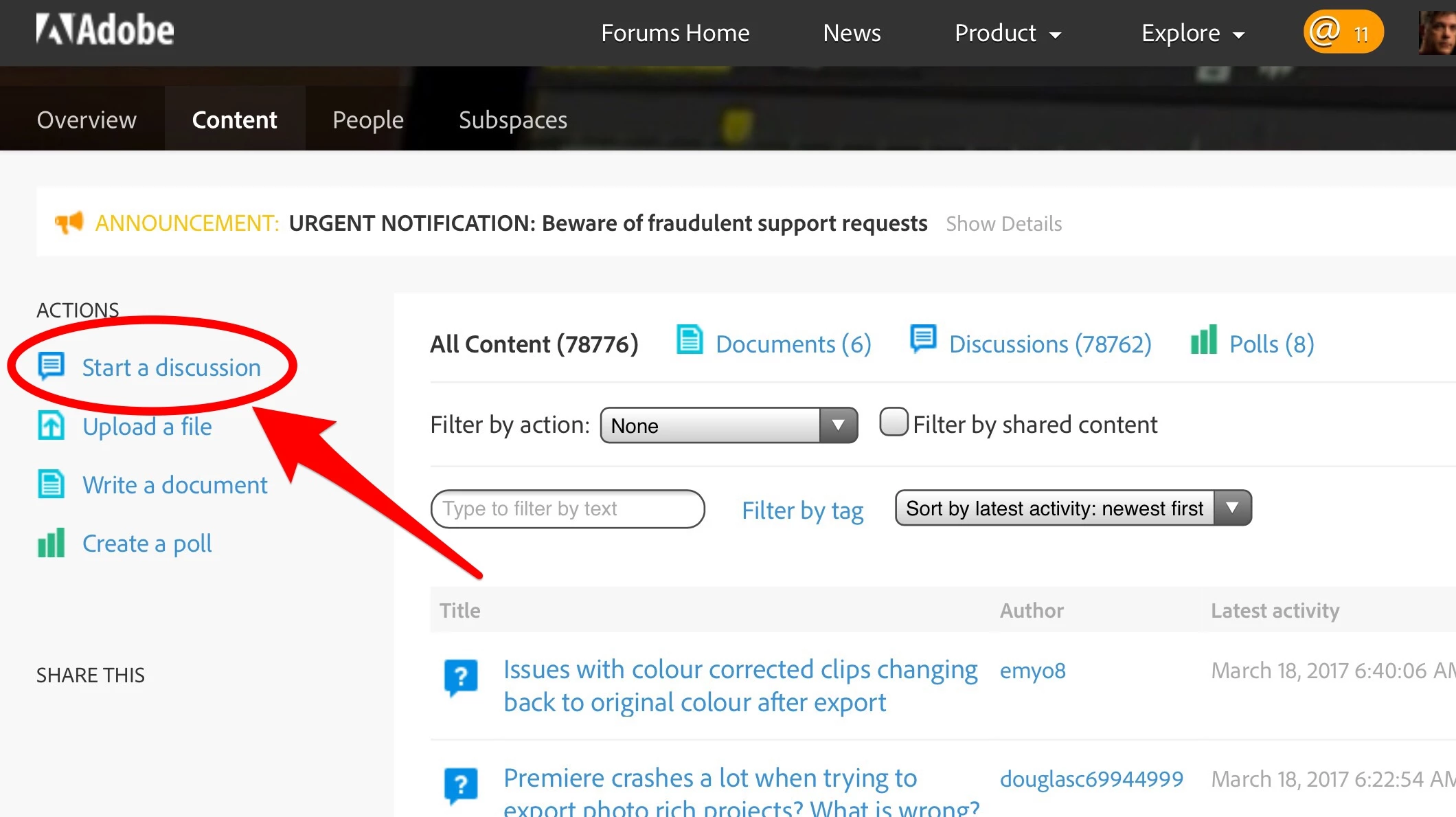
    Then, when you're viewing the Content page, you can select "Start a Discussion" as shown, from the left sidebar:

    I hope that helps!

    Mike

    2 replies

    Participant
    April 24, 2020

    I need some help. PLEASE. Adobe has not provided me with straightforward answers and I am sooooo frustrated I could spit. I have worked with Adobe Premiere Pro for 4 years now and have never had a real problem with exporting files. Now a rep is trying to tel me that it might have something to do with variable bit rate video files on an IPhone vs constant bit rate, etc. whatever. I have a low IQ n many things but I can promise you, that assessment is WRONG. I did nothing from last year to this year and when I would export about 25 minutes of a video show, it would take maybe an hour to export. Yesterday I tried exporting a 5 minute video ALL SHOT ON A GOPRO and it said it would take 9 hours! Unacceptable. If I could walk away from Adobe I would BUT all my shows are edited and ready to go and all I want to do is speed up the exporting, etc. SO I am looking at a new Mac Book Pro with better speed, specs, all the bells and whistles, and then I am thinking of using Adobe's 2020 updated version. Here's my dilemma. A few years ago I went and updated my premiere Pro version and it screwed up all my video editing sessions,. I couldn't fins the files and the video piece here and there and they just wouldn't come back into the season . . . SO what did Adobe do for me . . . you ready? They got me to reload the previous version, and magically all my sessions were back to normal. And they wanted a standing ovation. Buttheads. Big deal. They did nothing for me. SO my biggest concern is my past shows. If I get a new Mac and go wth there 2020 upgrade of Premiere Pro, what guarantees do I have that my previous files and sessions will be recognized and open correctly? AND to maybe solve that problem entirely, can I use that older version on the files I have now and use a different newer version on a newer computer? Does Adobe allow me to do that? I saw you had knowledge of stuff like this so I am praying you might be kind enough to help me and give me some intelligent guidance rather than poor guessing. Thanks and I hope I hear from you soon. Love, Austin.

    Michael J. Hoffman
    Community Expert
    Michael J. HoffmanCommunity ExpertCorrect answer
    Community Expert
    March 18, 2017

    Hi Kizzume,

    The structure of the forums isn't always obvious. First, you'll need to select "Content," from the menu at the top of the Premiere Pro page, like so:

    Then, when you're viewing the Content page, you can select "Start a Discussion" as shown, from the left sidebar:

    I hope that helps!

    Mike