
PKBeam
Participant
July 19, 2018
Answered

How do I preserve multiple audio tracks when exporting?

  • July 19, 2018
  • 1 reply
  • 15648 views

I want to trim many H.264 videos, which all have two stereo audio tracks each. Everything appears fine when importing and editing but when trying to export, the two audio tracks are merged into one (and I would like to keep them separate for future editing).

How do I stop this from happening?
    This topic has been closed for replies.
    Correct answer ApexAV

    I've done this some times and I do it as following:

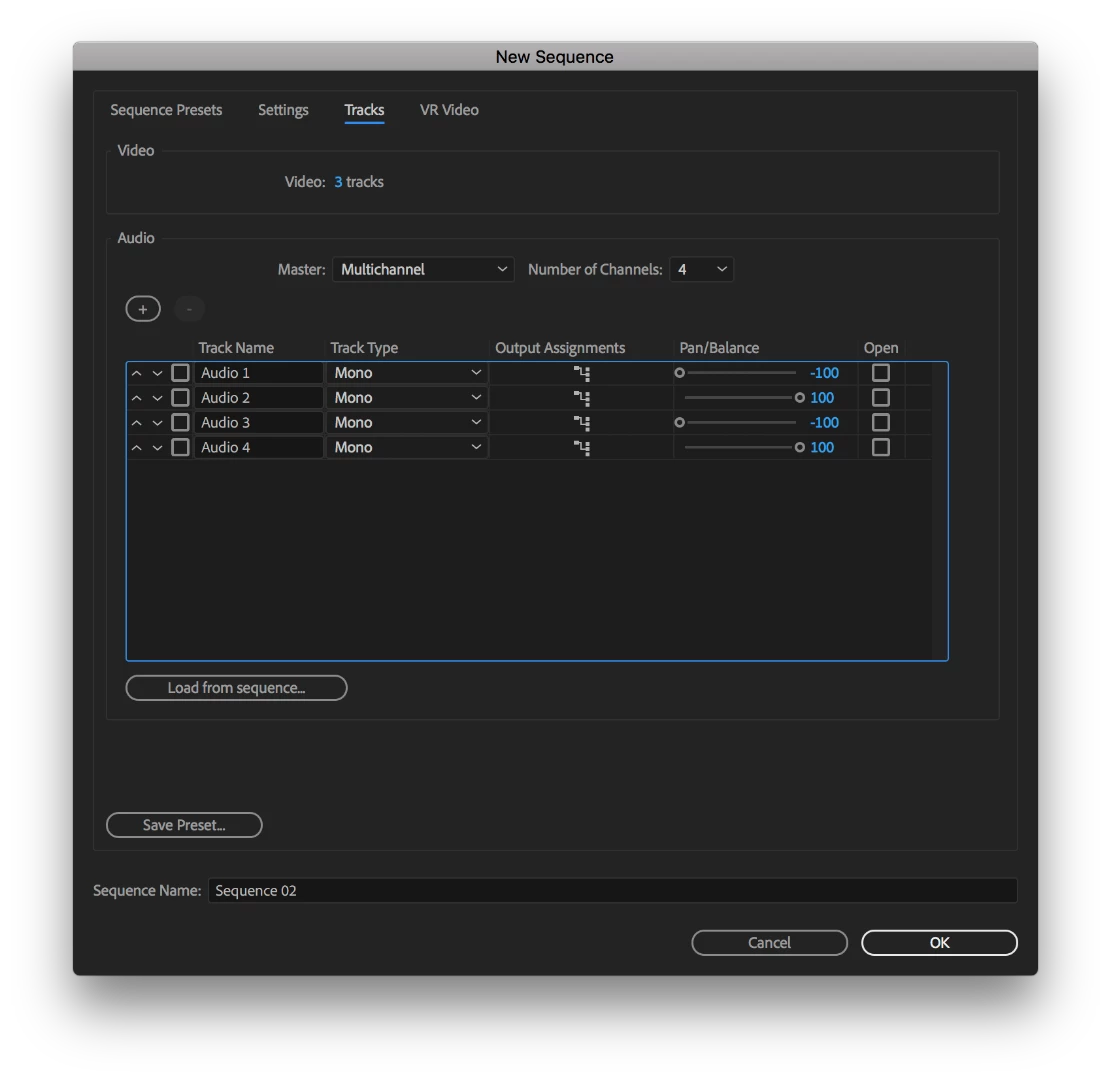
    Make new sequence > Go to tracks tab > Change Master: "Stereo" to "Multichannel"

    Change the output Assignments and Pan/Balance as you wish. (easiest way is to let the tracks correspont with the outputs)

    Make sure your audiotracks on your timeline are dual mono to preserve every audio.

    I'd set it up something like this:

    Note:

    Your export can't be a h.264, as it can't hold over 2 audiotracks. I always export in DNxHD (MXF) which can contain up to 32 audiotracks.

    Make sure your export settings correspond with your timeline settings

    1 reply

    ApexAV
    ApexAVCorrect answer
    Inspiring
    July 19, 2018

    I've done this some times and I do it as following:

    Make new sequence > Go to tracks tab > Change Master: "Stereo" to "Multichannel"

    Change the output Assignments and Pan/Balance as you wish. (easiest way is to let the tracks correspont with the outputs)

    Make sure your audiotracks on your timeline are dual mono to preserve every audio.

    I'd set it up something like this:

    Note:

    Your export can't be a h.264, as it can't hold over 2 audiotracks. I always export in DNxHD (MXF) which can contain up to 32 audiotracks.

    Make sure your export settings correspond with your timeline settings