
Answered
How to apply 'Two Tone' in Premiere
I'm curious how to, if possible, apply a two tone visual effect in Premiere Pro. To clarify: not monochrome or black and white, two-tone
Example: Two Tone Example - Album on Imgur

I'm curious how to, if possible, apply a two tone visual effect in Premiere Pro. To clarify: not monochrome or black and white, two-tone
Example: Two Tone Example - Album on Imgur
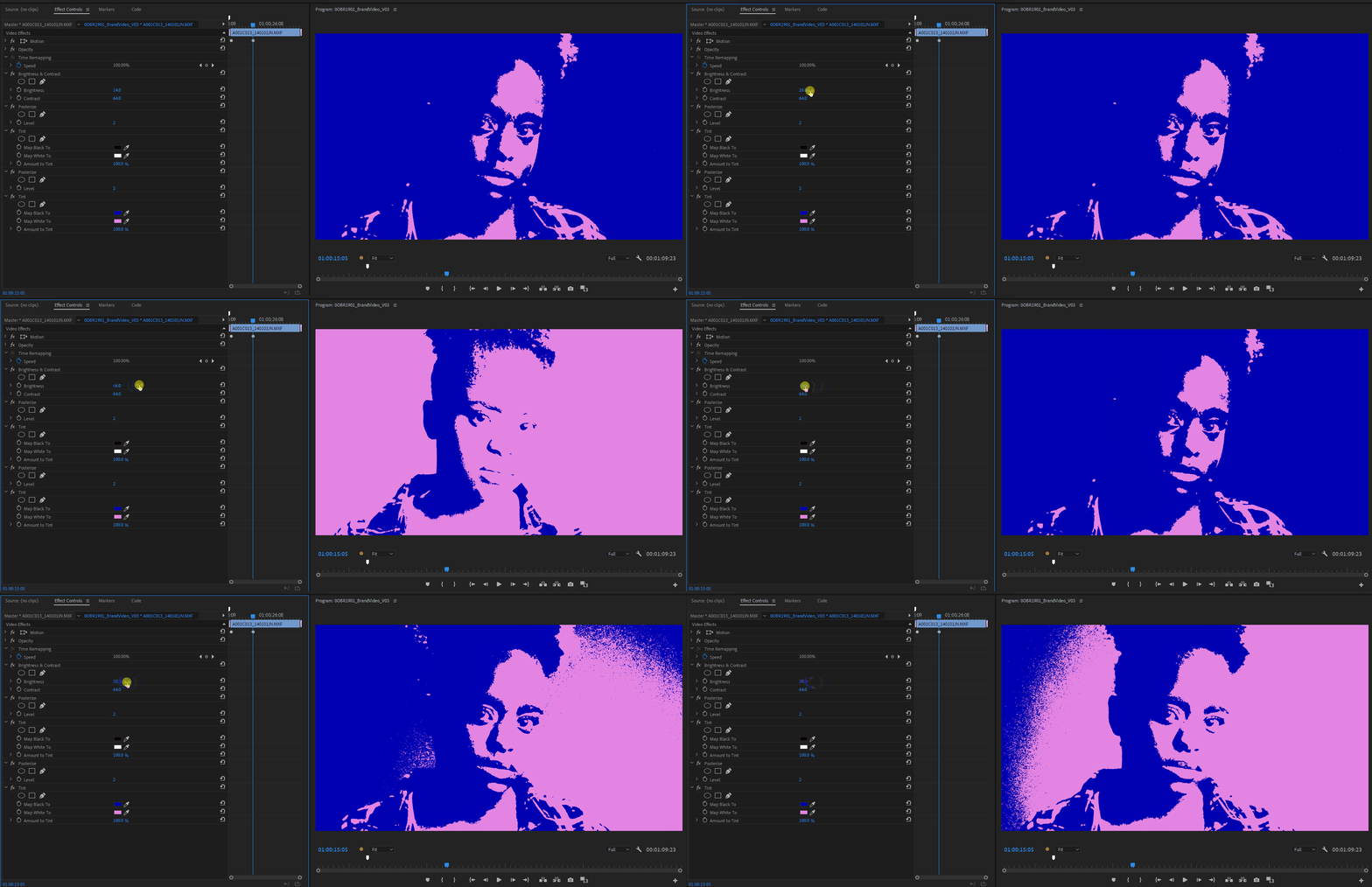
There's a bunch of ways you can achieve this effect, basically you need to limit your output to only 2 colors. Posterize will limit the number of output colors so if you sandwich a tint effect between two posterize effects set to 2 and then add your final tint effect with your desired colors, you now have only two colors to work with.
Now to change which colors fall under each, you can add any sort of Brightness / Contrast effect before the Posterize in order to adjust which light range falls under which color.
Already have an account? Login
Enter your E-mail address. We'll send you an e-mail with instructions to reset your password.
 AdChoices