Dan Finlayson
Participant
March 6, 2019
Resuelto

How to enable CUDA on Premiere Pro CC 2019 Windows 10

  • March 6, 2019
  • 4 respuestas
  • 44237 visualizaciones

I've just recently built a new Windows 10 machine to replace my old 2010 Mac Pro.  I've installed the newest web driver from Nvidia.  CUDA acceleration appears as an option for the Mercury Playback Engine in both Premiere and Media Encoder.  When I make an export, even with CUDA selected, the software encodes with my CPU instead.

I was under the impression that on Windows 10 I only need to install the driver, that I don't need a separate CUDA driver like on macOS.  Is this the case or do I need to install the CUDA 9.2 or 10 Toolkit from Nvidia's site?  If I dont need the toolkit, what could be causing this?

Relevant system specs:

Gigabyte Designare Z390

i7-9700k

RTX 2070

32gb ram

Thanks!

Este tema ha sido cerrado para respuestas.
Mejor respuesta de Ann Bens

What cuda does and not does:

CUDA, OpenCL, Mercury Playback Engine, and Adobe Premiere Pro | Adobe Blog

You dont need the toolkit just the driver.

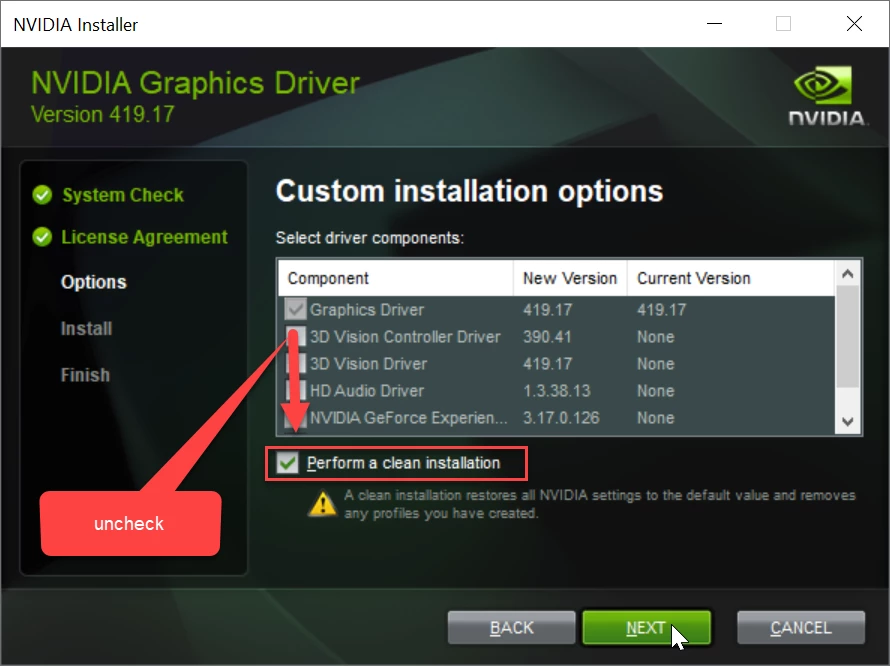
Uncheck everything in the install window except the driver.

Do a clean install and reboot after installing.

4 respuestas

Known Participant
June 25, 2019

Before following the steps to install the driver from NVidia I recommend following these steps: Adobe Premiere Help: How to Enable CUDA Graphics Card

I double checked the CUDA Supported Cards file and my graphic card wasn't listed. Once I added it to the list, Premiere Pro now recognizes my card and enables hardware Mercury Playback Engine

Ann Bens
Community Expert
Community Expert
June 25, 2019

I added it to the list

Your link is old stuff (CS5) as there is no longer list in the newer versions of Premiere unless your are using an older version which you do not mention.

caiofernandesart
Known Participant
June 11, 2019

I have been facing the exact same issue.

The problem seems to occur randomly. I have already rendered the same exact video with the GPU working (80% of usage) and not working properly (15% of usage), both times CUDA was enabled.

Everyone I ask about it I get the same answer as above: "GPU is only used for certain effects" or something like that. The thing is I´m pretty sure my timeline has GPU accelerated effects, such as warp stabilizer a lots of color correction on Lumetri and Colortista. As I said, I have already rendered the same video twice and at the time GPU was properly utilized the render times was a lot faster.

I truly don´t know what is that and apparently no one knows.

Ann Bens
Community Expert
Ann BensCommunity ExpertRespuesta
Community Expert
March 6, 2019

What cuda does and not does:

CUDA, OpenCL, Mercury Playback Engine, and Adobe Premiere Pro | Adobe Blog

You dont need the toolkit just the driver.

Uncheck everything in the install window except the driver.

Do a clean install and reboot after installing.

Dan Finlayson
Participant
March 6, 2019

Interesting!  I'm not sure why my GPU usage was so much higher compared to my CPU on my old machine when I exported.  I was always under the impression that encoding was specifically part of the CUDA workload but maybe something else was taxing the system?

I know this is entirely the wrong forum but would you happen to know if Davinci uses CUDA for encoding, not just rendering?

Legend
March 7, 2019

Resolve offers the option of either software or hardware encoding.

Blackmagic Forum • View topic - Resolve Studio h.264/265 encoders SSIM index - And some Bugs

Legend
March 6, 2019

If CUDA is turned on, then it is being used where it can.

If you have an Intel CPU with QuickSync, you can use software encoding in the final export, but that's unrelated to CUDA.

The Windows Display Driver includes everything.  Do not install a separate CUDA driver as that can cause issues.