

Image Size VOB file properties
Hi,
I have a personal DVD video. I copied the VOB files to my computer to edit in Premiere. I only use Razor Tool to split & delete the videos into several segments.
I noticed my VTS_04_4.VOB got chop on the right. It was missing some video on the right frame.
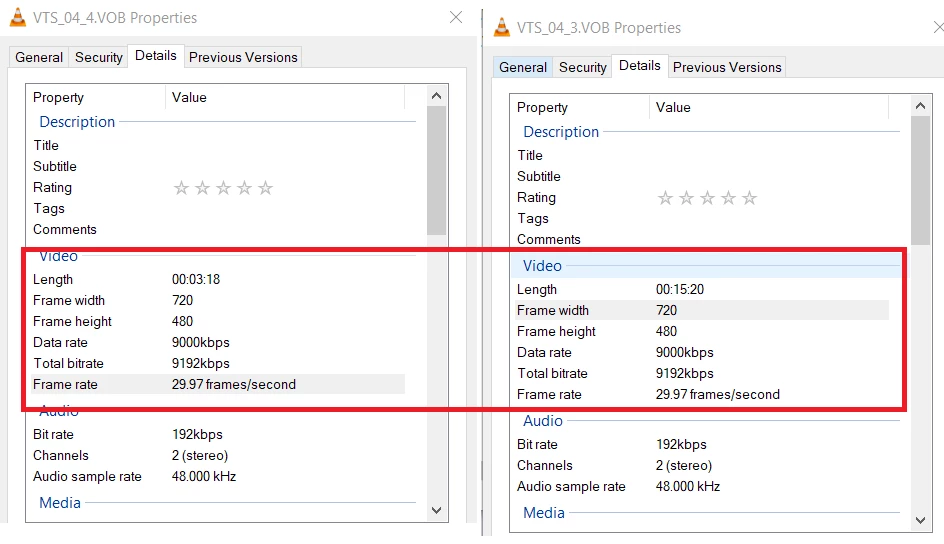
Below is the properties from Premiere. It is different from Windows Details properties show as 720 x 480.
How do I fix that in Premiere to use 720 x 480?
The Frame Rate is also wrong as well.
Thanks.
File Path: C:\Edit\VTS_04_4.VOB
Type: MPEG Movie
File Size: 219.85 MB
Image Size: 540 x 480
Frame Rate: 23.976
Source Audio Format: 48000 Hz - compressed - Stereo
Project Audio Format: 48000 Hz - 32 bit floating point - Stereo
Total Duration: 00:03:18:00
Pixel Aspect Ratio: 1.5802
Alpha: None
Video Codec Type: MPEG 4:2:0
File Path: C:\Edit\VTS_04_3.VOB
Type: MPEG Movie
File Size: 1023.97 MB
Image Size: 720 x 480
Frame Rate: 23.976
Source Audio Format: 48000 Hz - compressed - Stereo
Project Audio Format: 48000 Hz - 32 bit floating point - Stereo
Total Duration: 00:15:19:19
Pixel Aspect Ratio: 1.2121
Alpha: None
Video Codec Type: MPEG 4:2:0
 AdChoices