
melmjv
Participant
January 2, 2018
Question

Images appear corrupt

  • January 2, 2018
  • 3 replies
  • 1056 views

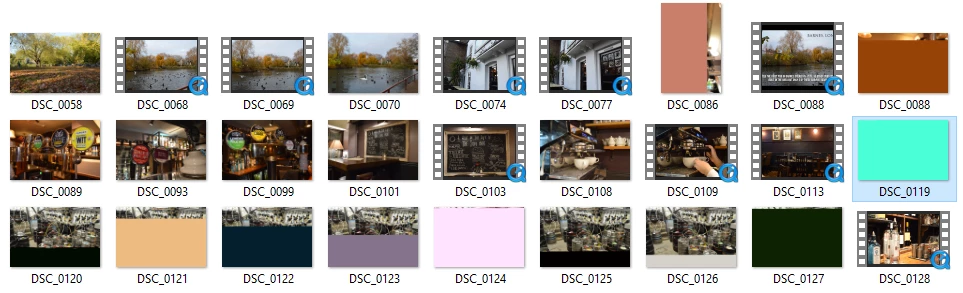
I created a project in Adobe Premiere about a month ago and now in my photos file where the images used for the project are, these look corrupt. Also when playing the video project on the areas where the photos should appear, it says media pending. Could this be because I had added effects onto them? I've deleted the effects but yet no change has occurred. I now need the photos for another project and unfortunately I don't have them backed up anywhere else. Doesn't seem like anyone else on the internet has encountered this issue as can't find any answers.
This topic has been closed for replies.

3 replies

Kevin-Monahan
Community Manager
Community Manager
January 10, 2018

MelMJV,

Still having trouble? Please let us know how we can assist.

Thanks,
Kevin

Kevin Monahan - Sr. Community and Engagement Strategist – Adobe Pro Video and Audio
davidw24486344
Participant
April 13, 2018

Yep still get images that look corrupt in Adobe Premiere. Looks like a major on going issue.

Community Expert
January 3, 2018

Hi,

try to check the driver where you put the photos and try to copy on another driver/external and open it somewhere else.

As you mentioned, the glitches sometimes showed full photos means the photo is not corrupted maybe the driver which reading it.

Najihah

Peru Bob
Community Expert
Community Expert
January 3, 2018

I've had this happen to video when not allowing it to fully conform the audio, but I have never experienced it with photos.

I have not used this, so I can't specifically recommend it, but it may work:

Free JPEG Recovery Software | JPEG Repair - EaseUS

melmjv
melmjvAuthor
Participant
January 3, 2018

Thank you for the suggestion, I've just tried it out but still hasn't resolve my issue. Its odd as sometimes it glitches and shows the full photo for a brief second before going back to being in a strange colour

Peru Bob
Community Expert
Community Expert
January 3, 2018

Just a long shot:

Try updating or rolling back your video driver directly from the card manufacturer's site.