


Participant
Jun 7, 2018 5:28 PM UTC
Answered

iPhone/FilmicPro footage: PCM sound issues in Premiere Pro

I'm experiencing some very annoying sound issues on my footage taken on an iPhone using a FilmicPro app (yes, a VFR footage) when I edit it in a Premiere Pro. Unable to solve them.

* The video files recorded with FilmicPro are .mov - PCM sound codec

* I have the latest PP CC 2018 release (12.1.1. Build 10) that supports the VFR, running on an iMac with OS Sierra 10.12.6.

* Yes, I cleared all that Media cache files etc., but no solution. Neither using the Handbrake app.

Here is the list of problems I am unable to fix:

1. Audio is gone

Everything is usually OK once the FilmicPro/PCM file is imported, I can see the waveform and hear the sound. But then - usually when I switch from PP to another app and then go back to PP - the audio is gone. I see the waveform, but I hear no audio, both in the Source or Timeline. In some occasions, the audio is "muted" right I import the files, sometimes I even do not see the waveform. I have to shut down the PP and relaunch it again to fix this, but the problem is back once I skip to another app again. Sometimes even the first restart of PP doesn't help.

This audio issue affects the FilmicPro PCM footage only: if there is AAC FilmicPro, some iPhone native camera footage or non-mobile footage in the project, these files are OK all the time...

2. No VFR option under the Master

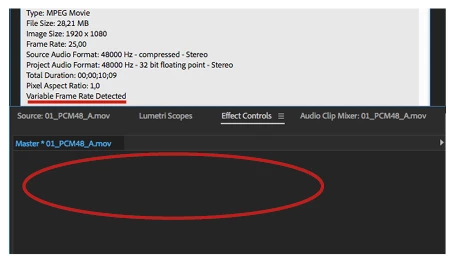
Once I import the file to the project and right-click the Options, it says "Variable Frame Rate Detected". OK. But once I go to the Source -> Effects Control –> Master, where the "MPEG source settings" (Preserve Audio/Smooth Video) should be located, there is completely nothing. No option at all.

This issue is common for all VFR footage, not just FilmicPro.
3. A .mov video w/ AIFF audio imported just as an audio file

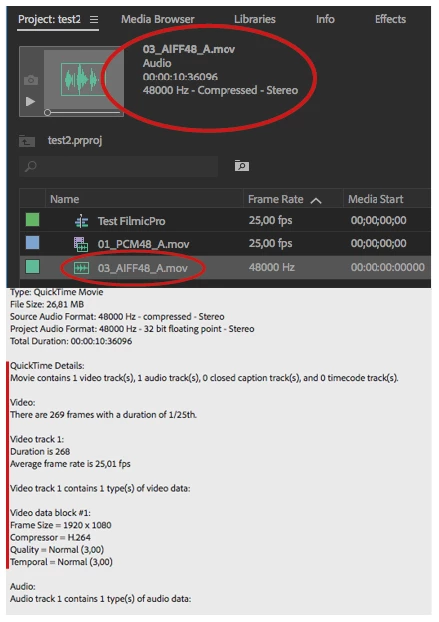
For .mov FilmicPro video files with PCM or AAC audio, the video is imported OK. But once I want to import the video with AIFF audio track, PP imports just the audio, not the video. But under the Properties, I can find all the video info.
Before the CC 2018 with VFR support was released, there was an audio sync issue with this FilmicPro footage (yes, no VFR support), but I could edit the project in a normal way. Now it is completely impossible, as I am used to shoot with PCM sound for best result.

Any idea how to fix this? Switching to Final Cut will be the last option

Thanks,

Stepan

This topic is closed to new replies. Start a new post to keep the conversation going.
MirkolokoCorrect answer
Participant
Sep 27, 2018 8:01 PM UTC

Found a WORKAROUND

I seriously think I found a way to make audio WORK on Premier Pro both PC and MAC.

But you will deffinitly need a Mac to make it work.

YOU MUST
From Filmic Pro app, make sure footage gets into Camera Roll and iCLOUD, not in Filmic Pro app

YOU MUST NOTon a mac : Do not use image capture to import the footage, this will make .MOV file and you do not want that.


TO IMTHE FOOTAGE
MAKE SURE

you import them from your MAC with iCloud Drive on Safari (drag&drop)
NOT Photos (the app on your mac)
and NOT image capture

Only iCloud Drive from your browser on your MAC

This will make .M4V  files and those files will work on both Premier Pro Pc & Mac !

I tried ICloud Drive on my browser from my PC and the files we're still in .MOV and it didn't work in Premier pro.
Still have sound enable when importing footage.

Voilà!

Good Luck Folks !

5 replies

MirkolokoCorrect answer
Participant
Sep 27, 2018 8:01 PM UTC

Found a WORKAROUND

I seriously think I found a way to make audio WORK on Premier Pro both PC and MAC.

But you will deffinitly need a Mac to make it work.

YOU MUST
From Filmic Pro app, make sure footage gets into Camera Roll and iCLOUD, not in Filmic Pro app

YOU MUST NOTon a mac : Do not use image capture to import the footage, this will make .MOV file and you do not want that.


TO IMTHE FOOTAGE
MAKE SURE

you import them from your MAC with iCloud Drive on Safari (drag&drop)
NOT Photos (the app on your mac)
and NOT image capture

Only iCloud Drive from your browser on your MAC

This will make .M4V  files and those files will work on both Premier Pro Pc & Mac !

I tried ICloud Drive on my browser from my PC and the files we're still in .MOV and it didn't work in Premier pro.
Still have sound enable when importing footage.

Voilà!

Good Luck Folks !

Translate
Participant
Jul 10, 2018 9:10 AM UTC

Hi,

I've the same issue, the only workaround I found is to close en re-launch premiere pro, but this is very annoying, and I spend a lot of time

Translate
juanmario
Participating Frequently
Jul 11, 2018 1:39 AM UTC

Apparently there are known errors with FilmicPro files as you can see in this thread:

https://forums.adobe.com/thread/2441443

At the end of the thread an error similar to that mentioned here is mentioned, although it is another codec, it is observed that the problem occurs in the audio encoder in FilmicPro

Translate
Kevin J. Monahan Jr.
Legend
Jun 20, 2018 6:25 AM UTC

Hi Stepan,

Does everything function as normal with Premiere Pro CC 12.x? Let us know. If so, is it possible to work in 12.x until we can fix these issues?

Thanks,
Kevin

Translate
Kevin Monahan - Sr. Community and Engagement Strategist – Adobe Pro Video and Audio